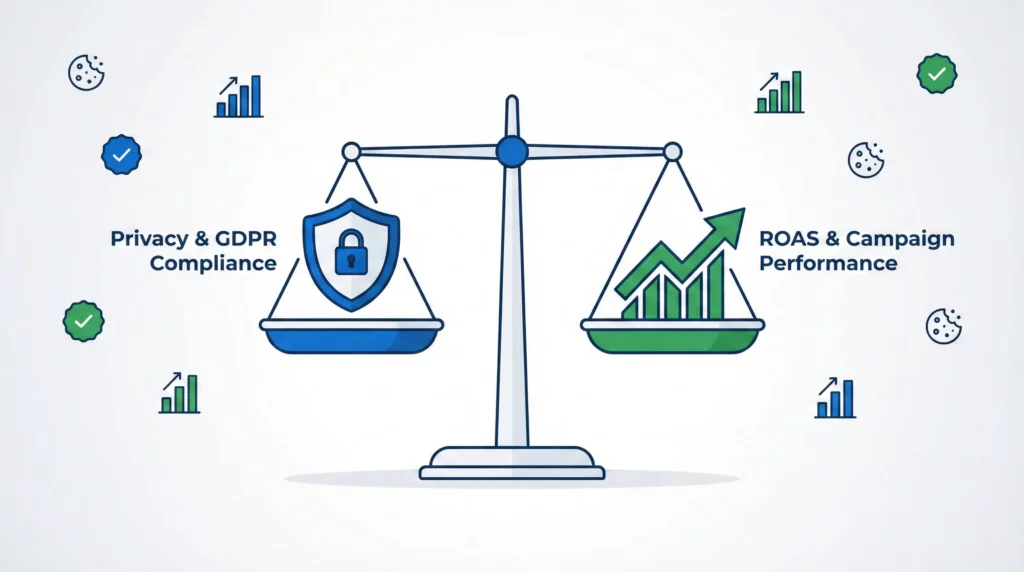
Digital advertising has changed. When someone lands on your site and clicks “Reject” on your cookie banner, your tracking stops. You lose the connection between ad click and conversion. For Google Ads campaigns, this creates a serious problem: your automated bidding algorithms think your ads aren’t working when they actually are.
This guide explains how Google Consent Mode solves this measurement gap. You’ll learn how conversion modelling works, why Advanced Mode matters for campaign performance, and what to expect when you implement it.
Table of Contents
The Problem: Signal Loss Is Killing Your Campaigns
Privacy regulations (GDPR, CCPA, the Digital Markets Act) require cookie consent banners. When users decline tracking, traditional measurement infrastructure breaks. Pixels don’t fire. Cookies don’t get set. Cross-site identifiers disappear.
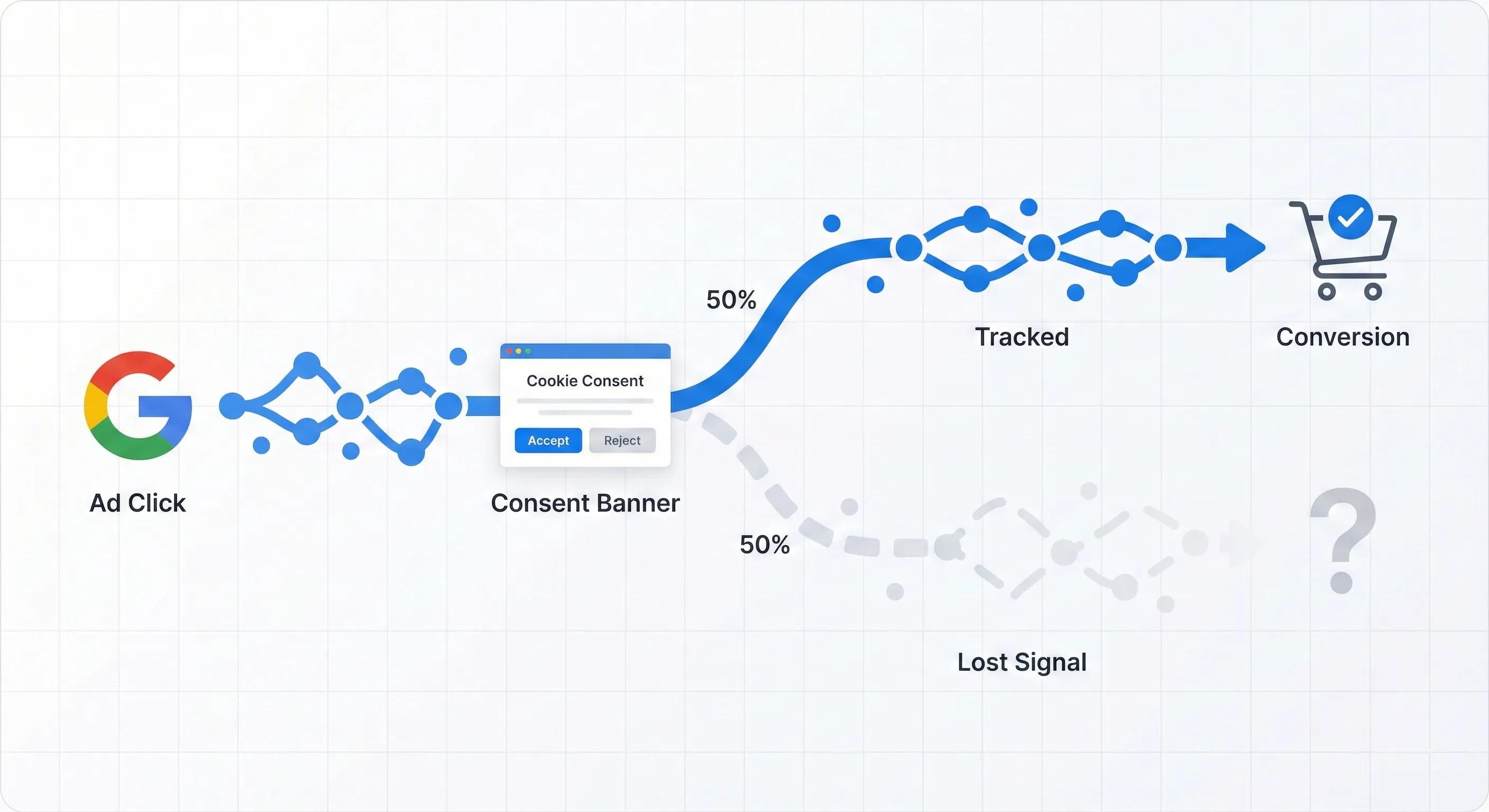
For your Google Ads campaigns, this creates what analysts call “signal loss.” If your consent rate is 50%, you’re only seeing half your conversions. The other half? They’re happening, but Google can’t see them.
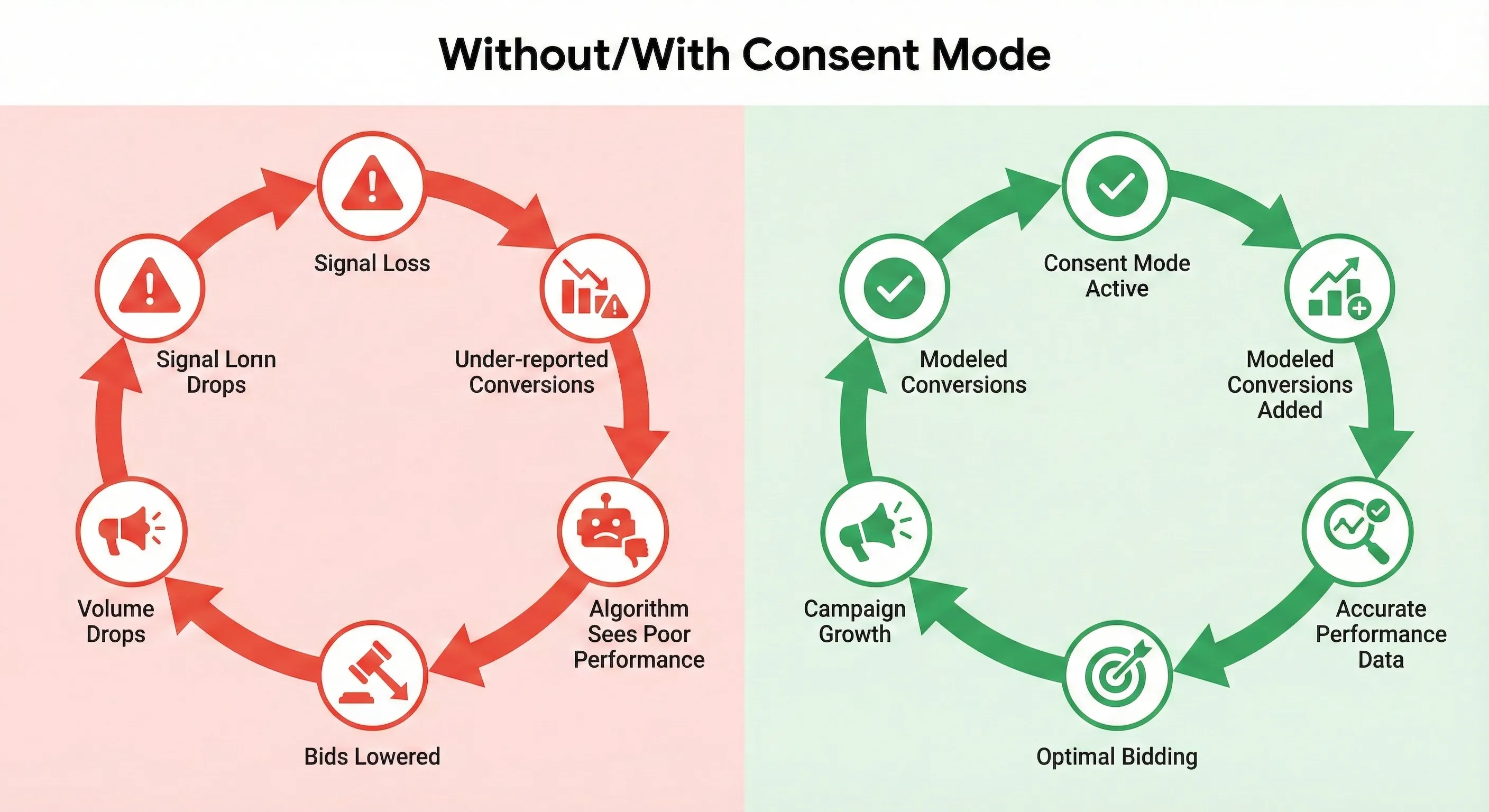
Here’s why this matters for your Return On Ad Spend (ROAS). When Google Ads can’t observe a conversion because someone declined consent, it reports zero value for that click. Your Smart Bidding algorithms (Target CPA (Cost Per Acquisition), Target ROAS) interpret this silence as poor performance. The algorithm responds by lowering bids, reducing auction participation, and throttling campaign volume.
You get a vicious cycle. Your actual performance stays the same, but your reported performance crashes. The algorithm reacts to false signals. Campaign volume drops. Your profitable ads get suffocated by measurement blindness.
Signal loss isn’t a reporting inconvenience. It’s a fundamental threat to campaign performance because it feeds broken data to the AI systems that control your bidding.
What Consent Mode Does (In Simple Terms)
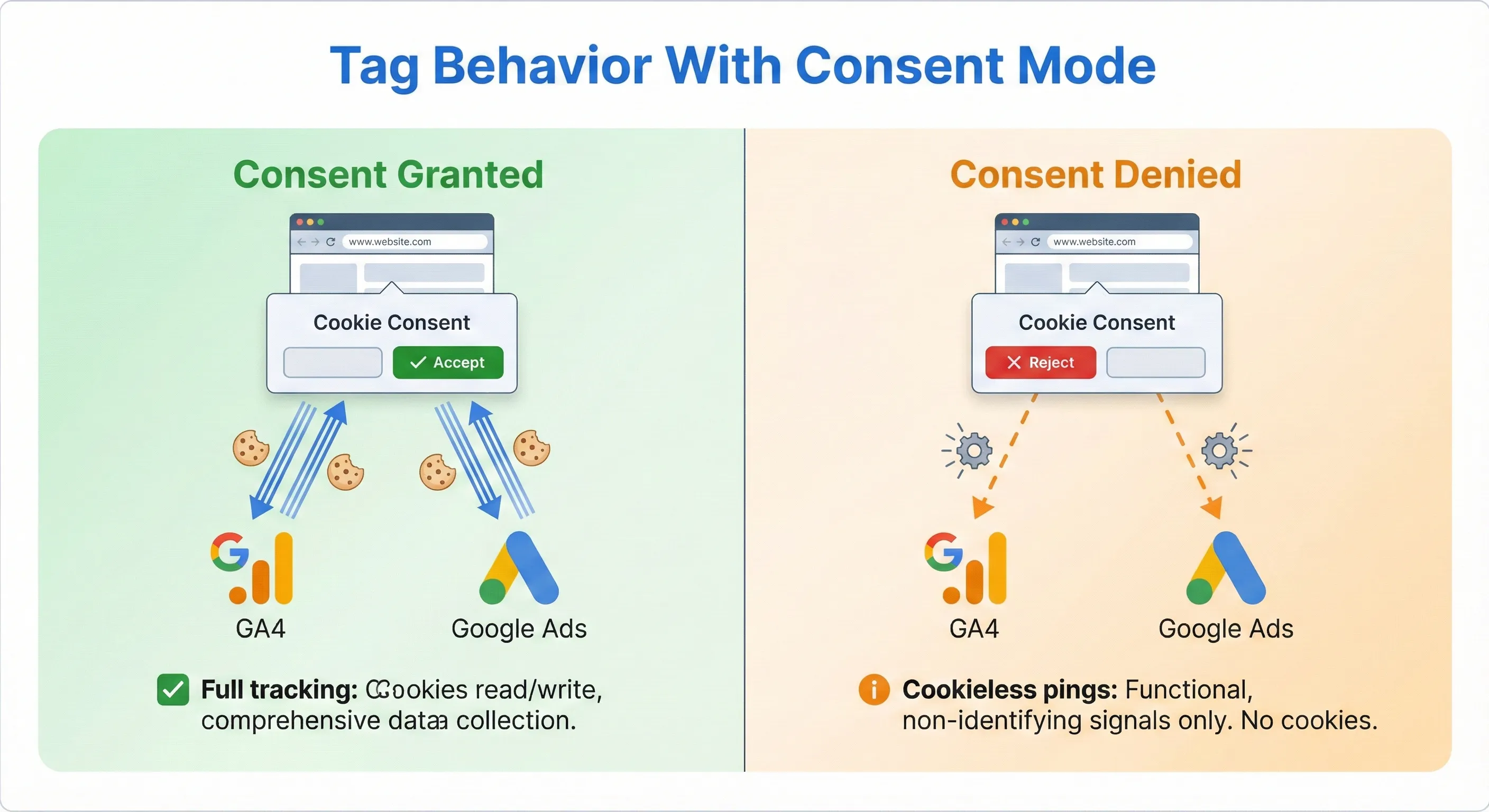
Google Consent Mode is a communication layer between your cookie banner and Google’s tags (Google Analytics 4, Google Ads, Floodlight). Instead of completely blocking tags when someone clicks “Reject,” it tells those tags how to behave based on the specific consent given.
Before Consent Mode, compliance meant a binary choice. User rejects cookies? Block all tags. Send nothing to Google. This destroyed all visibility into non-consenting traffic.
Consent Mode introduces smarter tag behaviour:
Consent Granted: Tags work normally. They read and write cookies to track user behaviour, attribution, and session depth.
Consent Denied: Tags modify their behaviour. They stop storing data on the user’s device (no cookies), but they still send signals to Google. These signals contain functional, non-identifying information like timestamps, device types, and referral URLs.
This mechanism is what allows Google to recover lost measurement through AI-driven conversion modelling. Instead of complete darkness for non-consenting traffic, you get enough signal for statistical modelling to fill the gap.
For the full technical breakdown of how Consent Mode works and the regulatory context, read our deep dive: What is Google Consent Mode v2? (And Why It Matters for Your Business).
How Conversion Modelling Works
The core value of Consent Mode is conversion modelling. When users deny consent, Google uses machine learning to estimate whether conversions happened. This moves measurement from purely deterministic (tracking 1:1 via cookies) to probabilistic (statistically estimating outcomes).
Observed vs. Modeled Conversions
Your Google Ads reports now contain two types of data:
Observed Conversions: These come from users who clicked “Accept” on your banner. The path from ad click to purchase is tracked via cookies. This is traditional, deterministic tracking.
Modeled Conversions: These are estimates for users who clicked “Reject.” Since Google can’t track these users across your site, it uses AI to predict whether conversions occurred based on the behaviour of similar users who did consent.
Modeled conversions aren’t phantom numbers. They’re statistically derived probabilities attributed to real ad clicks.
The Mechanics of Extrapolation
When someone visits your site without consenting (assuming you’re using Advanced Mode), certain non-identifying signals remain observable. Google can see the time of day, device type, browser version, location (country/city), and the ad click identifier (GCLID).
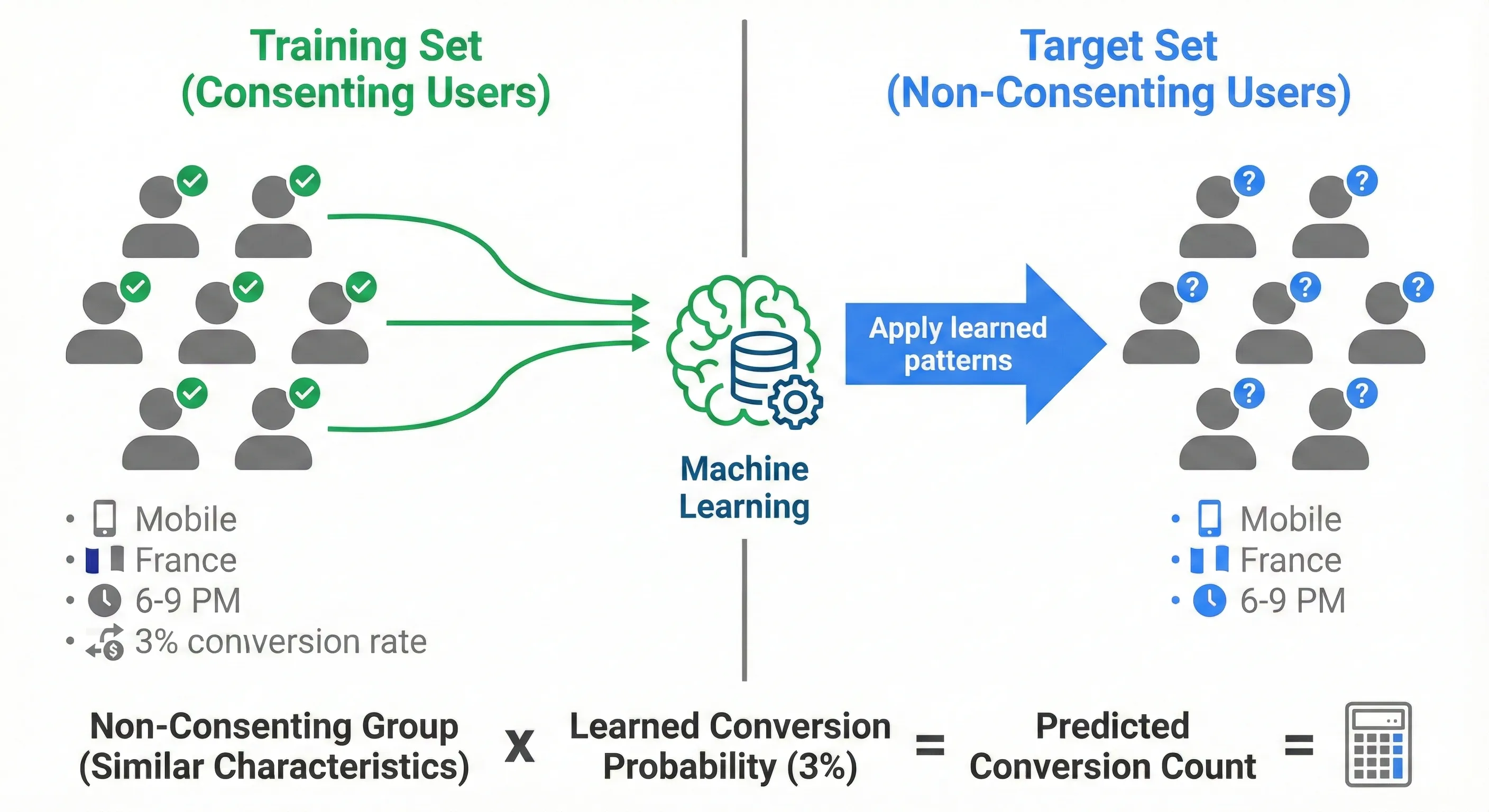
Google’s machine learning splits your data into two groups:
The Training Set (Consenting Users): Google analyses conversion rates and user paths from people who accepted tracking. It identifies patterns. For example, mobile users in France clicking a specific campaign between 6 PM and 9 PM might have a 3% conversion rate.
The Target Set (Non-Consenting Users): The algorithm looks at non-consenting traffic. If it sees users with similar characteristics (mobile, France, 6-9 PM), it applies the conversion probability from the Training Set to this unobserved group.
This lets Google report a modeled conversion count that’s statistically representative, rather than reporting zero. It answers: “If these non-consenting users behaved like consenting users with the same characteristics, how many conversions would we see?”
The Consent Bias Correction
One critical aspect of Google’s modelling is correcting for consent bias. Users who reject cookies typically convert at lower rates than those who accept (often 2x to 5x lower). Privacy-conscious users behave differently.
If you simply applied the conversion rate from consenting users to everyone, you’d vastly over-report results. Google’s AI accounts for this difference. It adjusts the model to reflect the lower conversion probability of users who decline tracking.
In one example Google shared, an advertiser with a 50% consent rate saw only a 19% drop in observed conversions (not 50%), meaning non-consenting users were already converting less. Modelling then provided an 18% uplift, accurately bridging the gap without overstating value.
Quantitative Impact
Consent Mode can recover approximately 70% of ad-click-to-conversion paths lost due to cookie consent choices.
Direct campaign impact varies by consent rate, but benchmarks provide guidance. TUI (the travel company) saw a 7% increase in reported conversions after implementing Consent Mode. While 7% might seem modest, in a high-volume account this recovery can determine whether campaigns hit efficiency targets or get paused.
For advertisers in markets with stricter privacy compliance and lower consent rates, the uplift is often higher. Benchmarks suggest that with a 50% consent rate, modelling can deliver an 18% uplift in reported conversion rates.
Accuracy Validation
Google validates model accuracy through “holdback testing.” The algorithm takes a slice of observed (consenting) data and hides it from the model. It then predicts conversions for this hidden slice based only on non-identifying signals.
By comparing predictions against the known reality of the holdback group, the system continuously calibrates accuracy. This testing minimises the risk of systematically over-reporting results.
Basic vs. Advanced Mode: The Strategic Choice
You have two implementation options: Basic Mode and Advanced Mode. This choice involves a trade-off between data utility and compliance interpretation. Your legal team will likely favour Basic. Your marketing team will favour Advanced.
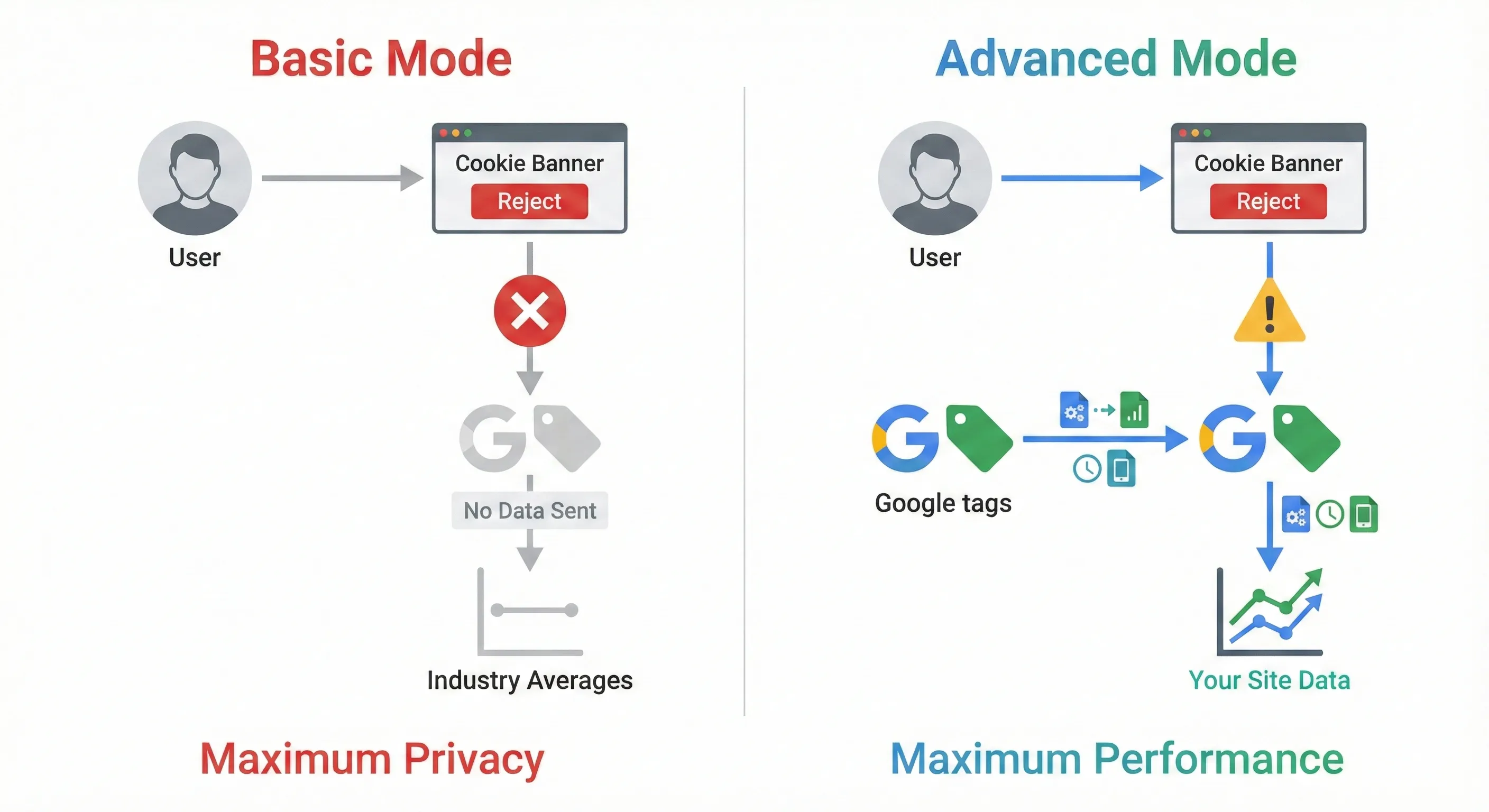
Basic Mode: Maximum Privacy Safety
In Basic Mode, Google tags are completely blocked until someone grants consent.
Behaviour: If someone clicks “Reject,” no tags fire. Nothing gets sent to Google—not even anonymous signals.
Modelling Consequence: Because Google receives no signal from non-consenting users, it can’t use advertiser-specific modelling. It doesn’t know how many users rejected consent on your site. Instead, it relies on general, aggregate models based on broader industry trends.
Strategic Outcome: This provides the highest privacy safety and is the default choice for highly regulated industries. However, it offers the lowest data recovery fidelity. The modelling is generic and less responsive to your specific campaigns, often leading to persistent under-reporting.
Advanced Mode: Maximum Performance
In Advanced Mode, Google tags load immediately when someone lands on your site, regardless of consent status.
Behaviour: If someone denies consent, the tags switch to a restricted state. They don’t write cookies, but they send “cookieless pings” to Google’s servers.
The Ping Data: These pings contain non-identifying functional information: timestamps, device types, referrer headers, and crucially, ad-click information (the GCLID). This lets Google know “an ad click led to a visit,” even though it can’t track that user’s subsequent journey.
Modelling Consequence: These pings fuel high-fidelity modelling. They let Google build an advertiser-specific model. The system knows exactly how many users clicked your ad and landed on your site, even without consent. This allows highly accurate calibration of the conversion model for your specific website, rather than guessing based on industry averages.
Strategic Outcome: Advanced Mode provides the highest data recovery potential for ROAS protection, though you’ll need to weigh this against your organisation’s compliance priorities. It provides the data density required to power Smart Bidding effectively. Without pings from Advanced Mode, the system can’t distinguish between “low quality traffic” and “non-consenting traffic.”
Comparison: Basic vs. Advanced Mode
| Feature | Basic Consent Mode | Advanced Consent Mode |
|---|---|---|
| Tag Behaviour (Consent Denied) | Tags Blocked (No Fire) | Tags Load (Cookieless Pings) |
| Data Transmission | None | Functional Signals (Time, Device, URL, GCLID) |
| Modelling Type | General / Aggregate | Advertiser-Specific / Granular |
| Data Recovery Potential | Low | High (Up to 70% recovery) |
| Smart Bidding Impact | Weak (Generic Signals) | Strong (Calibrated Signals) |
| Privacy Profile | Maximum Safety | High Utility / Lower Risk |
Recommendation for Google Ads Performance
For advertisers prioritising Smart Bidding performance, Advanced Mode provides the data density these systems require. The cookieless pings provide the critical volume of data points that the algorithm needs to understand traffic quality. However, this comes with the compliance considerations discussed in the limitations section. Your choice should balance performance needs against your organisation’s risk tolerance.
Without Advanced Mode, the bidding algorithm operates with a blindfold. It can’t distinguish between a user who didn’t convert and a user who simply refused tracking. The absence of data gets interpreted as failure, whereas the presence of pings allows the system to model success.
Ready to implement this? Follow our step-by-step tutorial: How to Set Up Consent Mode with Google Tag Manager.
How Smart Bidding Breaks Without Consent Mode
The relationship between Consent Mode and Smart Bidding is direct and causal. Modern bidding algorithms need constant data to adjust bid values in real time. Auction-time bidding AI makes millions of decisions per second, and those decisions are only as good as the data feeding them.
The Underbidding Problem
When you lack Consent Mode (or use only Basic Mode), the system reports zero conversions for non-consenting users. However, the cost of those clicks still appears in your account. This creates a dangerous data asymmetry.
The Math: Consider a campaign where you spend $1,000 on 1,000 clicks. In reality, 20 users convert. However, if 500 users deny consent (50% consent rate), the system might only observe 10 conversions from the consenting group.
The Reporting Failure: Your reported CPA appears to be $100 ($1,000 / 10 conversions), but your actual CPA is $50 ($1,000 / 20 conversions). Your ROAS appears to be half its true value.
The Algorithmic Reaction: The Smart Bidding algorithm is programmed to hit your target (let’s say $50 CPA). It sees a $100 CPA against a $50 goal. It reacts logically but destructively: it lowers bids to reduce cost. This kills campaign volume, pushes your ads to lower-quality inventory, and excludes you from valuable auctions.
Stabilising the Bid Curve
Consent Mode acts as a corrective lens. By feeding modeled conversions into the Conversions column in Google Ads, it repairs the broken feedback loop.
Correction: With Consent Mode active, the system models the missing data. It now reports the estimated 20 conversions (10 observed + 10 modeled).
Outcome: Your reported CPA aligns with reality ($50). The algorithm recognises the campaign is hitting its target. It maintains aggressive bidding, ensuring you continue winning impressions among valuable audiences, regardless of their consent choice.
This data continuity is essential for Performance Max and App Campaigns, which depend entirely on conversion signal volume. These campaign types often struggle to exit the learning phase without sufficient data density. Without Advanced Consent Mode data recovery, these automated campaigns may stagnate due to perceived low conversion probability, never reaching the velocity required to perform.
What to Expect: Limitations and Requirements
Consent Mode is powerful, but it’s not magic. It’s a sophisticated statistical tool that operates under specific constraints. You need to manage expectations around implementation timelines, data thresholds, and reporting delays.
The Cold Start Problem
Modelling is probabilistic. It requires a statistically significant baseline of data to function. Google can’t model conversions for an account with minimal traffic because the margin for error would be too high.
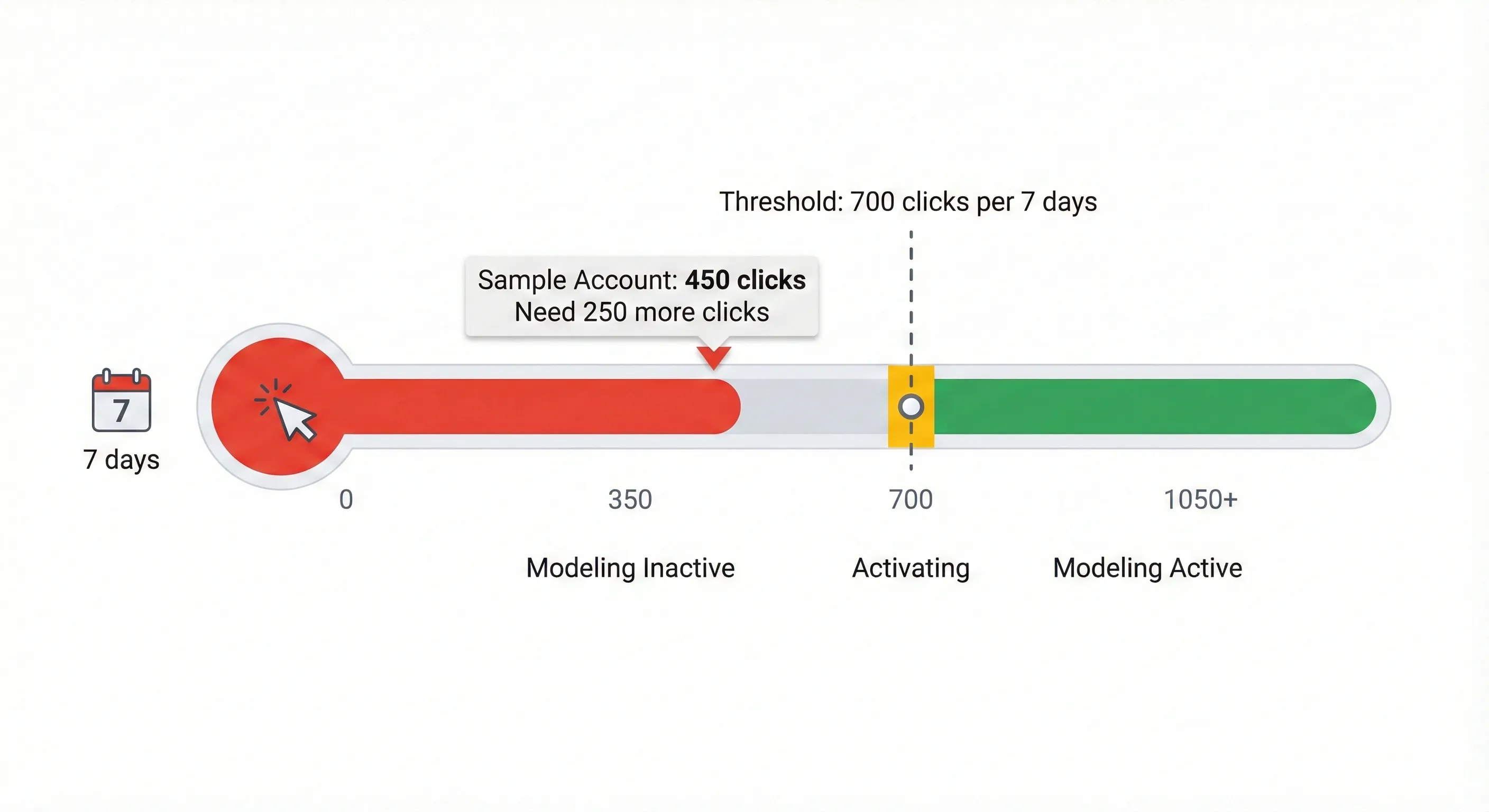
The Threshold: You need 700 ad clicks over a 7-day period, per country and domain grouping, to be eligible for active modelling.
Implication: This creates a “cold start” problem for small advertisers or hyper-local campaigns with low click volume. You might implement Consent Mode perfectly but see no immediate change because you haven’t met the threshold for the AI to activate. For these accounts, Consent Mode is still necessary for compliance, but the performance uplift may be negligible until volume increases.
Reporting Delays
Modeled data isn’t instant. Unlike pixel-based tracking that reports conversions within minutes or hours, modeled conversions require processing time. Google needs to correlate trends, validate accuracy, and run holdback tests.
The Delay: Expect a lag of up to 5 days (sometimes longer) for modeled conversions to fully stabilise in your reports.
Strategic Adjustment: You need to adjust your reporting windows. Analysing yesterday’s performance is no longer viable for budget decisions. Focus on rolling 7-14 day windows to account for the arrival of modeled data. Making drastic cuts based on the last 24 hours will likely lead to premature optimisation errors.
The Advanced Mode Grey Area
Advanced Mode offers superior data recovery, but it occupies a complex position in European privacy regulation.
The Controversy: Privacy advocates (such as NOYB) and some data protection authorities (like the French CNIL) have raised concerns about cookieless pings. Their argument is that even without storing data on a device (no cookie), the transmission of the ping involves an IP address, which is considered personal data under GDPR.
Google’s Position: Google asserts that these pings are functional and necessary for service delivery. IP addresses collected via pings are used only for geo-resolution (determining country/city) and are then immediately discarded or anonymised. They’re never written to disk or used to build user profiles.
The Decision: This presents a risk-versus-reward decision. Performance-focused brands face a choice: accept the potential legal risk of Advanced Mode in exchange for data visibility, or opt for Basic Mode’s regulatory defensibility with reduced performance. However, highly risk-averse organisations (finance, healthcare) may opt for Basic Mode to ensure absolute regulatory defensibility, consciously accepting the trade-off of lower data fidelity and reduced ad performance.
Next Steps: Implementing Consent Mode
You’ve learned how Consent Mode protects ROAS through conversion modelling. Now you need to implement it.
Immediate Actions:
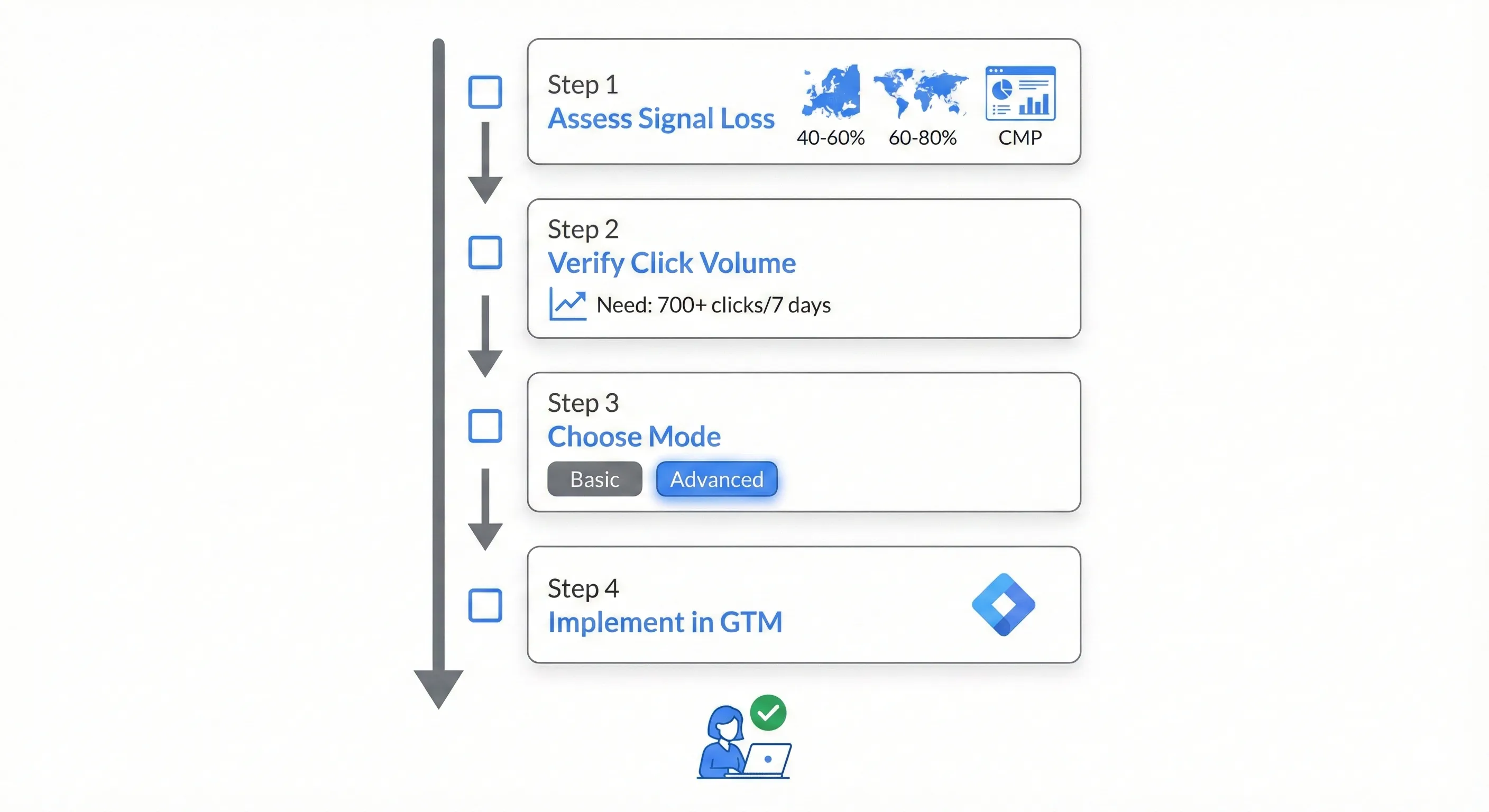
- Assess potential signal loss: Estimate your consent rate by reviewing your Consent Management Platform’s analytics (if available), or assume a 40-60% consent rate for European traffic and 60-80% for other markets as rough benchmarks.
- Verify your click volume: Check whether you meet the 700 clicks per 7 days threshold. Log into
Google Ads, clickCampaigns, and filter by the last 7 days. If you’re below this threshold, implement Consent Mode for compliance but don’t expect immediate modelling uplift. - Decide on Basic vs. Advanced: Discuss the trade-offs with your legal and marketing teams. For most performance-focused businesses, Advanced Mode is the right choice.
- Follow the implementation guide: Our step-by-step tutorial covers the technical setup in
Google Tag Manager: How to Set Up Consent Mode with Google Tag Manager.
Understanding the Bigger Picture:
Consent Mode solves the measurement gap created by privacy regulations, but it’s one component of a complete measurement infrastructure. Understanding how it connects with proper conversion tracking, attribution windows, and campaign structure creates a system that delivers reliable performance data across all privacy scenarios.
How to Build Your Marketing Measurement Foundation shows you how Consent Mode integrates with your complete measurement infrastructure.
If You Need Help:
Our Marketing Measurement Foundation service provides complete implementation if you prefer expert setup. We handle Consent Mode configuration, conversion tracking, and Smart Bidding optimisation.
Conclusion
In the privacy-first era, missing data is the single greatest threat to advertising efficiency. Compliance with regulations like GDPR and the Digital Markets Act is mandatory, but your strategic response is a choice.
You can view compliance as a burden that degrades performance, or you can view it as an engineering constraint that can be solved with the right tools. Advertisers who treat Consent Mode merely as a legal requirement will suffer from signal loss, leading to under-reporting and passive bidding strategies that erode market share. Those who implement Consent Mode effectively can reduce the measurement gap caused by privacy regulations.
Google’s research suggests Consent Mode can recover approximately 70% of lost conversion paths, though your results will vary based on your specific traffic patterns and consent rates. This restored data feeds Smart Bidding algorithms the intelligence they need to bid aggressively and accurately. It protects ROAS and ensures your marketing budgets are optimised for reality, not just for the fraction of users who click “Accept.”