If you’ve been running Google Ads or using Google Analytics, you’ve probably heard about Consent Mode v2. Maybe you received an email warning about compliance deadlines. Maybe your agency mentioned it in passing. Maybe you saw a notification in your Google Ads account and clicked “Remind me later.”
Here’s what you need to know: this isn’t just another compliance checkbox. Google Consent Mode v2 represents a fundamental shift in how digital advertising measurement works. For businesses that don’t understand it, the consequences include data loss ranging from 30% to 60%, broken remarketing campaigns, and return on ad spend (ROAS) calculations that no longer reflect reality.
Table of Contents
The Context Behind the Change
For over two decades, digital marketing operated on a relatively straightforward foundation. A user clicked an ad, a cookie was placed on their browser, and when they purchased, that conversion was recorded. This linear “click-to-sale” journey formed the bedrock of ROAS calculations, budget allocation decisions, and growth strategies.
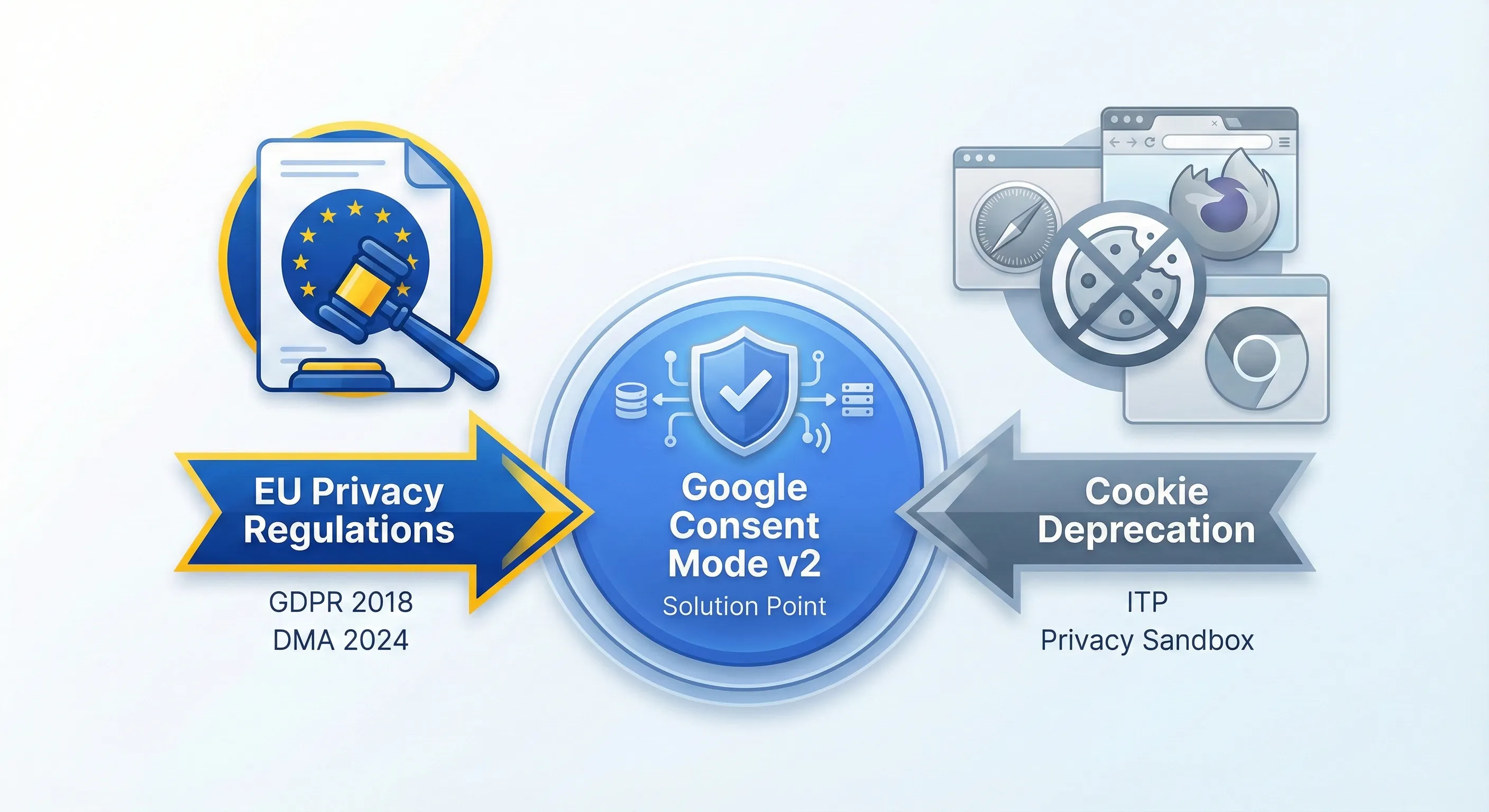
That foundation has been systematically dismantled. What we’re experiencing is the convergence of two powerful forces: regulatory enforcement from the European Union and the technical deprecation of third-party cookies by major browsers.
Google Consent Mode v2 is the result of this convergence. It’s the system Google built to operate within the new regulatory and technical constraints.
Understanding the Regulatory Framework: The Digital Markets Act
While the General Data Protection Regulation (GDPR) established the legal necessity of user consent back in 2018, enforcement was often sporadic and localised. The Digital Markets Act (DMA), which came into full enforcement in March 2024, operates on a different scale.
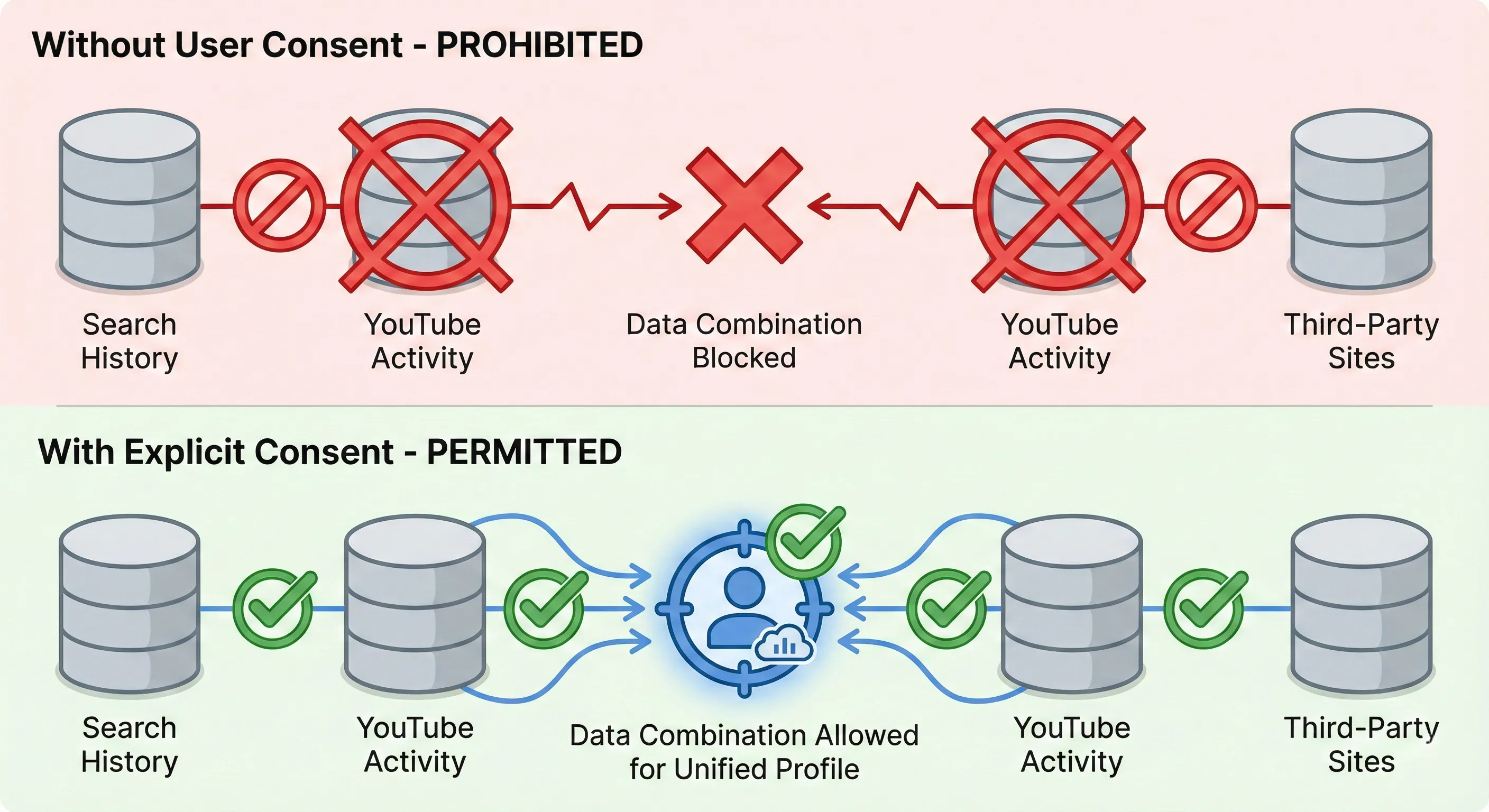
The DMA targets what the European Commission calls “Gatekeepers”: massive digital platforms with systemic market power. This includes Alphabet (Google), Meta (Facebook), Amazon, Apple, Microsoft, and ByteDance (TikTok). The regulation’s core principle is straightforward: these platforms cannot combine user data across their various services without explicit user consent.
Google cannot legally combine data from your Search history, your YouTube viewing habits, and your activity on third-party websites to build an advertising profile unless you explicitly agree to this data combination.
The enforcement mechanism is substantial. The DMA imposes fines of up to 10% of global annual turnover for non-compliance, escalating to 20% for repeat offences. For a company with Google’s revenue, this translates to billions in potential penalties.
The Liability Shift
Facing this regulatory framework, Google constructed a compliance architecture. Consent Mode v2 effectively pushes the responsibility of consent collection down the supply chain to you, the advertiser.
Google’s position is clear: “We will not process your user data for remarketing or personalisation unless you send us a verified digital signal proving you obtained consent.” If you fail to send this signal, Google’s systems are programmed to refuse the data for advertising purposes.
This is enforcement by architecture. Compliance is no longer purely a legal risk managed by lawyers; it’s a technical requirement managed by code. If your website doesn’t send the correct Consent Mode v2 signals, your data doesn’t get processed for advertising, regardless of whether you actually obtained consent.
The Parallel Development: The Deprecation of Third-Party Cookies
Regulatory pressure is only half the context. The other half is technological change.
Third-party cookies (the traditional mechanism for tracking users across different websites) are being phased out. Apple’s Safari browser effectively blocked them years ago through Intelligent Tracking Prevention (ITP). Firefox implemented similar restrictions through Enhanced Tracking Protection (ETP). Google Chrome, the dominant browser, is in the prolonged process of phasing them out entirely through its Privacy Sandbox initiative.
The Measurement Gap
The combination of strict consent laws and browser restrictions creates what the industry calls the “Measurement Gap.”
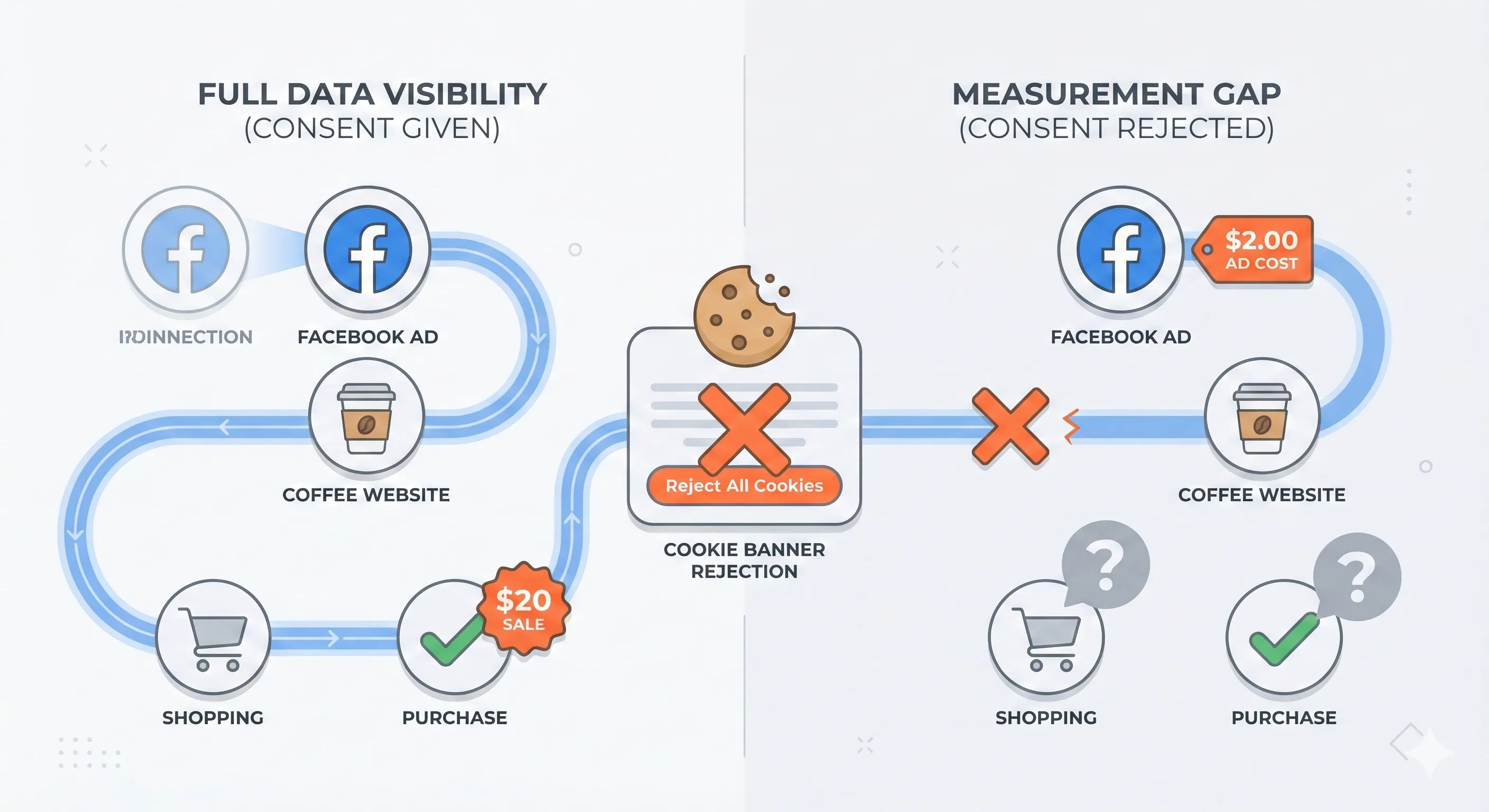
Consider this scenario: A user clicks your Facebook ad for organic coffee. The click costs you $2.00. They land on your website but reject the cookie banner. They browse, decide they like what they see, and purchase $20.00 worth of coffee.
What does your ad platform see? It records the cost: $2.00. What does your analytics platform see? Nothing. Or at best, a direct visit with no attribution to the ad that brought them there.
The business impact is straightforward. Your reported ROAS is 0. The campaign appears to be failing. If you make decisions based on this incomplete data, you shut down a profitable revenue stream.
This is the gap that Consent Mode v2 is designed to address. While we may no longer be able to track every individual user, we need a way to count them and attribute their value.
This measurement gap is precisely what Consent Mode v2 is designed to address. While we can no longer track every individual user with perfect precision, we need a system that can count them, attribute their behavior, and provide actionable data for optimization—all while respecting their privacy choices.
How Consent Mode v2 Actually Works: The Traffic Signal System
Technically, Google Consent Mode v2 is an Application Programming Interface (API) that standardises communication between your website’s cookie banner and Google’s tracking tags (Google Analytics 4, Google Ads, Floodlight, etc.).
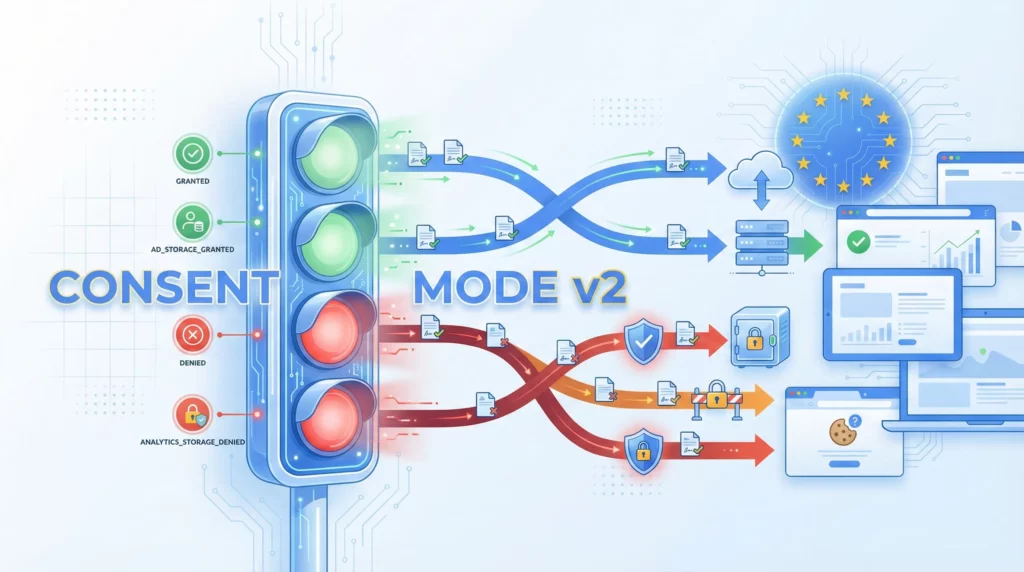
For non-technical decision-makers, the best way to understand it is as a traffic signal system for data.

In the old model, the traffic light was binary: Green (track everything) or Red (track nothing). Consent Mode v2 introduces a multi-lane system where different types of data are controlled by specific signals.
The Evolution from v1 to v2
The Evolution from v1 to v2
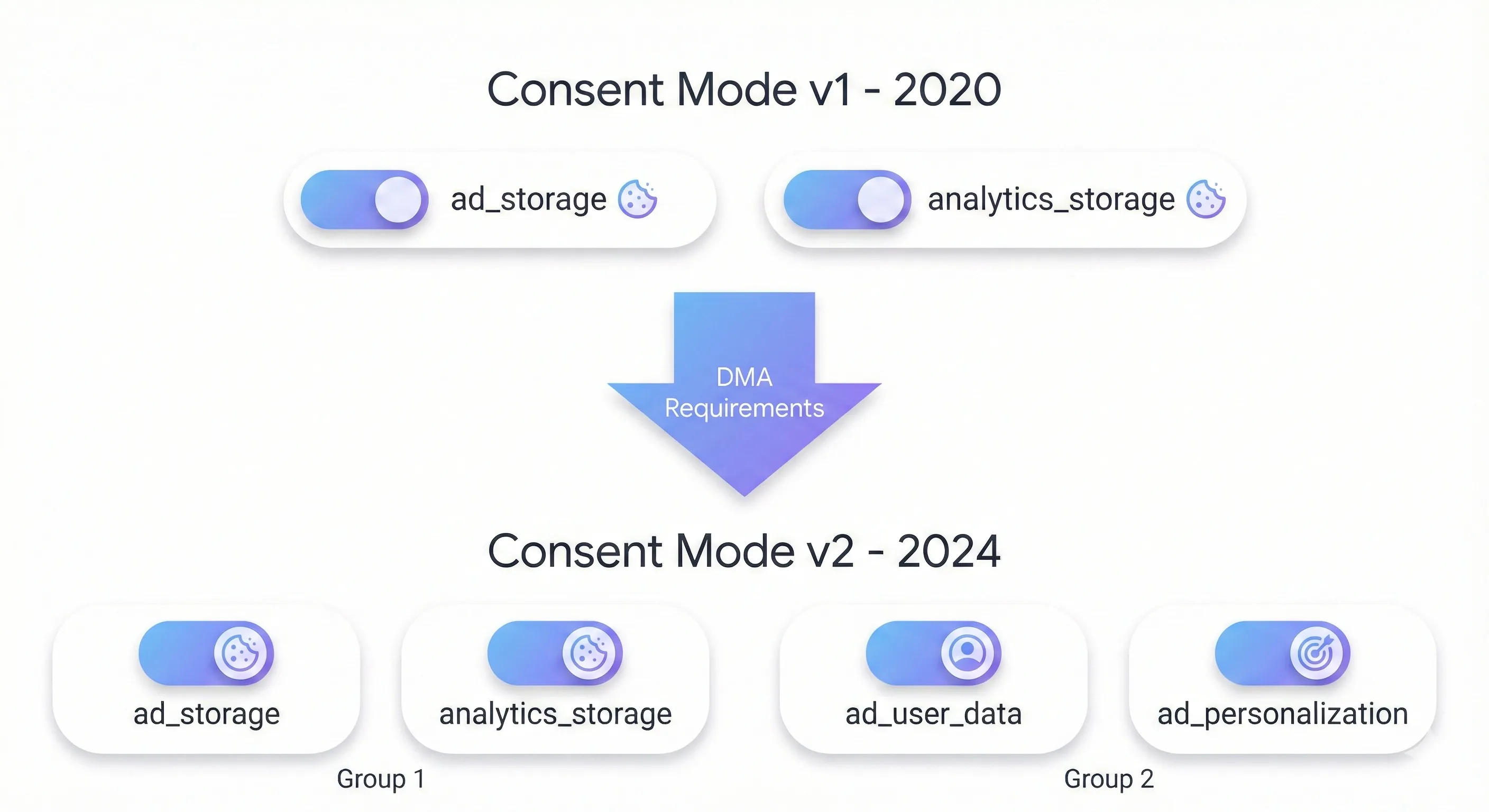
When Google first released Consent Mode in 2020 (v1), it focused solely on storage permissions—whether tags could read or write cookies to the browser. This addressed GDPR’s cookie consent requirements under the ePrivacy Directive.
The two original signals were:
ad_storage: Permission to store advertising cookiesanalytics_storage: Permission to store analytics cookies
These signals told tags: “Can I access the browser’s storage?” If denied, tags couldn’t set cookies like _ga or _gcl_au.
Why v2 Was Required
The 2024 Digital Markets Act imposed new requirements on major platforms like Google. It wasn’t enough to confirm cookies were stored with permission. These platforms had to demonstrate users explicitly consented to their personal data being:
- Used for advertising purposes
- Combined across platform services (Search, YouTube, third-party sites)
Consent Mode v1 couldn’t signal these distinctions. A user might consent to analytics cookies (to help improve site performance) but not consent to having their behavior used for targeted advertising across Google’s network.
The v2 Addition
Version 2 (required March 2024 for EEA traffic) added two data usage signals:
ad_user_data: Consent for sending user data to Google for advertisingad_personalization: Consent for personalized advertising and remarketing
Now the system distinguishes between storage (can cookies be written?) and usage (can Google use this data for ads?). A website might receive “granted” for analytics_storage but “denied” for ad_personalization—meaning analytics cookies are permitted, but Google cannot use that data to build remarketing audiences.
This separation is the core technical response to the DMA’s requirements.
The Four Data Signals
Consent Mode v2 operates by sending specific parameter states to Google’s tags. These parameters determine how the tags behave on your website.
analytics_storage (The Statistics Lane)
This signal controls whether cookies related to analytics can be stored on the user’s device.
When granted, the tag sets a first-party cookie and assigns a consistent User ID to the visitor. This allows you to stitch together a session: “User landed on homepage, viewed Product A, added to cart, and left.”
When denied, no analytics cookies are written. The system cannot persist a User ID across pages. Each page load is effectively seen as a new, unique instance, breaking session continuity unless modelling is applied.
ad_storage (The Marketing Attribution Lane)
This signal controls cookies used for advertising attribution and conversion tracking.
When granted, Google Ads cookies are set. If the user converts, the tag can read the cookie to see which ad click brought them there. Attribution is deterministic and precise.
When denied, no advertising cookies are written. The link between the ad click and the conversion is severed at the browser level.
ad_user_data (The DMA Compliance Lane)
This is one of two critical additions in version 2. It controls whether user data (including hashed identifiers) can be sent to Google specifically for advertising purposes.
When granted, the system is permitted to send data to Google’s ad servers to help build audiences and track conversions.
When denied, even if analytics data is collected on your site, it cannot be routed to Google’s advertising machinery. This creates a firewall between your site analytics and your ad platforms, preventing the data from being used for ad optimisation.
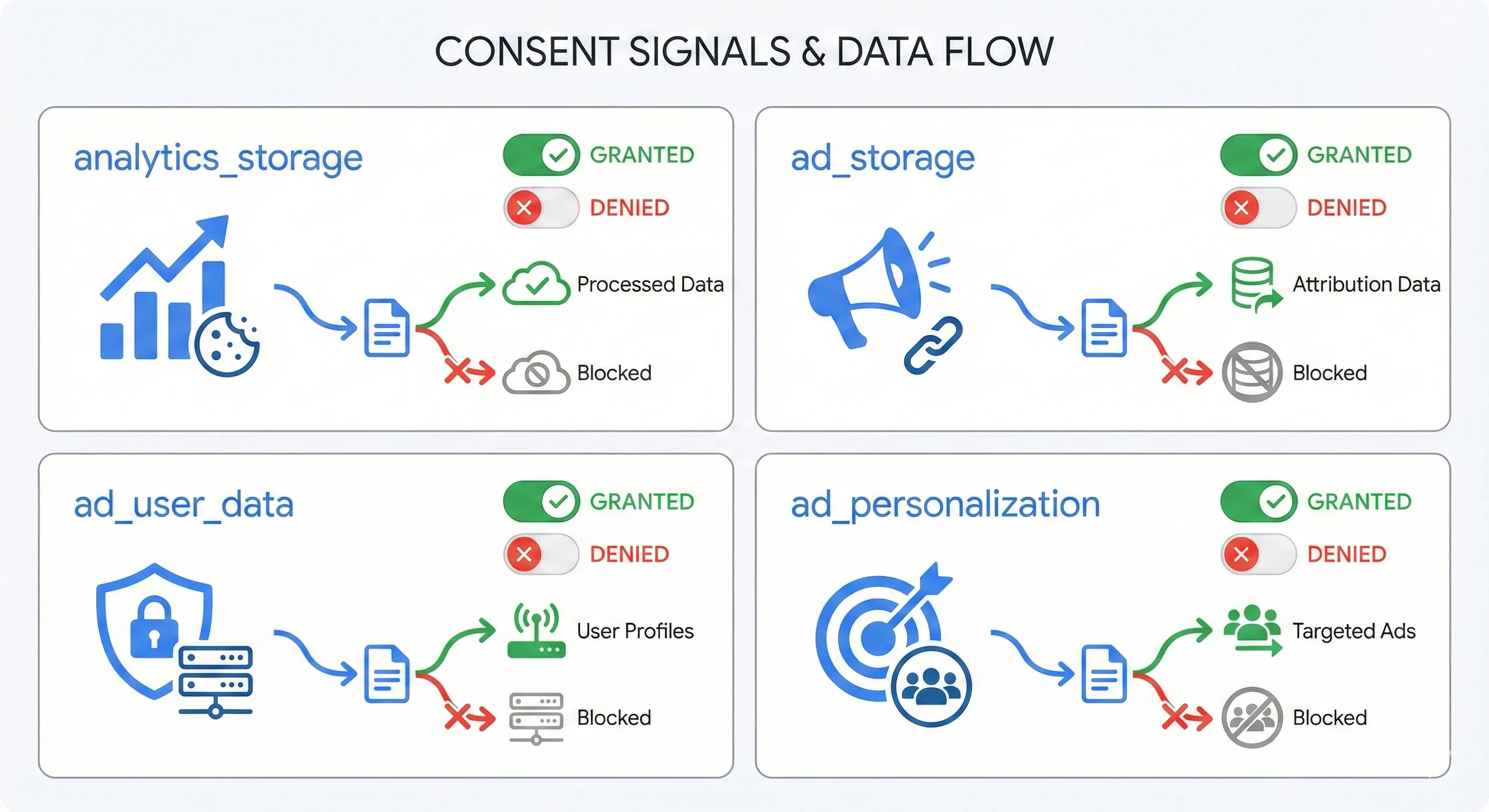
ad_personalization (The Remarketing Lane)
This parameter specifically governs the use of data for personalisation and remarketing.
When granted, the user can be added to remarketing lists like “Cart Abandoners” or “Past Purchasers.” You can retarget them with specific creative based on their behaviour.
When denied, the user cannot be retargeted. You might still be able to show them context-based ads (ads based on keywords they searched), but you cannot target them based on their past interaction with your brand. This is essentially the control switch for remarketing audiences in the European Economic Area.
Dynamic Tag Adaptation
The mechanism that makes Consent Mode work is dynamic adaptation. In a traditional setup without Consent Mode, if a user declined cookies, the tag manager would simply block Google’s tags from firing. The tracking code would never run.
With Consent Mode, Google’s tags are designed to be “consent-aware.” They load on the page regardless of the user’s choice (in Advanced implementation, which we’ll discuss shortly) and actively listen for the consent signals.
Here’s how this plays out: A user lands on your page. The default signal in GDPR regions is “Denied.” The GA4 tag loads but enters a restricted state. It reads the analytics_storage=denied signal and does not set a cookie.
The user reviews your cookie banner and clicks “Accept All.” The Consent Management Platform sends an update command. The signals instantly flip to granted. The GA4 tag pivots immediately, writes the cookie, and begins normal tracking for the remainder of the session.
This fluidity ensures consent is respected immediately without requiring a page reload, maximising data capture for users who do consent.
The Critical Decision: Basic vs Advanced Implementation
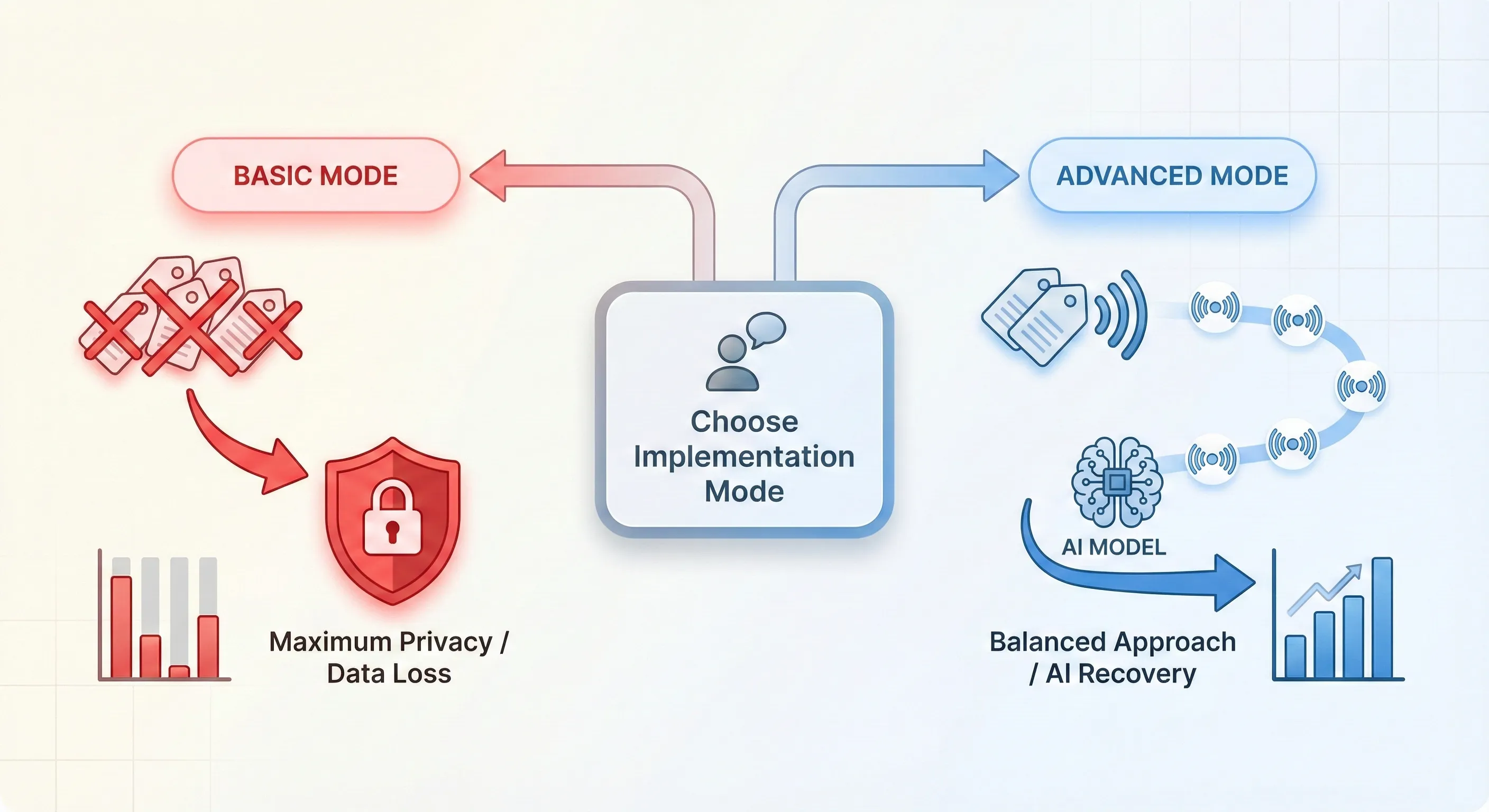
The single most important decision you’ll make when adopting Consent Mode v2 is choosing between Basic and Advanced implementation. This isn’t merely a technical configuration; it’s a strategic decision that balances legal risk appetite against data utility.
The industry terminology can be misleading. “Basic” doesn’t mean “easy,” and “Advanced” doesn’t necessarily mean “better” for everyone.
Basic Implementation: The Strict Blocking Approach
In Basic implementation, your website treats the cookie banner as a hard gate. No Google tags are allowed to load or execute until the user interacts with the banner and explicitly grants consent.
The mechanics work like this: Your Consent Management Platform (CMP) or Google Tag Manager is configured to suppress all Google tags by default. If the user clicks “Reject,” the tags remain suppressed. No code fires. No data is sent to Google. Only if the user clicks “Accept” do the tags load and fire, carrying the granted signals.
The consequences are straightforward.
For every user who rejects consent, you have 100% data loss. If your consent rate is 50%, your analytics will show 50% fewer visitors than reality. Your Google Ads account can still attempt to model conversions, but it must rely on what Google calls a “General Model”: aggregate data from other advertisers and generic industry trends used to estimate your performance. It lacks specific calibration data from your actual unconsented traffic.
This is the most conservative approach from a privacy perspective. It’s favoured by organisations with extremely strict legal interpretations (common in Germany or in finance sectors) who believe that even an anonymous data transmission constitutes processing requiring consent.
Advanced Implementation: The Filtration Approach
Advanced implementation fundamentally changes the data relationship. In this mode, Google tags load immediately when the page opens, before the user has made a choice. However, they load in a restricted mode.
The tags fire upon page load and check the default consent state (usually denied in the EEA). Upon seeing the denied signal, they don’t write or read cookies. Instead, they send what are called “Cookieless Pings” to Google’s servers.
These pings are lightweight data packets containing functional, non-identifying information: timestamp of when the hit occurred, user agent (browser type, device model, operating system), referrer (the URL the user came from), and indications of whether the URL contains a Google Click Identifier (GCLID), though this isn’t linked to a user profile in the traditional sense.
The strategic advantage of Advanced Mode is visibility. Google can see the volume of unconsented traffic. It knows: “1,000 people clicked your ad. 600 accepted cookies and converted at 5%. 400 rejected cookies.”
Because Google has the count and context of the unconsented users via the pings, it can build a model specifically calibrated to your website’s performance. This replaces the generic approach of Basic Mode with a tailored statistical projection.
Comparing the Two Approaches
| Feature | Basic Implementation | Advanced Implementation |
|---|---|---|
| Tag Loading Behaviour | Tags are blocked entirely until consent is granted | Tags load immediately; behaviour adjusts based on consent status |
| Data Transmission (Unconsented Users) | Zero data sent (complete blackout) | Cookieless Pings are sent (anonymised signals) |
| Cookie Usage | Cookies set only after consent | Cookies set only after consent; no cookies in restricted mode |
| Modelling Type | General Model: Based on generic industry trends, less accurate | Advertiser-Specific Model: Calibrated using your site’s actual unconsented traffic volume |
| Data Recovery Potential | Lower (relies on external assumptions) | Higher (can recover significant lost conversion data via AI) |
| Privacy/Legal Risk | Lowest (maximum strictness) | Moderate (relies on the argument that pings are non-identifying) |
The choice between Basic and Advanced mode affects both your GA4 analytics reporting and your Google Ads campaign performance. For detailed analysis of how each mode impacts your GA4 dashboards, modelling activation, and report accuracy, see our Complete Guide to GA4 Consent Mode v2. For technical implementation instructions for either approach, see our guide on How to Implement Cookie Consent With Google Tag Manager.
The Role of AI Conversion Modelling
The feature that makes Consent Mode v2 more than just a compliance mechanism is Conversion Modelling. This is how Google uses artificial intelligence to fill the gaps in your reports created by cookie rejection.
How AI Recovery Works
To understand modelling, you need to shift from thinking about tracking individuals to thinking about tracking cohorts (groups of users with similar characteristics).
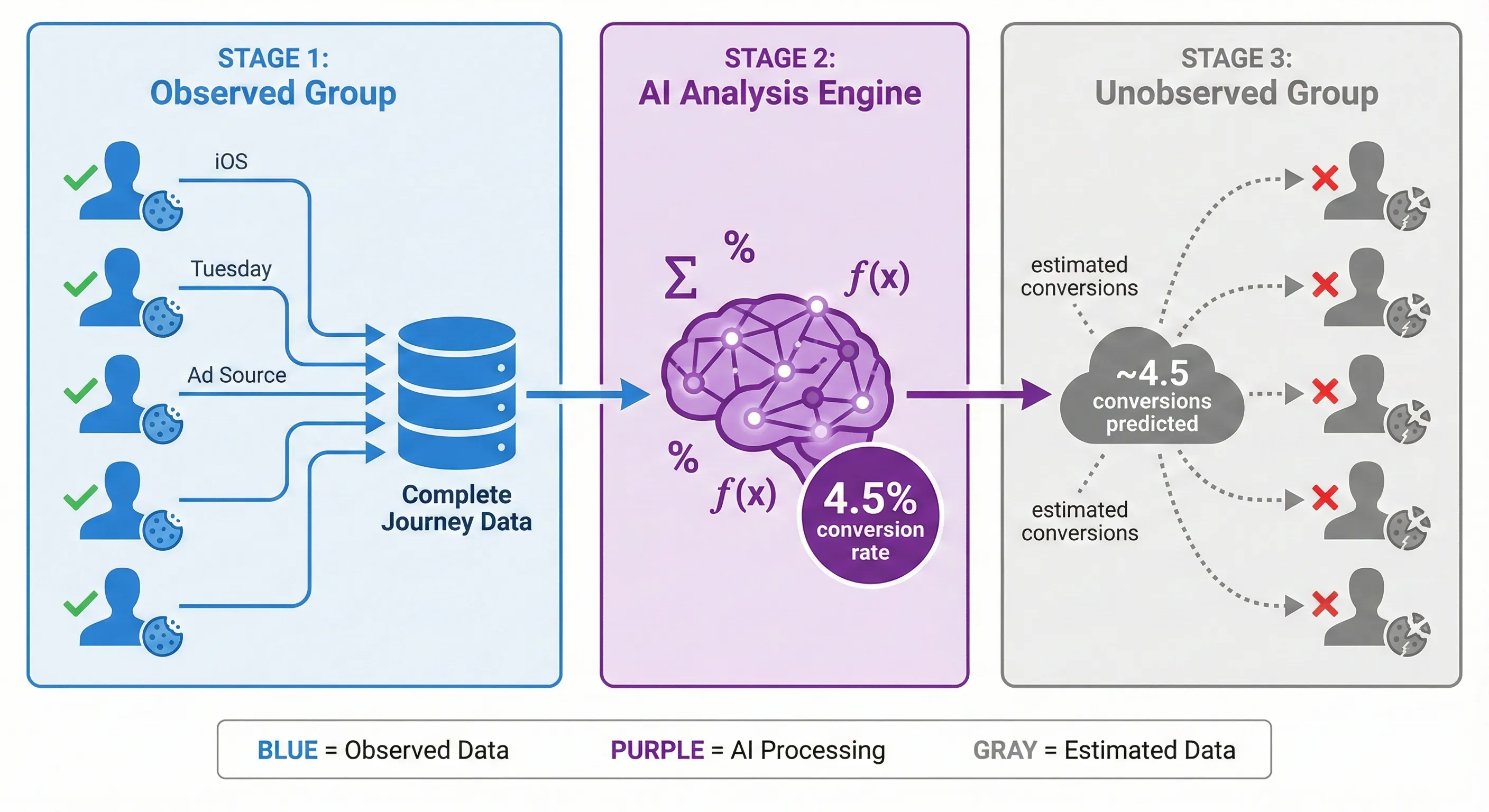
Google’s modelling engine analyses two distinct groups of users on your site:
The Observed Group (users who consented): Google has complete visibility into their journey. It knows their device type, time of day, browser, referral source, and exactly how they moved through your funnel to purchase.
The Unobserved Group (users who rejected cookies): In Advanced Mode, Google receives pings from this group. It knows they exist, and it knows their surface-level attributes (device, time, referrer), but it cannot track their journey linearly.
The AI analyses the Observed Group to find correlations. It might discover a pattern: “Users visiting from an iOS device on a Tuesday evening via a ‘Summer Sale’ ad click have a 4.5% conversion rate.”
The AI then looks at the pings from the Unobserved Group. It identifies pings that match those same attributes (iOS, Tuesday, Summer Sale ad). It applies the learned conversion rate to this unobserved cohort. If there were 100 such pings, the model estimates roughly 4.5 conversions, even though it never saw the “Thank You” page fire for those specific users.
For step-by-step instructions on configuring your implementation to enable modelling, see our guide on How to Implement Cookie Consent With Google Tag Manager.
The Consent Bias Correction
Google’s modelling algorithms also correct for behavioural differences between consenting and non-consenting users, as these groups often convert at different rates. For detailed information on how modelling appears in your GA4 reports and how to verify it’s working, see our Complete Guide to GA4 Consent Mode v2. This ensures the modelled numbers are conservative and realistic.
Industry reports suggest that Advanced Consent Mode can recover 70% or more of lost ad-click-to-conversion journeys. For businesses operating on thin margins, recovering this attribution data can be the difference between scaling a campaign and pausing it based on incomplete performance data.
The Reality of Data Thresholds
While the promise of AI modelling is valuable, it’s not universally available. There are specific data thresholds that determine whether you’ll benefit from modelling, creating a disparity between large advertisers and small businesses.
The Google Ads 700-Click Threshold
For Google Ads to activate its conversion modelling, a campaign must meet minimum volume requirements. You need at least 700 ad clicks over a 7-day period, per country and domain grouping.
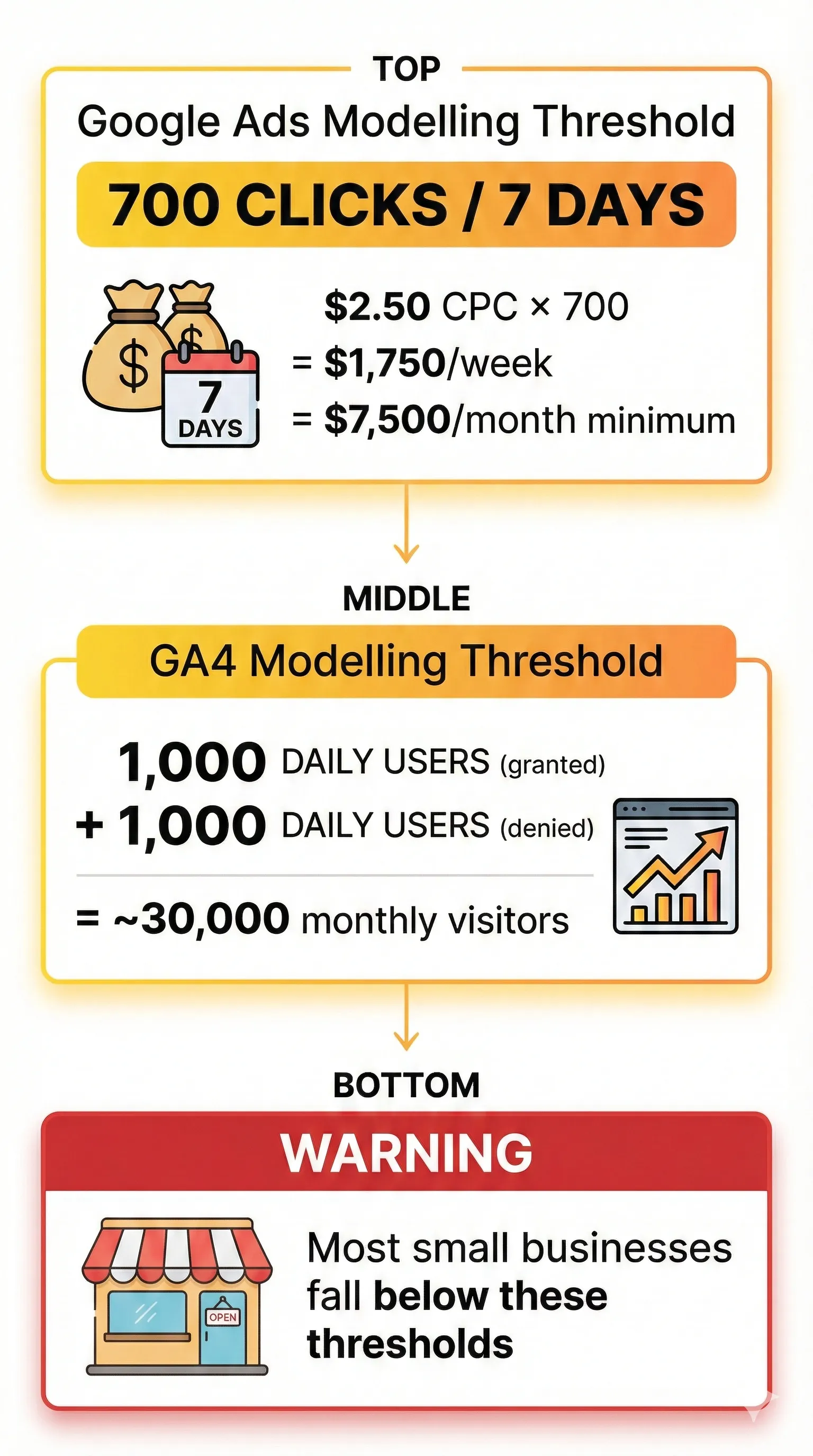
The small business implication is significant. If your average Cost Per Click (CPC) is $2.50, you must spend roughly $250 per day ($7,500 per month) to qualify for modelling. A typical small business spending $1,500 per month will not meet this threshold.
These smaller advertisers will implement Consent Mode v2 (as required for compliance), but they likely won’t see the reporting uplift in their Google Ads dashboard. The AI doesn’t have enough data points to train a reliable model.
For these businesses, Consent Mode is primarily a compliance mechanism to keep their remarketing lists operational and prevent account issues, rather than a tool for immediate data recovery.
For Google Analytics 4, similar volume thresholds apply for behavioural modelling. GA4 requires substantial traffic from both consenting and non-consenting users before it can generate modelled reports. For detailed GA4 thresholds and reporting configuration, see our Complete Guide to GA4 Consent Mode v2.
The CMP Cost Factor
Implementing Consent Mode requires software: a Consent Management Platform. While Google certifies partners, these are commercial businesses with pricing models that can be challenging for small businesses.
Many CMPs offer “free” plans, but the limitations quickly push you into paid tiers. For example, one popular platform limits the free plan to 50 subpages. WordPress sites routinely generate numerous dynamic pages (tag archives, author pages, category pages). A seemingly simple 5-page brochure site can easily generate 60+ URLs, forcing you into a premium plan at around $16 per month.
Small businesses must now budget not just for ads, but for the infrastructure to measure those ads legally.
What Implementation Actually Involves
While you don’t need to implement Consent Mode yourself, understanding what’s involved helps you make informed decisions and evaluate vendor proposals.
The Three-Layer Architecture
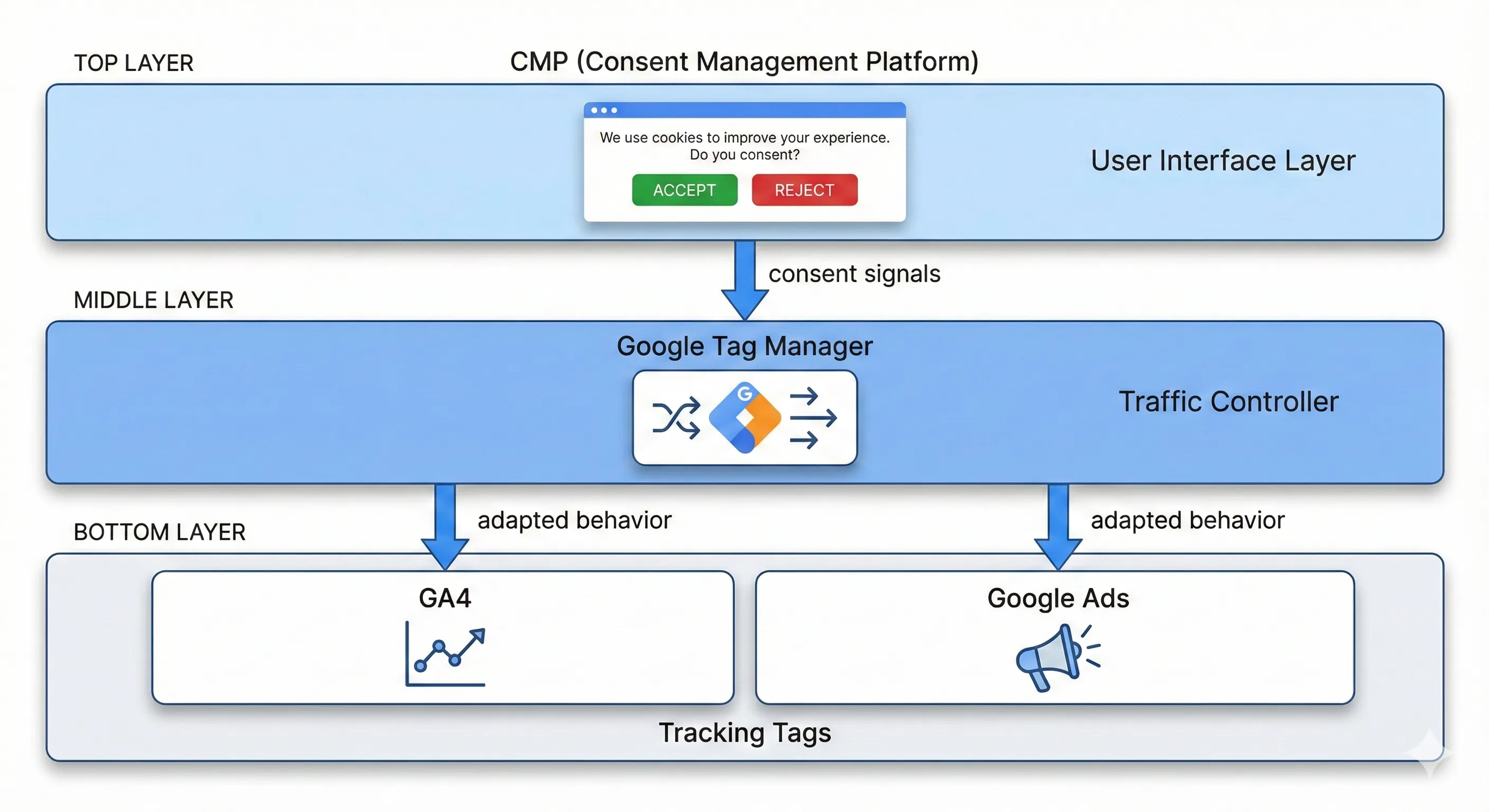
Implementation involves three distinct components working together:
The Consent Management Platform (CMP): This is the software that displays the cookie banner to your users and manages their consent choices. It’s the user interface layer. Popular options include CookieYes, Cookiebot, and Termly. These platforms must be Google-certified to ensure the consent signals are formatted correctly.
The Tag Manager: This is typically Google Tag Manager (GTM), which acts as the traffic controller for all your marketing tags. It receives the consent signals from the CMP and tells your Google Analytics and Google Ads tags how to behave based on those signals.
The Configuration Settings: Within both the CMP and your Google accounts, you need to configure specific settings: choosing Basic vs Advanced mode, enabling “Blended” data in GA4, and ensuring your tags are set up to receive consent signals.
The Basic Process
At a high level, implementation involves coordinating these three layers: selecting and configuring a Google-certified CMP, ensuring proper tag sequencing in Google Tag Manager, and enabling appropriate settings in your Google accounts.
The complexity isn’t in any single step, it’s in ensuring all three layers communicate correctly and that you’ve made the right strategic choices for your business size and risk tolerance.
For complete step-by-step implementation instructions, including CMP selection criteria, detailed GTM trigger configuration, tag setup, and testing procedures, see our guide on How to Implement Cookie Consent With Google Tag Manager.
Making the Strategic Decision
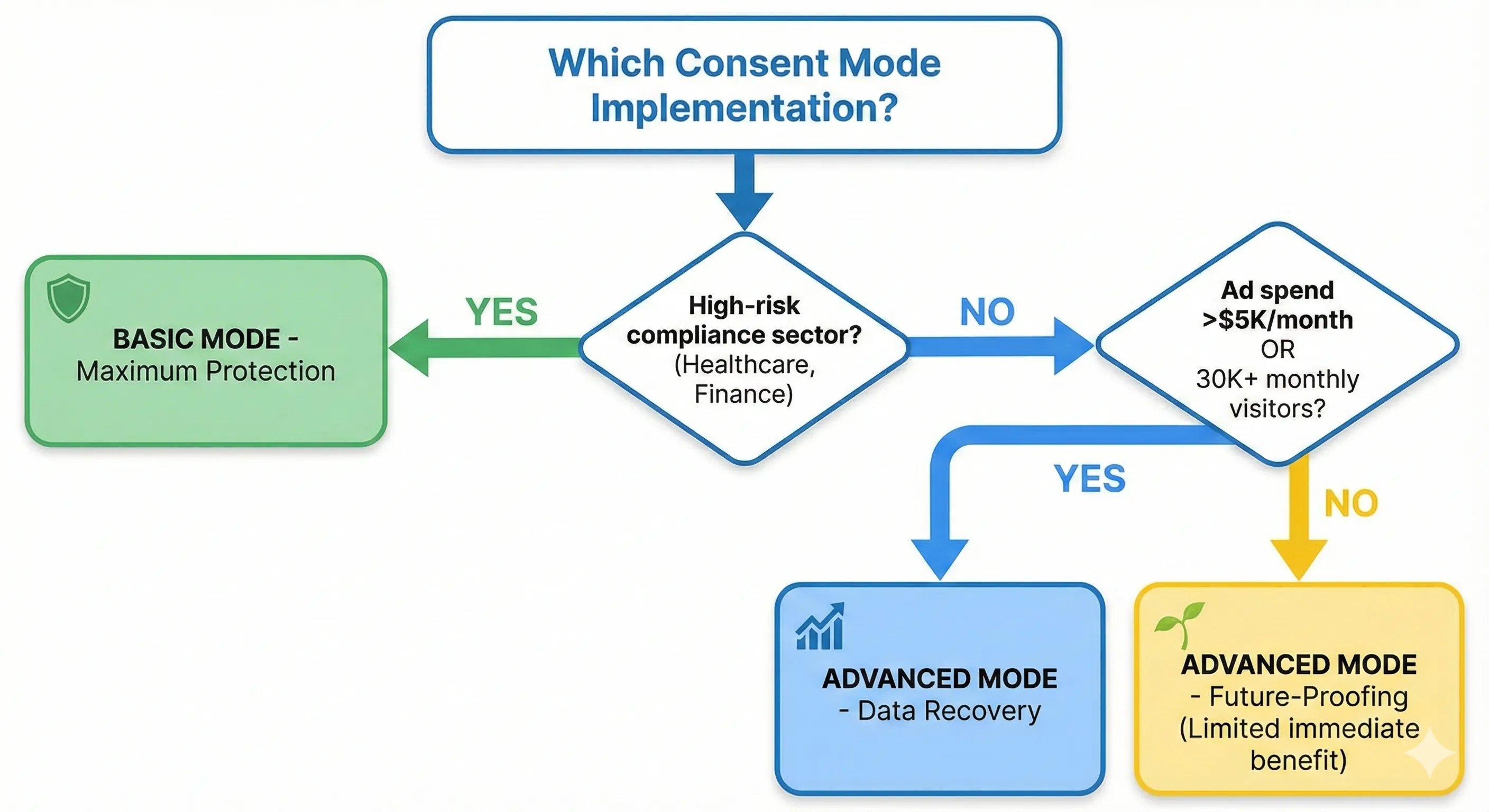
Understanding Consent Mode v2 ultimately comes down to making informed strategic decisions rather than just achieving technical compliance.
Choose Advanced Mode If:
You rely heavily on Google Ads for revenue and need the most accurate possible attribution data. You operate in a standard commercial sector (ecommerce, services, B2B) without heightened privacy requirements. You’re comfortable with the privacy implications of cookieless pings being sent before consent. You want to maximise your chances of benefiting from conversion modelling if you grow past the thresholds.
Choose Basic Mode If:
You operate in a high-risk compliance vertical like healthcare or financial services. You’re based in or primarily serve customers in jurisdictions with extremely strict interpretations of privacy law (particularly Germany). Your legal counsel has advised maximum caution regarding any data transmission before explicit consent. You’re willing to accept a 30 to 50% drop in reported metrics in exchange for the lowest possible legal risk.
For Small Businesses Below the Thresholds:
If you’re spending less than $5,000 per month on Google Ads or receiving fewer than 30,000 monthly website visitors, manage your expectations. You’re implementing Consent Mode v2 primarily for compliance and to maintain basic remarketing capabilities, not for immediate data recovery through AI modelling.
This doesn’t mean implementation is pointless; it means you need to plan your measurement strategy differently. Focus on building first-party data assets like email lists. Consider implementing “Offline Conversion Imports” where you upload your actual sales data back to Google Ads to verify attribution. Don’t rely solely on Google’s modelled reports as your single source of truth.
Next Steps
Understand Platform-Specific Implications
Before implementation, understand how Consent Mode v2 affects each Google platform you use:
For Google Analytics 4: GA4 has specific property settings, distinct modelling thresholds, and unique reporting considerations. Understanding how Consent Mode affects your analytics dashboards, what “Blended” reporting identity means, and how to interpret modelled versus observed data is crucial for maintaining measurement visibility. See our Complete Guide to GA4 Consent Mode v2 for detailed GA4 configuration and reporting implications.
For Google Ads: Conversion modeling in Google Ads operates differently than GA4, with its own volume thresholds. Understanding how Consent Mode affects your remarketing audiences, bidding algorithm performance, and attribution accuracy is essential for campaign optimization.
Configure Your Technical Implementation
Once you’ve made your strategic decision between Basic and Advanced mode, you’ll need to configure your consent infrastructure. Our How to Implement Cookie Consent With Google Tag Manager guide provides complete step-by-step instructions for:
- Selecting and configuring a Google-certified Consent Management Platform
- Setting up proper trigger sequences in Google Tag Manager to avoid race conditions
- Configuring Google and non-Google tags to respect consent signals
- Testing and validating your implementation
- Debugging common configuration issues
Understanding the Complete Measurement System
Consent Mode v2 governs how tracking behaves based on user consent, but it’s one component of a complete measurement infrastructure. Understanding how it connects with Google Tag Manager for deployment, GA4 for analytics processing, conversion tracking for platform optimization, and UTM parameters for attribution creates a system that maintains measurement capability while respecting privacy regulations.
How to Build Your Marketing Measurement Foundation shows you how Consent Mode integrates with your complete measurement infrastructure, enabling compliant tracking while preserving remarketing capabilities and conversion attribution through AI modelling.
If You Need Help
Consent Mode v2 implementation requires selecting the right CMP, configuring Basic versus Advanced mode, integrating with Google Tag Manager, and enabling modelled reporting in GA4 and Google Ads. Our Marketing Measurement Foundation service provides complete implementation with proper consent architecture if you prefer expert setup.
The New Measurement Reality
Google Consent Mode v2 marks a significant transition point in digital advertising measurement. The certainty of 1:1 user tracking has been replaced by the probability of AI models and the complexity of consent management.
For businesses that have relied on straightforward, transparent measurement for two decades, this transition requires adjustment. It involves new costs (CMPs), new technical complexity (consent signals), and reduced data transparency (modelling instead of tracking).
The alternative to adaptation is progressive data degradation. Without proper Consent Mode implementation, your remarketing audiences stop updating. Your conversion data becomes increasingly incomplete. Your ability to make informed decisions about campaign performance deteriorates over time.
The question isn’t whether to implement Consent Mode v2 (that decision has been made by regulators and platforms). The question is whether you’ll implement it strategically, understanding the trade-offs and thresholds, or reactively, checking a compliance box without understanding what you’re gaining or losing.
Understanding this system doesn’t require you to become a technical expert. It requires you to ask the right questions: What implementation mode makes sense for my business size and risk profile? Do I have the traffic volume to benefit from modelling? What will my actual data loss look like? How should this change my measurement strategy?
The businesses that navigate this transition successfully won’t necessarily be the ones with the most sophisticated technical implementations. They’ll be the ones that understand what the data means, what it doesn’t mean, and how to make decisions within the new constraints.