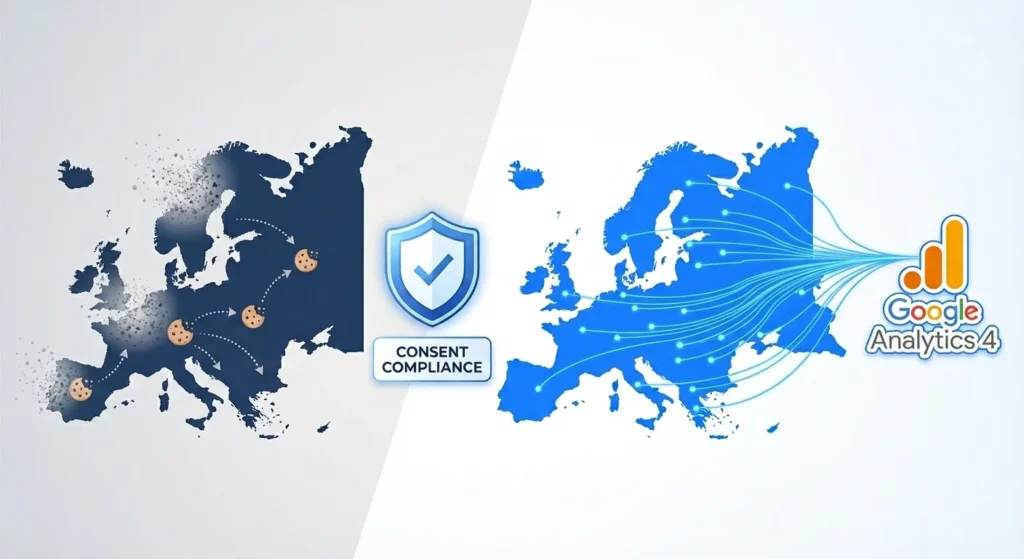
If you’re running ads to European customers, you’ve likely noticed something alarming: your conversion data has gotten worse. Your remarketing lists have stopped growing. Your Google Ads bidding algorithms seem confused. You’re not imagining it.
The Digital Markets Act (DMA) changed the rules in March 2024, and if you haven’t implemented Google Consent Mode v2, you’re losing data every single day. This guide explains exactly what’s happening, why it matters, and how to fix it.
Table of Contents
Why Your European Traffic Data Disappeared
The digital advertising world operated for years on a simple premise: websites could track visitors by default. That world ended with European privacy regulations, particularly the Digital Markets Act (DMA) that came into full enforcement in March 2024.
The DMA requires platforms like Google to obtain explicit user consent before processing personal data for advertising purposes. Without proper consent signals, Google quarantines the data, it doesn’t use it for remarketing, doesn’t feed it into bidding algorithms, and treats it as if it doesn’t exist.
For a complete explanation of the regulatory context, how the DMA differs from GDPR, and why this shift happened, see our guide on What is Google Consent Mode v2?
The Three Ways You Lose Money
When you fail to implement Consent Mode v2 properly, three specific things break in your advertising operation.
First, your remarketing audiences stop building. Every visitor who declines cookies becomes invisible to your audience lists. Your “Cart Abandoners” list, typically your highest-converting audience, stops growing for European traffic. Your “Previous Purchasers” list stagnates. You lose the ability to re-engage people who already showed interest in your business.
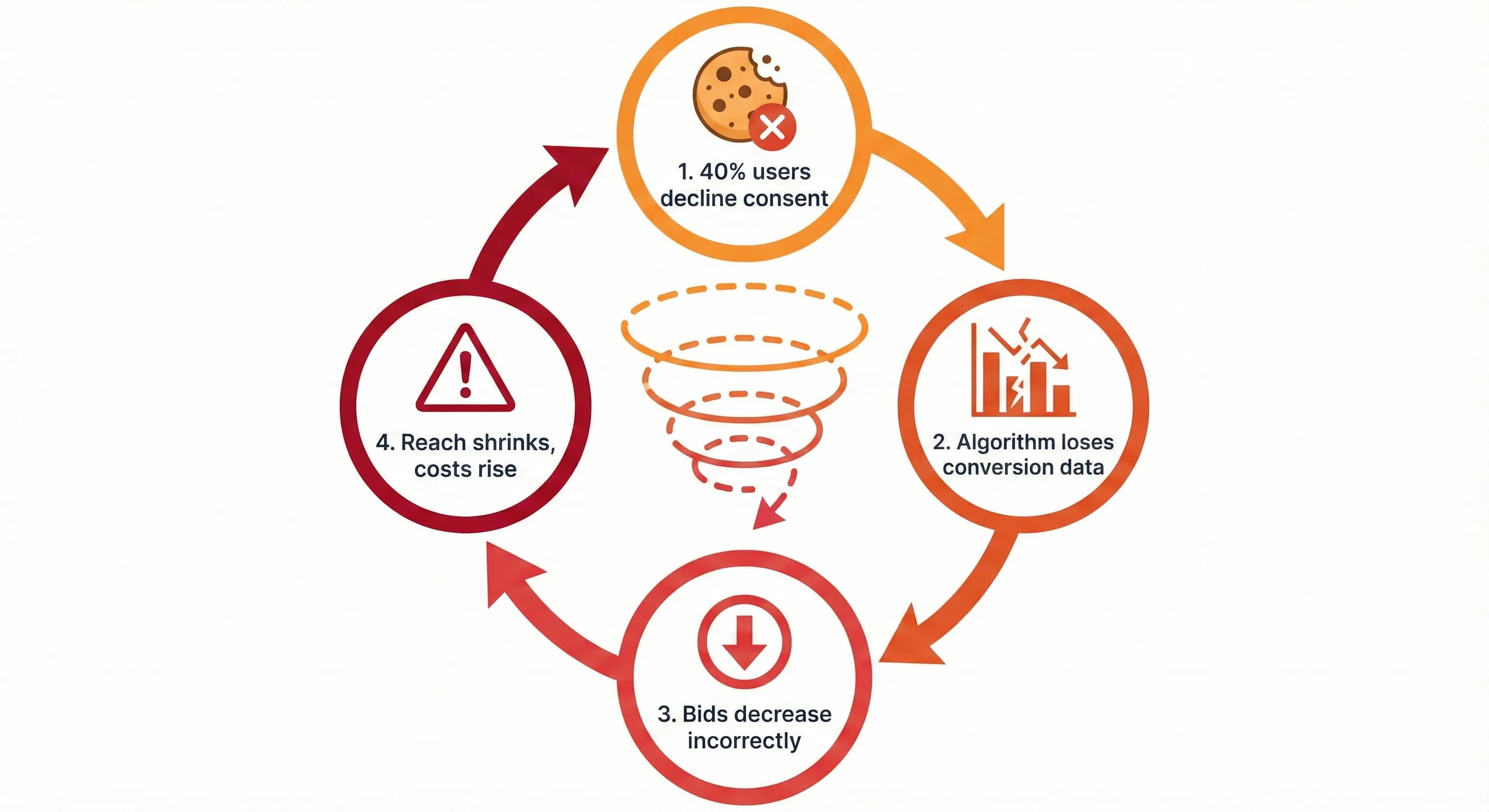
Second, your bidding algorithms lose their feedback loop. Modern bidding strategies like Target CPA, Target ROAS, and Maximize Conversions are machine learning systems. They need to see which clicks turn into conversions so they can identify patterns and optimise future bids.
When 40% of your users decline consent (a typical rate in privacy-conscious markets like Germany), and you’re using a basic cookie setup, your algorithm loses visibility into 40% of your conversions. The algorithm thinks those campaigns failed, even if they drove sales. It responds by bidding down or excluding that traffic entirely, creating a death spiral where your costs increase and your reach decreases.
Third, your attribution breaks. You can’t attribute conversions to the right campaigns if Google never received the conversion data in the first place. Your reports show conversions as “Direct” traffic when they actually came from your paid campaigns. You make decisions based on incomplete information.
What Consent Mode v2 Actually Does
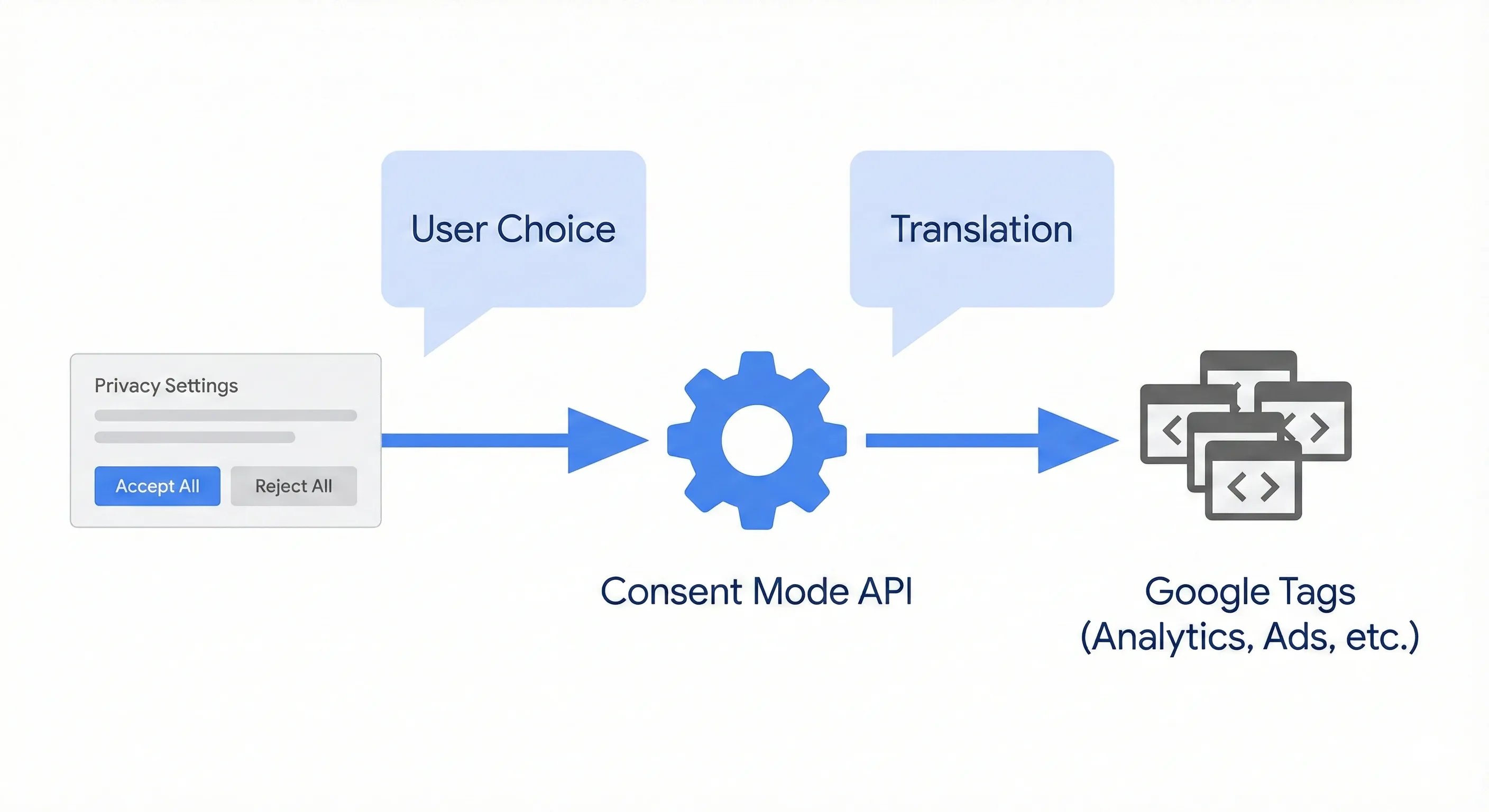
Google Consent Mode v2 isn’t a cookie banner or a consent management platform. It’s an API (a communication protocol) that sits between your cookie banner and your Google tags. It tells your tags how to behave based on what the user chose.
Think of it as a translator. Your cookie banner speaks the language of user interface (“Accept All” or “Reject All”). Your Google tags speak the language of data collection (set this cookie, send this request). Consent Mode translates the user’s choice into specific instructions the tags understand.
The Four Consent Signals
The core innovation in version 2 is the expansion from two consent parameters to four. Each parameter controls a specific aspect of how Google can use data.
| Signal Parameter | Function & Purpose | Compliance Context |
|---|---|---|
ad_storage | Storage Permission: Controls whether the Google tag can write or read cookies related to advertising (e.g., the _gcl_au cookie). | Fundamental for deterministic conversion tracking. If denied, no persistent identifiers are stored on the device. |
analytics_storage | Storage Permission: Controls whether the Google tag can write or read cookies related to analytics (e.g., the _ga cookie). | Essential for session stitching and user journey analysis. If denied, each page view may appear as a new user. |
ad_user_data | Data Usage Permission: Controls whether user data (including hashed first-party data) can be sent to Google for advertising purposes. | New in v2. Directly maps to the DMA’s requirement for user consent before processing personal data for ads. |
ad_personalization | Personalisation Permission: Controls whether data can be used for remarketing and personalised ad serving. | New in v2. The “gatekeeper” signal for audience building. If denied, the user cannot be added to remarketing lists. |
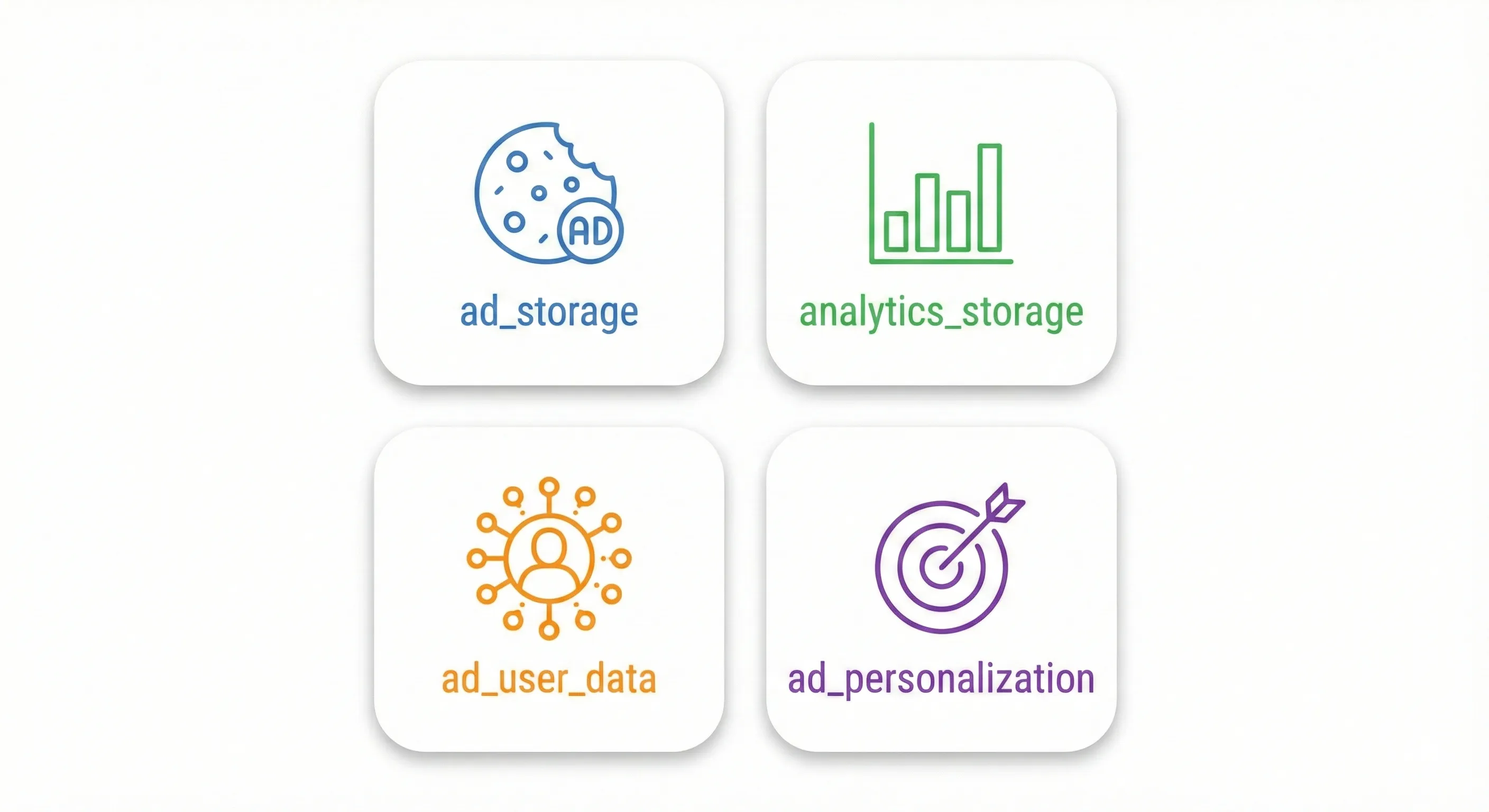
These four parameters work independently. A user might accept analytics cookies but decline advertising cookies, resulting in analytics_storage='granted' and ad_storage='denied'. Your Consent Mode implementation must handle all possible combinations.
How Google Reads Your Consent Signals
When Consent Mode is active, these four signals get encoded into a parameter called gcd (Google Consent Decision) that’s appended to every request your tags send to Google’s servers. You can see this parameter in your browser’s network inspector.
The gcd parameter looks something like &gcd=11p1p1p1p5. This cryptic string contains dense information about not just what the consent state is, but how it got there.
The letters in the string map to specific states. An l means the signal hasn’t been set at all (Consent Mode isn’t active). A p means denied by default with no user update yet. A t means granted by default. A q means denied by default and confirmed denied by the user. An r means denied by default but then granted by the user. A v means granted by default and confirmed granted.
This granularity matters for debugging. If you see ps in your gcd parameter, you know the default state loaded but the user update never occurred. This usually indicates a race condition (we’ll cover that shortly). If you see rs, you know the mechanism successfully captured a user’s opt-in.
Basic vs Advanced: The Most Important Choice You’ll Make
Consent Mode offers two implementation approaches: Basic and Advanced. This choice fundamentally determines how much data you’ll recover from users who decline cookies.
Basic Mode: The Hard Block
In Basic Consent Mode, your Google tags don’t load at all until the user grants consent. You typically implement this through Google Tag Manager by setting up exception triggers that prevent tag firing unless the consent state is granted.
Here’s what happens: when someone lands on your site, they see your cookie banner. No Google tags fire. No requests go to Google’s servers. The visitor is digitally invisible. If they click “Accept,” the tags load and everything works normally. If they click “Reject,” the tags stay blocked and you collect zero data from that visit.
The Basic approach appeals to risk-averse legal teams because it guarantees no data transmission without consent. However, it results in 100% data loss for non-consenting users. Your analytics only include people who accepted tracking, which creates a biased dataset. Privacy-conscious users often behave differently than users who accept all cookies, but you’ll never see that behaviour.
More critically, Basic mode makes behavioural modelling impossible. Google’s machine learning models need baseline data about non-consenting users to estimate their behaviour, and Basic mode provides none.
Advanced Mode: The Cookieless Ping
Advanced Consent Mode takes a more sophisticated approach. Your Google tags load immediately when the page loads, before the user interacts with the banner. However, the tags read the consent state (which must default to denied for compliance) and adjust their behaviour accordingly.
When consent is denied, the tags don’t write or read cookies. They don’t create persistent identifiers. Instead, they send what Google calls “cookieless pings” to their servers.
These pings are the key to everything. They allow Google to know that an interaction occurred without identifying who the user is. The ping contains functional information like timestamps, browser type (from standard HTTP headers), and the referring URL. It includes the consent status flags confirming that ad_storage and analytics_storage are denied. It may include high-level campaign information like the Google Click ID (GCLID) from the URL, though Google processes this in a way that prevents building persistent profiles when consent is denied.
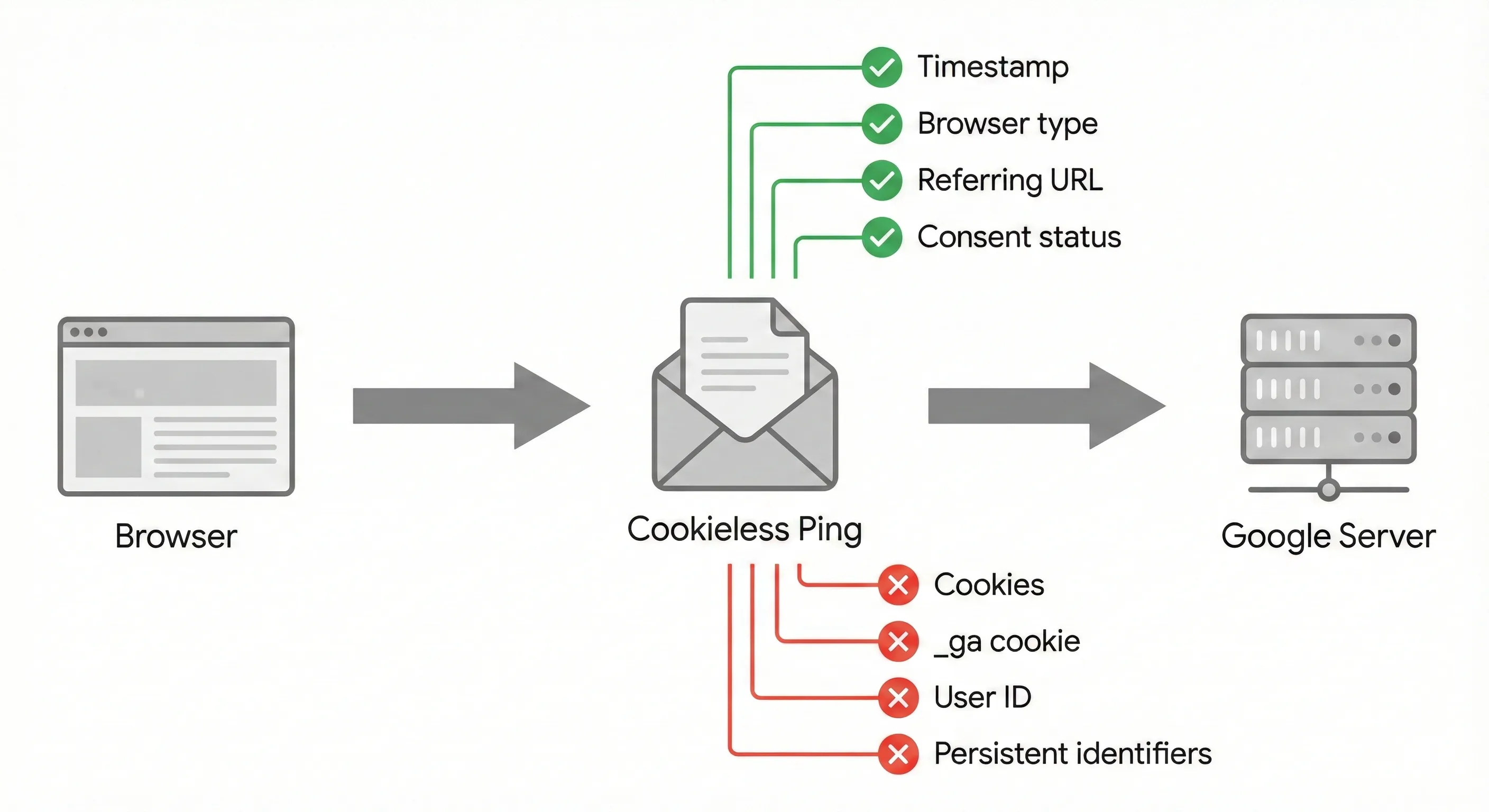
Critically, the ping does not contain cookies. No _ga cookie. No _gcl_au cookie. No persistent user ID that could track someone across sessions.
If the user subsequently grants consent, the tags update their status (via the update command), begin setting cookies normally, and send fully trackable data.
The Trade-Off: Privacy vs Performance
The choice between Basic and Advanced mode is fundamentally a business decision disguised as a technical one. Here’s how they compare:
| Feature | Basic Consent Mode | Advanced Consent Mode |
|---|---|---|
| Tag Loading Behaviour | Blocked entirely until consent is granted. | Loads immediately; behaviour adapts to consent state. |
| Cookie Setting | Set only after consent. | Set only after consent. |
| Data Transmission (Denied) | None. Zero data is sent to Google. | Cookieless Pings. Functional, non-PII signals sent. |
| Behavioural Modelling | Disabled. No data exists to model from. | Enabled. Pings provide the volume needed for ML. |
| Conversion Modelling | Limited to general modelling (less accurate). | Granular. Uses specific ad-click signals for high accuracy. |
| Privacy Profile | Maximum restriction; zero transmission. | Privacy-preserving; data aggregation and differential privacy used. |
| Business Value | High data loss; skewed analytics. | Mitigated data loss; recovered conversions and true ROI. |
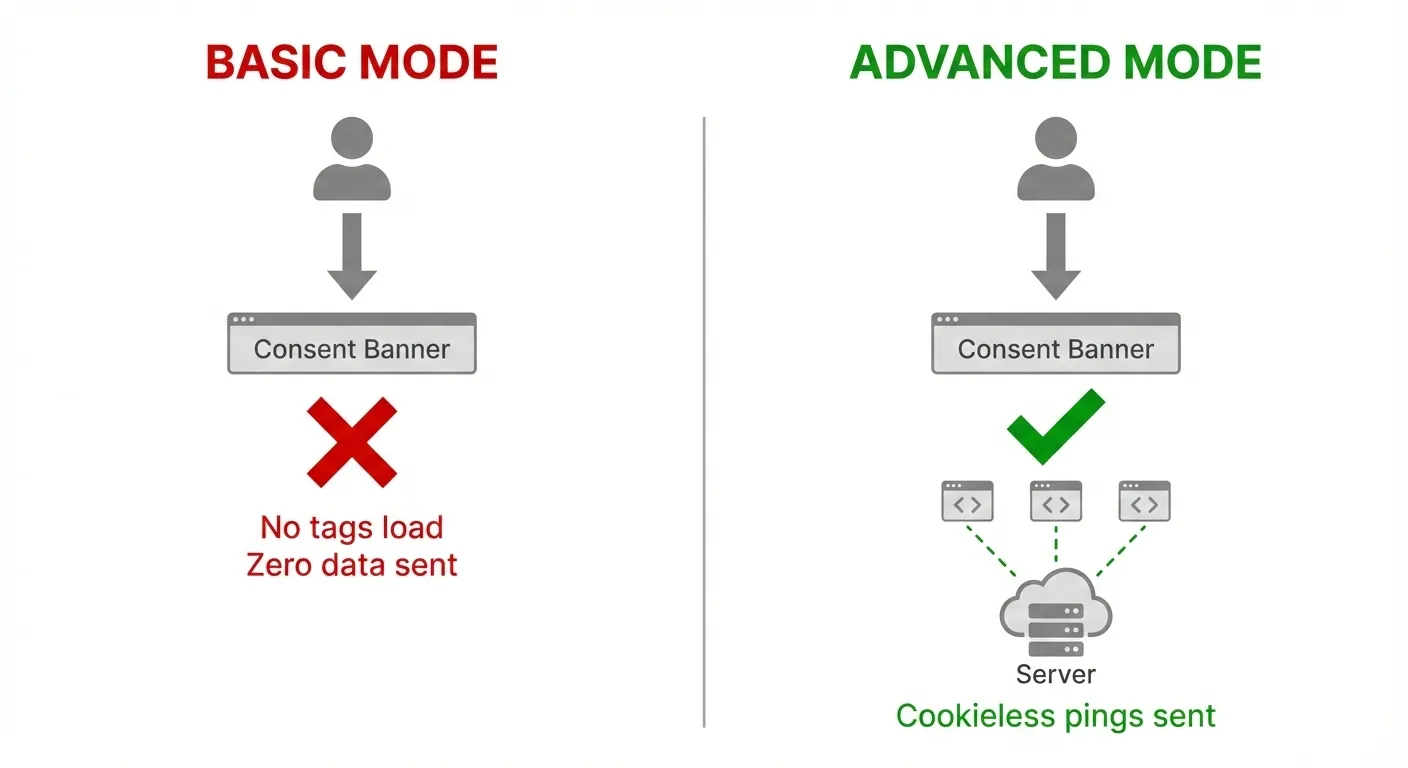
Most organisations targeting European markets need Advanced mode to remain competitive. Basic mode is appropriate only for businesses with extremely conservative legal requirements or those with such high consent rates that data loss doesn’t materially impact performance.
How Behavioral Modelling Recovers Your Lost Data
The real power of Advanced Consent Mode lies in what it enables: behavioural modelling. This is where machine learning fills the gaps left by users who decline cookies.
The Machine Learning Mechanism
Google’s modelling engine doesn’t guess randomly. It uses a training and calibration methodology based on observed user behaviour.
The system identifies the “Observed Set”: users who granted consent. The algorithm analyses their behaviour in detail, looking for correlations between observable data points and conversion outcomes. For example, it might learn that mobile users coming from a specific ad campaign between 6 PM and 9 PM have a 5% conversion rate.
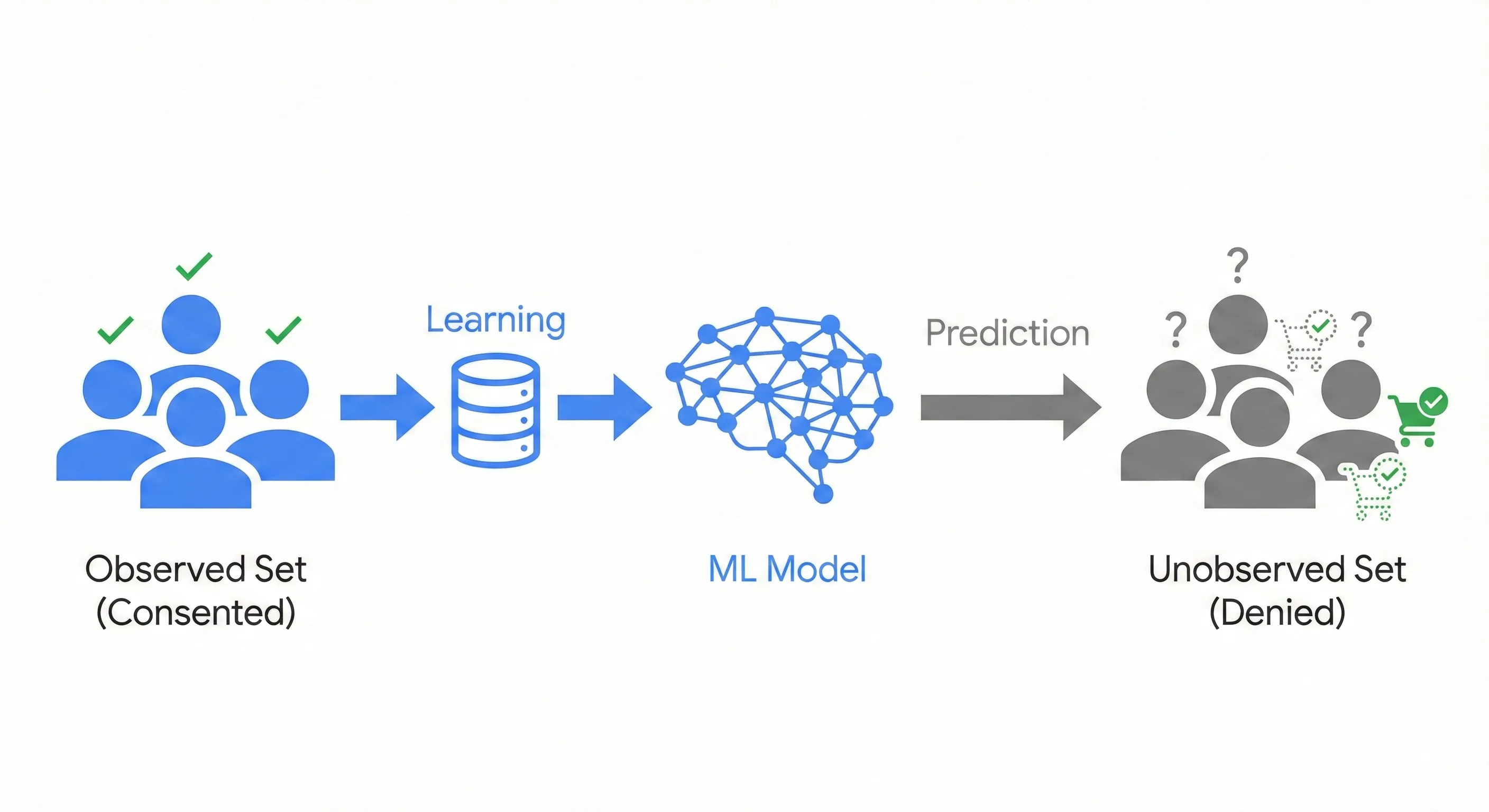
Then it examines the “Unobserved Set”: the cookieless pings from users who denied consent. It sees there were 500 pings from that same campaign, on mobile devices, during the same time window.
Using the patterns learned from consenting users, the model estimates the conversions for the non-consenting group. It applies holdback validation (hiding a portion of known data to test accuracy) to calibrate its predictions.
This process allows GA4 to report on users and sessions that never actually accepted a cookie. It constructs a probable reality that’s far more accurate than the incomplete data from Basic mode.
The Quantifiable Impact
The business case for behavioural modelling is backed by real numbers.
Research indicates that modelling can recover roughly 70% of the attribution paths lost when users decline cookies. Without this, those conversions would be misattributed to Direct traffic or lost entirely from your reports.
A prominent case study involved Air France, which implemented Consent Mode and observed a 9% uplift in reported conversions across European markets. This 9% represented revenue that was previously invisible to their bidding algorithms. With visibility restored, they could optimise more aggressively and more accurately.
There’s another important correction that modelling provides. Consenting users are typically 2-5 times more likely to convert than non-consenting users. Basic mode, which only tracks consenting users, therefore artificially inflates your reported conversion rate. You think you’re converting at 5%, but you’re actually converting at 3%. Advanced mode with modelling corrects this bias, giving you a more accurate (if sobering) view of true performance.
The Threshold Problem for Small Businesses
Behavioural modelling sounds ideal, but there’s a catch: it requires substantial data volume to activate. Google enforces strict thresholds to ensure the models have enough data to be accurate.
To activate modelling, your GA4 property must meet all of these criteria:
First, Advanced Consent Mode must be properly implemented and verified, with tags loading before the consent dialogue.
Second, you need at least 1,000 events per day with analytics_storage='denied' for at least 7 consecutive days. This is the “unobserved” volume that needs modelling.
Third, you need at least 1,000 daily users sending events with analytics_storage='granted' for at least 7 of the previous 28 days. This is the training set that teaches the model.
Fourth, your GA4 property settings must use the Blended reporting identity. If you’re set to Device-based identity, modelling is strictly disabled and you’ll only see observed data.
This thresholding creates a real problem for small-to-medium businesses. If you’re getting 500 daily visitors, you’ll pay the setup costs of Advanced Consent Mode but never receive the modelling benefits. You’ll have the same visibility as if you’d used Basic mode.
For smaller businesses, the strategy must shift. You can’t rely on modelling to save you, so you need to maximise your consent acceptance rate through banner optimisation. Clear language, transparent value propositions, and non-intrusive design become critical conversion rate optimisation activities.
Implementation Guide: Getting It Right
Implementing Consent Mode v2 correctly requires careful attention to technical details. Common issues include race conditions (where tags fire before consent state is established), trigger sequencing problems, and integration challenges with offline conversion systems.
For complete step-by-step implementation instructions, including how to avoid race conditions, configure proper trigger sequences in Google Tag Manager, handle offline conversion uploads with consent status, and debug common configuration issues, see our guide on How to Implement Cookie Consent With Google Tag Manager.
The sections below focus on GA4-specific configuration decisions that affect your reporting.
The Google Signals Decision
Google Signals is a GA4 feature that enables cross-device tracking and demographic reporting by leveraging data from signed-in Google users. It’s powerful for understanding your audience, but it interacts with Consent Mode in a way that can cause problems.
When Google Signals is active, GA4 applies strict privacy thresholds. If the number of users in a report segment is low, GA4 hides the data to prevent re-identification. This is called thresholding, and it often makes reports appear empty or significantly under-reported for smaller websites.
The trade-off is real. Enabling Signals is often a prerequisite for robust audience building in Google Ads. However, it can degrade the granularity of your GA4 reporting.
For properties with substantial traffic (typically 10,000+ daily users), keep Signals on. The benefits outweigh the occasional thresholded report. For smaller properties struggling with thresholding, consider a dual-property setup: one GA4 property with Signals enabled (for audience building) and one with Signals disabled (for granular reporting). Alternatively, export your data to BigQuery, which bypasses many of the standard reporting thresholds.
Understanding Differential Privacy
If you’re using Advanced mode, your security team may ask about the safety of the cookieless pings. The question is legitimate: even if you’re not setting cookies, you’re still sending data to Google about users who declined tracking.
Google addresses this through differential privacy, a cryptographic standard that injects statistical noise into datasets. Even if a ping is received, the aggregation logic ensures that no single individual’s contribution can be reverse-engineered from the output.
The system is designed to provide aggregate truth while obscuring individual reality. You can know that 1,000 users from Campaign A converted at 3%, but you can’t identify which specific user converted. This aligns with the highest standards of data privacy while still enabling useful analytics.
What This Means for Your Marketing Strategy
The transition to Consent Mode v2 isn’t a temporary patch. It’s the foundational architecture for the next decade of digital analytics. The era of deterministic, pixel-perfect tracking is over. We’ve entered the era of probabilistic data.
Three Strategic Imperatives
If you’re targeting the EEA (or planning to), you face three immediate priorities.
First, implement Consent Mode v2 now if you haven’t already. This isn’t optional. The risk of losing remarketing audiences and attribution data is an existential threat to your advertising efficiency. Every day you delay is another day of data loss.
Second, choose between Basic and Advanced mode based on your business reality, not just your legal team’s preference. Basic mode satisfies the most conservative risk appetites, but Advanced mode is the only path to maintaining competitive performance in attribution and bidding. Most organisations need Advanced mode to remain competitive.
Third, optimise your consent acceptance rate. In a modelled world, the quality of the model depends on the quality of the training data. If only 20% of users grant consent, your model is guessing based on a small, potentially unrepresentative sample. If 60% grant consent, your model is far more accurate.
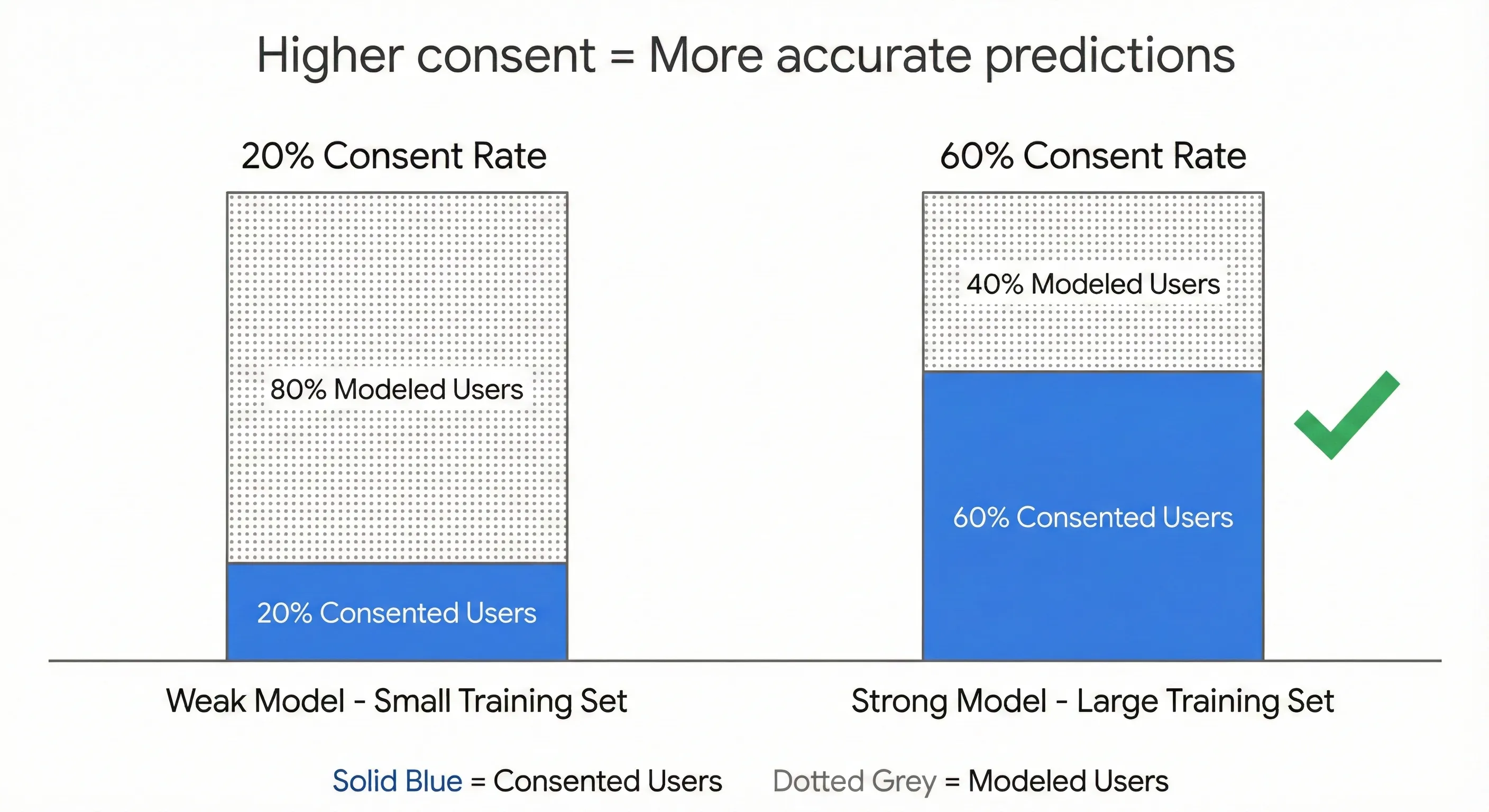
This means your cookie banner is now a conversion rate optimisation priority. Clear, transparent language about how you use data (and what value users get in return) can materially improve acceptance rates. Non-intrusive design that doesn’t interrupt the user experience also helps. Testing different banner designs and copy is no longer just a compliance activity—it’s a performance marketing activity.
The Data Quality Shift
You also need to adjust your expectations about data precision. You’re not going to get the perfect, complete datasets you had five years ago. That world is gone.
What you can get is data that’s accurate enough for good decision-making. A 70% recovery rate on attribution means you can still optimise campaigns effectively. Modelled conversion data might not be precise to the penny, but it’s directionally correct, which is what your bidding algorithms actually need.
The businesses that struggle in this new environment are those that refuse to accept probabilistic data. They keep waiting for perfect information and end up making decisions based on dangerously incomplete information instead. The businesses that thrive are those that embrace modelling, understand its limitations, and use it to make better decisions than their competitors who are still operating in the dark.
Next Steps
Configure Your GA4 Property Settings
If you’ve already implemented Consent Mode v2 (or are implementing it now), ensure your GA4 property is configured correctly:
- Enable “Blended” reporting identity in your GA4 property settings (Admin > Data Settings > Data Collection). This allows GA4 to use modeled data alongside observed data.
- Verify Google Signals settings align with your data needs and threshold concerns
- Monitor your consent acceptance rates and modeling activation status
- Use GA4 DebugView to confirm events are being sent even when consent is denied
Understand Your Complete Measurement Infrastructure
Consent Mode v2 is one component of your measurement foundation. For a complete understanding of how consent management integrates with Google Tag Manager for deployment, conversion tracking for optimization, and your overall analytics strategy, see our guide on How to Build Your Marketing Measurement Foundation.
Implement Consent Mode v2 Technically
If you haven’t yet implemented Consent Mode v2, or need to audit your existing implementation, see our guide on How to Implement Cookie Consent With Google Tag Manager for complete step-by-step instructions covering CMP selection, GTM configuration, trigger setup, and testing procedures.
If You Need Help
Consent Mode v2 implementation requires coordinating your Consent Management Platform, Google Tag Manager configuration, and GA4 property settings to work together correctly. Our Marketing Measurement Foundation service provides complete implementation with proper consent architecture and GA4 configuration if you prefer expert setup.
Final Thoughts: Thriving in the Privacy-First Era
The data landscape has fundamentally changed. The Digital Markets Act and broader privacy regulations aren’t going away. If anything, they’re expanding to more jurisdictions.
The “black hole” of data loss caused by these regulations is real, but it’s not absolute. Through proper implementation of Advanced Consent Mode, you can illuminate much of that void. By capturing privacy-safe signals and leveraging machine learning, you can recover the majority of data that would otherwise be lost.
The organisations that thrive won’t be those that resist this change or try to work around it. They’ll be the ones that embrace privacy-first data collection as a competitive advantage. They’ll build consent experiences that users actually want to engage with. They’ll understand how to work with probabilistic data. They’ll make better decisions than competitors who are either non-compliant (and losing all the data) or stuck in Basic mode (and only seeing half the picture).
Consent Mode v2 isn’t the end of effective digital marketing. It’s the foundation of what comes next: a world where privacy and performance coexist, and where the smartest marketers learn to thrive within constraints that would have seemed impossible just a few years ago.