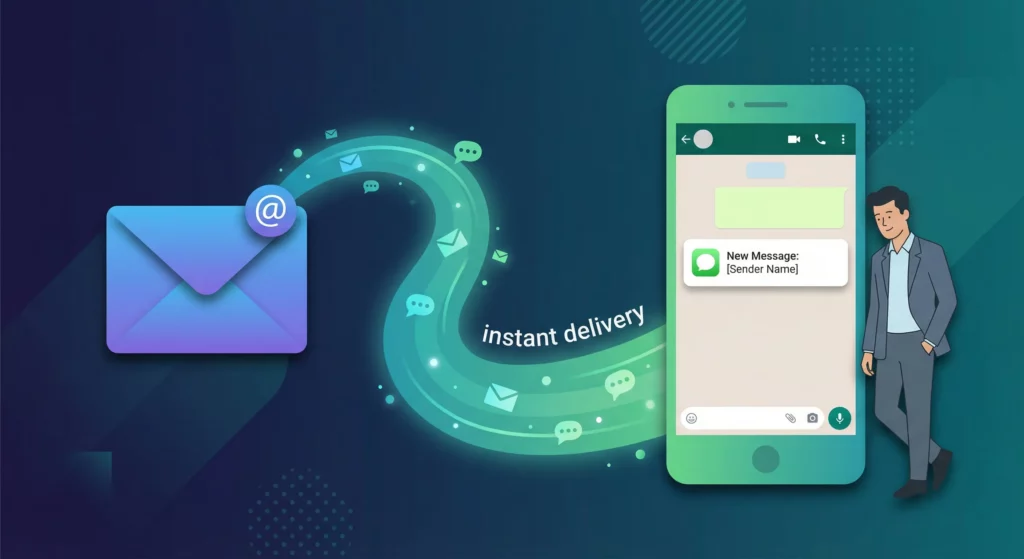
WhatsApp reads at 95–98%. Email opens at 17–25%. If your business sends time-sensitive information by email and wonders why nobody acts on it quickly, the channel is the problem.
Routing emails to WhatsApp means different things for different businesses. A sole trader wants their own important emails surfaced to their phone without opening an inbox. A logistics company needs supplier delivery notifications sent to the right driver. An IT team wants server alerts on their phone before they have time to check email. A multi-location business needs bookings routed to the correct branch manager. The use cases look similar on the surface but require genuinely different technical approaches.
This guide covers every option: manual forwarding, no-code automation platforms, dedicated point-solution tools, and AI-powered staff alert routing. For each approach you will get an honest assessment of what it can and cannot do, so you choose the right tool from the start rather than discovering its limits mid-build.
Table of Contents
Why Email Is Failing as an Alert Channel
The engagement gap is structural, not fixable by writing better subject lines. WhatsApp messages are read within an average of three minutes, with 80% read within five. The average email response time is six hours. WhatsApp click-through rates run at 45–60%; email manages 2–5%. Even the standard email open rate figure of 17–25% is increasingly unreliable, because Apple‘s Mail Privacy Protection pre-fetches tracking pixels and artificially inflates reported opens.
The deliverability situation has deteriorated further in 2025. GlockApps research found that high-volume senders saw inbox placement rates collapse from 49.98% to 27.63% year-over-year. Outlook and Hotmail now sit at just 26.77% inbox placement. Microsoft began routing emails from unauthenticated domains straight to Junk in May 2025. Messages that reliably reached inboxes two years ago are now quietly disappearing.
Notification fatigue compounds the problem. The average worker receives 153 Teams messages and 117 emails per day. Microsoft‘s 2025 Work Trend Index found employees interrupted every two minutes, and 82% of surveyed workers reported missing important emails because there are too many. An alert sent by email is one notification competing with hundreds of others, from the same interface the recipient uses for newsletters and internal memos.
The fundamental issue is a mismatch between medium and message. Email is designed for content that can wait. Alerts are synchronous by nature: they require immediate human attention. WhatsApp delivers a notification directly to an active chat interface, producing haptic feedback on a mobile device. Email does not. Routing time-sensitive emails to WhatsApp bridges that mismatch rather than working against it.
Four Reasons Businesses Route Email to WhatsApp
Before choosing a tool, identifying which use case you are solving determines which approach is appropriate. The four common drivers require genuinely different solutions.
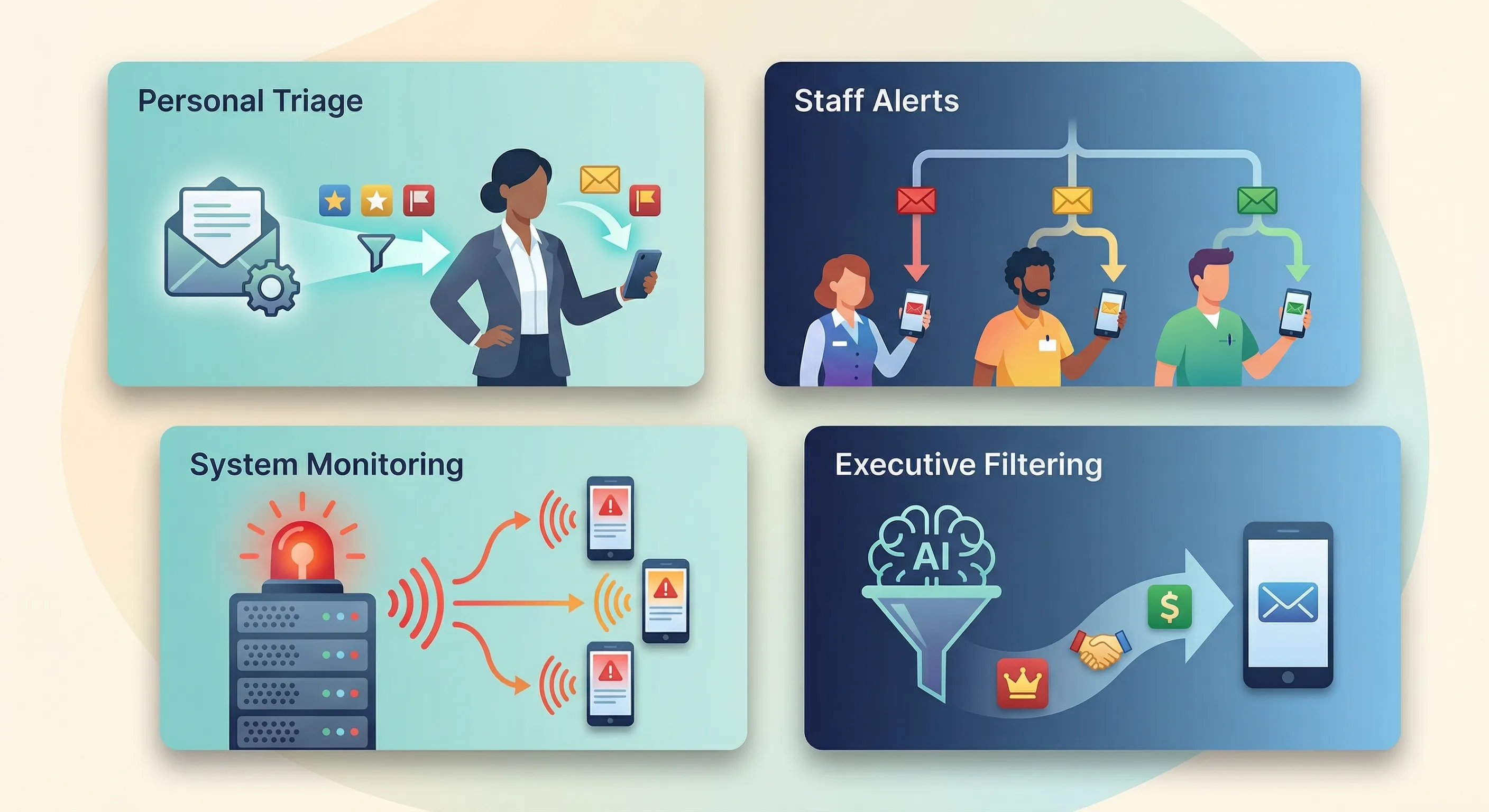
Personal inbox triage
The use case:
You receive more email than you can monitor in real time, but a small number of those emails are genuinely urgent. You want specific emails to surface on WhatsApp so you can respond without opening your inbox constantly.
Typical triggers include emails matching keywords such as “urgent,” “invoice,” or “new lead,” or emails from specific senders. This is the most straightforward use case and is well served by simple no-code tools.
Staff operational alerts
The use case:
Your business receives automated emails: supplier delivery confirmations, booking notifications, and maintenance visit reminders. Specific staff members need to act on them via WhatsApp.
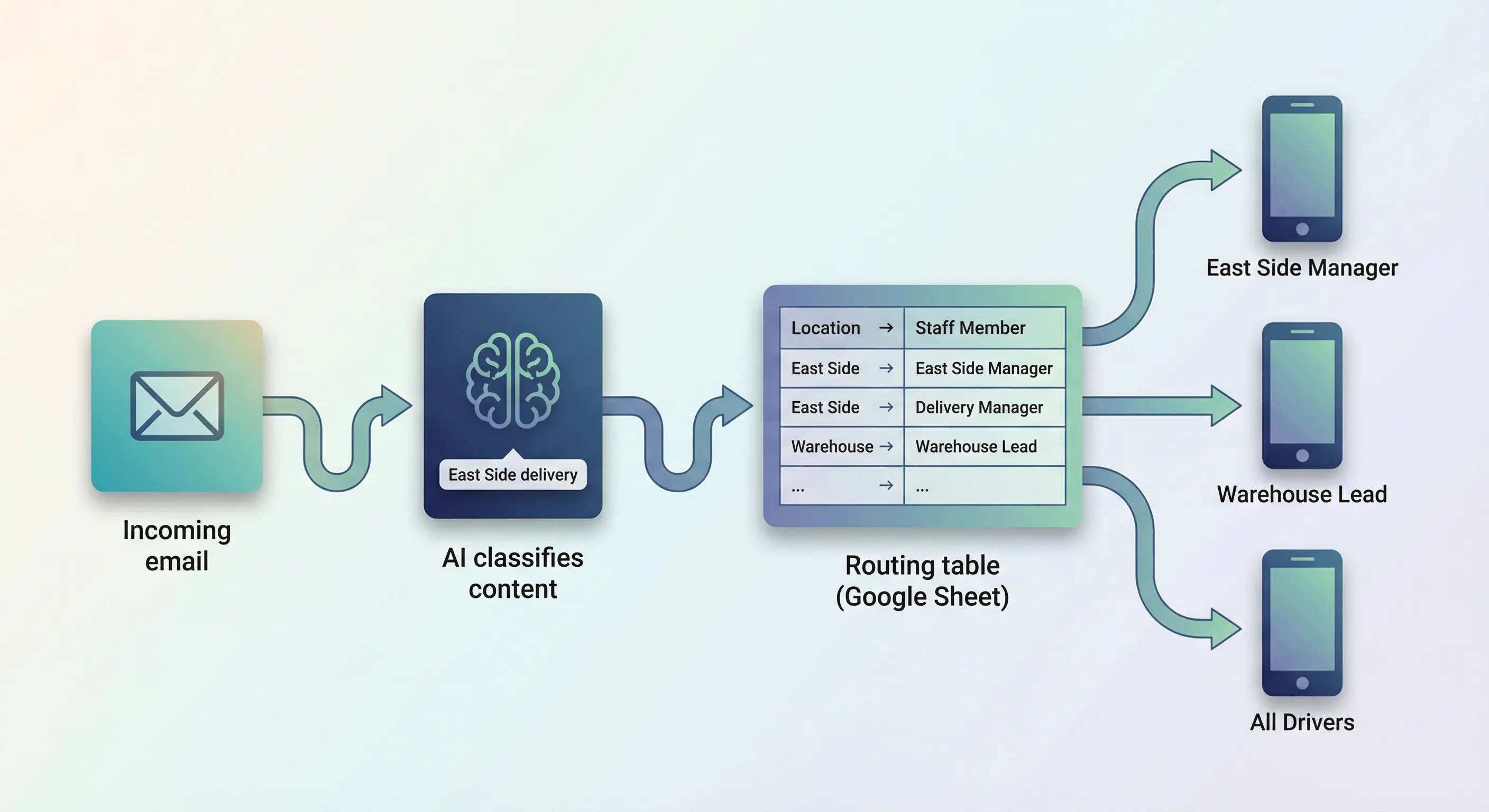
The challenge here is routing: the right email needs to reach the right person. A delivery going to your East Side location should alert the East Side manager, not everyone. This use case requires logic that reads the email content and decides who to notify, not just a simple forward.
Internal system monitoring
The use case:IT monitoring tools, point-of-sale systems, security platforms, or IoT sensors generate automated alert emails when something goes wrong. These alerts land in a team inbox and routinely get buried.
The “boy-who-cried-wolf” effect is well documented here: when critical and non-critical alerts share the same channel, people stop treating anything as urgent. Routing filtered, classified alerts to WhatsApp restores the signal.
Executive filtering
The use case:
Founders and senior managers receive high volumes of inbound email: sales enquiries, escalations, partnership requests, and noise. They want an AI-assisted layer that reads incoming emails, identifies the ones that actually matter, summarises them, and delivers a WhatsApp notification with only the ones worth acting on immediately.
This is the most technically demanding use case. It requires AI classification rather than simple keyword filtering.
Manual Methods (And Where They Break)
The baseline approach is copy-paste: someone reads an email, copies the relevant content, opens WhatsApp Web or the mobile app, and sends it to the right person. For very low volumes (a handful of emails per day at most), this works.
The mobile share feature provides a slightly faster path. On most devices you can share email content to WhatsApp directly via the operating system share sheet, but this requires manual repetition for every email and rarely preserves formatting or attachments cleanly.
The dedicated relay person is common in small businesses: one person monitors a shared inbox and forwards relevant emails to the right WhatsApp contacts. This creates a human bottleneck. When the relay person is unavailable, outside business hours, or simply overwhelmed, the system fails. There is also no audit trail: no record of who was notified, when, or what message was sent.
The time cost adds up quickly. Five hundred emails per month at two minutes each is 16.7 hours of manual labour every month. That figure excludes the cognitive overhead of context-switching between your inbox and WhatsApp throughout the day.
The right time to move beyond manual methods is when any of these conditions become true: volume exceeds what one person can reliably process; after-hours notifications are being missed; routing accuracy matters; or the relay person is a single point of failure for your operations.
No-Code Platforms: Zapier, Make.com, and n8n
Integration platforms connect your email provider (Gmail, Outlook, an IMAP server) to WhatsApp without writing code. Each platform has meaningfully different capabilities for this use case, and those differences matter more here than in most automation scenarios.
Zapier
Zapier is the most widely used automation platform and the one most businesses try first for email-to-WhatsApp routing. Its WhatsApp Notifications integration is easy to configure. It is also severely limited in a way that is not obvious until you are halfway through your build.
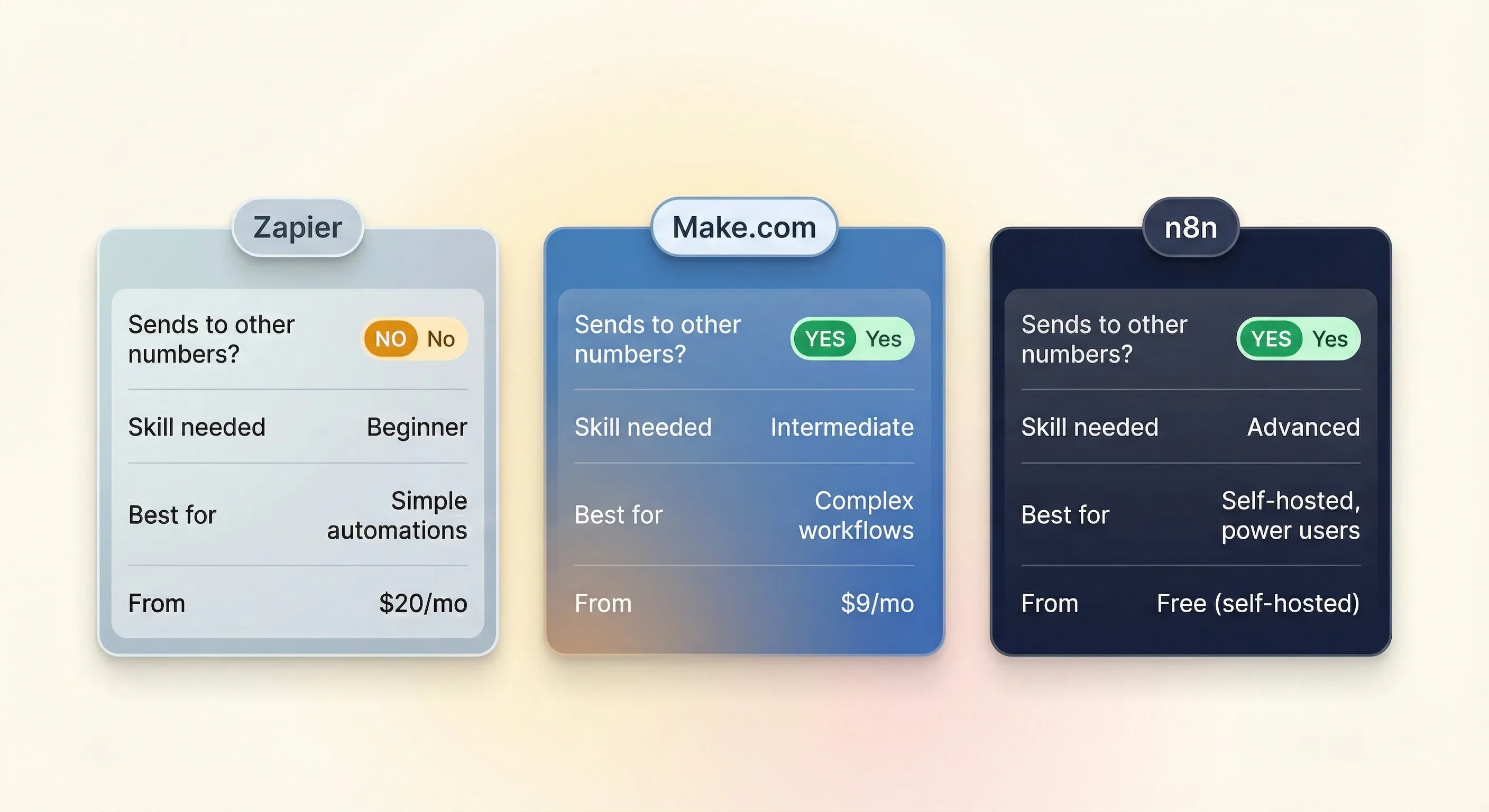
Important: Zapier‘s native WhatsApp integration can only send messages to the authenticated account holder’s own phone number. It cannot send to staff members, customers, or any other number.
This is a hard architectural limit, not a workaround issue. Zapier staff confirmed it explicitly in their community in September 2024: “You can only send WhatsApp Notification messages to yourself.” Troy Tessalone, the platform’s top-ranked community contributor, said the same. The WhatsApp Messenger integration that would allow sending to arbitrary numbers is not supported by Zapier.
Additional constraints: only seven pre-filled templates are available (New Lead, New Order, Shipping Confirmation, and four others); the message limit is 1,024 characters including the template text; the integration requires at least the Professional plan.
Who Zapier is right for: personal inbox triage only. If you want to receive alerts on your own phone when certain emails arrive, Zapier handles that cleanly.
Workaround for staff routing: connect Zapier to a third-party WhatsApp Business API provider such as Twilio or WATI, via Zapier‘s webhook action. This removes the “own number” restriction but requires a separate account, API credentials to manage, and per-message costs. It also shifts the task from no-code to low-code API orchestration.
Cost estimate for 500 emails/month: a two-step Zap (email trigger + WhatsApp notification) uses one task per email. The Professional plan at $19.99/month (annual billing) covers 750 tasks and is sufficient. Adding a BSP via webhook (three-step flow, ~1,500 tasks/month) pushes toward the Team plan at $69/month. With Twilio message fees at approximately $0.005–$0.05 per message, total cost runs roughly $20–75/month depending on configuration.
Make.com
Make.com (formerly Integromat) uses a visual, node-based workflow builder. Unlike Zapier, it offers a native WhatsApp Business Cloud integration that connects directly to Meta’s Cloud API. This integration can send messages to any phone number (not just your own), provided you have a WhatsApp Business API account with Meta.
The trade-off is a steeper learning curve. Make.com requires understanding data structures, JSON field mapping, and how its module system handles arrays. For a basic email-to-WhatsApp trigger this is manageable; for conditional routing to multiple recipients it becomes more involved.
In August 2025, Make.com switched from an operations model to a credit model. For standard modules, one operation equals one credit. A basic email trigger and WhatsApp send uses two credits per email execution.
| Plan | Monthly (annual) | Credits/month |
|---|---|---|
| Free | $0 | 1,000 |
| Core | $10.59 | 10,000 |
| Pro | $18.82 | Scalable |
Cost estimate for 500 emails/month: approximately 1,000 credits, which the free tier technically covers. For production use without polling delays, the Core plan at $10.59/month is more than sufficient. Meta API costs apply for template messages (see the Gotchas section for when those trigger).
Who Make.com is right for: technically confident owners who want to send alerts to specific staff members and are comfortable working with a visual builder and JSON concepts.
n8n
n8n is the most capable of the three platforms for email-to-WhatsApp routing. It offers a built-in WhatsApp Business Cloud node with full send capabilities, a Gmail trigger, and native AI classification nodes, all within the same workflow. This is the architecture that makes AI-enhanced email classification possible without stitching multiple services together.
The key economic advantage is execution-based billing: n8n charges per workflow execution, not per individual step. A complex 20-node workflow costs the same per execution as a 2-node one. For high-volume or AI-enhanced flows, this is significantly more economical than per-task pricing.
The self-hosted Community Edition removes per-execution costs entirely. Running n8n on a small VPS costs $5–20/month for infrastructure with no per-execution charges. The managed cloud Starter plan runs approximately $24/month.
n8n also includes a “Send and Wait for a Response” operation on the WhatsApp node, allowing a workflow to pause until the recipient replies. This enables two-way alert confirmation flows, which is useful when you need a driver to acknowledge receipt of a delivery alert.
Who n8n is right for: multi-staff routing based on email content, AI-powered classification and summarisation, high-volume automation, or any scenario where you need logic that Zapier and Make.com cannot handle.
Skill requirement: n8n requires comfort with webhooks, API authentication, and JSON data structures. It is genuinely technical. For businesses without that capability in-house, it is the tool that warrants getting help to set up properly.
Dedicated Email-to-WhatsApp Tools
For businesses that want email-to-WhatsApp routing without building a workflow from scratch, two categories of ready-made tools exist. Simple forwarding tools handle personal or fixed-destination delivery. Business Solution Providers handle multi-staff routing with a managed interface over the Meta Cloud API.
Simple forwarding tools
BeepMate:
Provides a dedicated email address. Any email forwarded to that address is delivered to a designated WhatsApp number. Includes AI summarisation so long emails are condensed before delivery, and priority filtering that suppresses low-value emails. Group delivery to a WhatsApp group is available as a premium feature. Pricing is typically via AppSumo lifetime deals or subscription marketplaces rather than a standard monthly plan.
WappSync:
Provides a private email gateway. Anything forwarded to your WappSync address lands in your own WhatsApp. Designed for personal forwarding and 2FA notification use cases rather than staff routing.
app2email:
Operates on the official Meta Cloud API and functions as a bidirectional bridge. Emails can be handled as WhatsApp messages and vice versa. Better suited to CRM-adjacent use cases where you want WhatsApp conversations accessible from email clients or helpdesks. Free trial available; pricing on application.
What these tools do not do: dynamic multi-staff routing based on email content. They deliver to a fixed number or a fixed group, but they cannot read an email, determine it concerns a delivery to the East Side location, and route it specifically to the East Side manager’s number. For that, you need either a configurable workflow or a Business Solution Provider.
Business Solution Providers
Business Solution Providers (BSPs) are Meta-approved partners that wrap the WhatsApp Cloud API in a usable interface. Unlike simple forwarding tools, BSPs support multi-staff routing, shared team inboxes, and CRM integration. They sit between “build your own n8n workflow” and “use a simple forwarding tool” — more capable than the latter, less work to maintain than the former.
| Provider | Starting price | Users | Key characteristic |
|---|---|---|---|
WATI | ~$59/month | 3 (locked at base tier) | WhatsApp-first, guided Meta verification |
Respond.io | ~$79/month | 10 | Omnichannel (10+ channels), 0% API markup |
Twilio | Pay-as-you-go | Unlimited | Raw API infrastructure; requires a developer |
WATI:
Entry-level BSP built specifically for WhatsApp. Includes a shared team inbox, routing rules, WhatsApp Flows support, and a guided Meta Business Verification process. The 3-user limit at the base plan is a constraint for growing teams. Pricing adds approximately 20% markup on Meta per-message costs.
Respond.io:
Omnichannel shared inbox covering WhatsApp, Messenger, Instagram, Telegram, and more. More powerful routing logic and CRM integration than WATI. Zero markup on Meta API costs at the base tier. Steeper learning curve and higher starting price.
Twilio:
Raw telecom API infrastructure used by enterprises for high-volume messaging. Requires custom application code to parse emails, structure messages, and manage routing. Not appropriate for businesses without a developer. Pay-as-you-go pricing: approximately $0.005/message platform fee plus standard Meta conversation charges.
When a BSP is the right choice: you need multi-staff routing but do not want to manage server infrastructure. BSPs abstract the API complexity into an interface. The trade-off is ongoing subscription cost and some dependence on the platform’s routing logic.
Unofficial and Grey-Area Tools
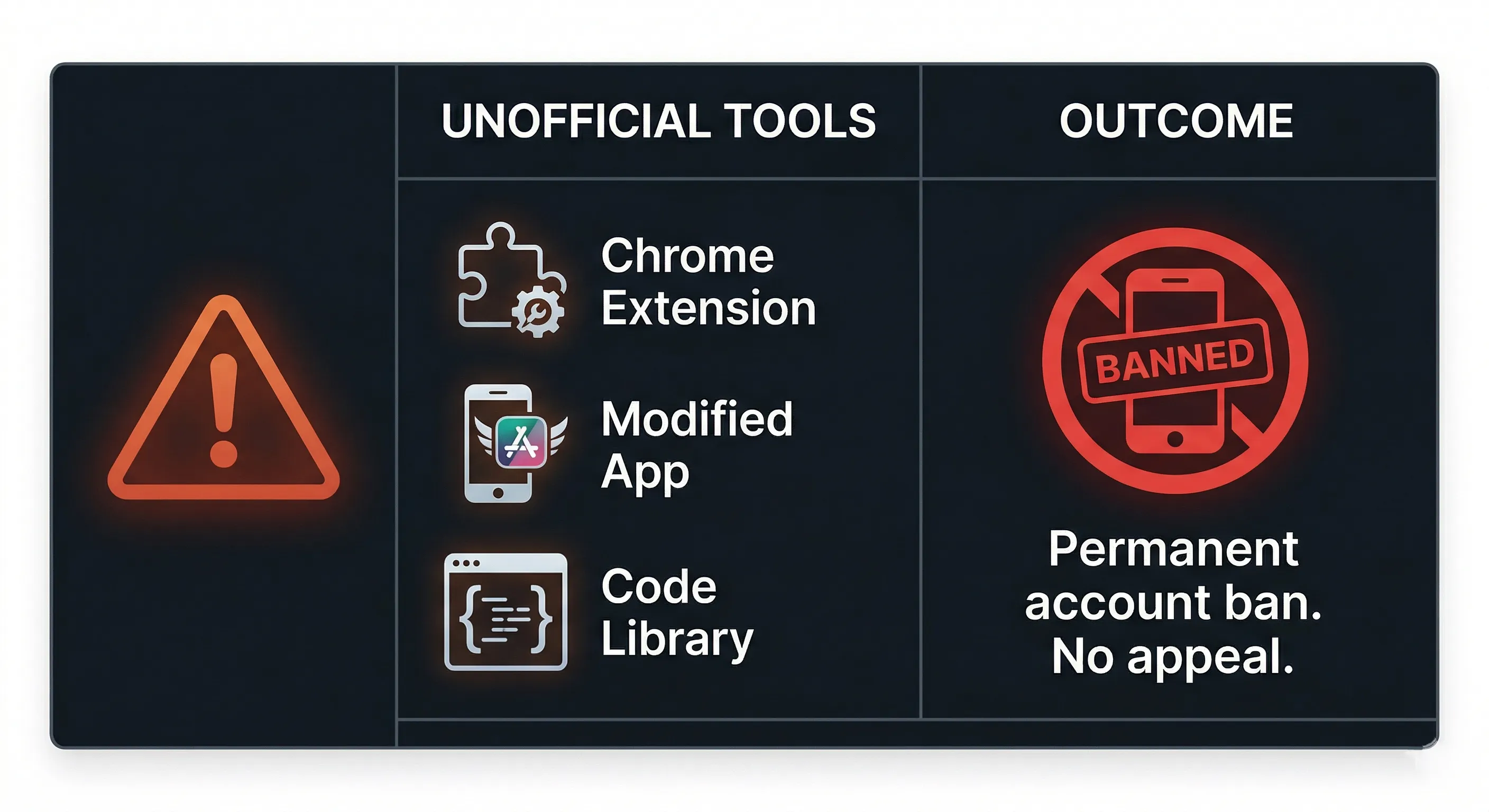
A significant secondary market exists for tools that route email to WhatsApp using unofficial methods: reverse-engineered WhatsApp Web protocols, Chrome extensions that automate the browser interface, and modified WhatsApp apps such as GB WhatsApp and FM WhatsApp.
The appeal.
These tools are marketed on speed and simplicity. No Meta Business Verification. No pre-approved message templates. No per-message fees. Setup takes minutes rather than days.
The critical risk warning.WhatsApp‘s Terms of Service prohibit unofficial automation. Meta’s detection systems in 2026 actively identify UI automation, DOM manipulation, and unnatural session injection. When detected, the result is the permanent, unrecoverable banning of the business phone number. There is no appeals process that restores a banned number. Every customer contact, group membership, and inbound message flow associated with that number is gone.
The modified apps (GB WhatsApp, FM WhatsApp) carry the same ban risk with an additional hazard: they are distributed through unofficial channels and have been documented installing malware on devices that run them.
The Baileys warning.Baileys is an open-source Node.js library that reverse-engineers the WhatsApp Web protocol, popular in developer communities for building unofficial WhatsApp bots. A widely distributed fork called lotusbail (downloaded over 56,000 times before being flagged) was found to steal credentials from anyone who installed it. Any project using Baileys or its derivatives carries both the TOS-violation ban risk and a supply chain security risk.
The pattern.
The research consistently documents the same sequence: a business uses an unofficial tool to avoid verification, reduces costs short-term, and eventually receives a ban. The emergency migration to the official API costs more in lost business continuity and rushed setup than the original verification process would have. The savings are not temporary. The ban is.
The Gotchas Nobody Mentions
WhatsApp Business API integrations come with platform rules that catch businesses off guard. Understanding them before building saves significant rework.
The 24-hour session window
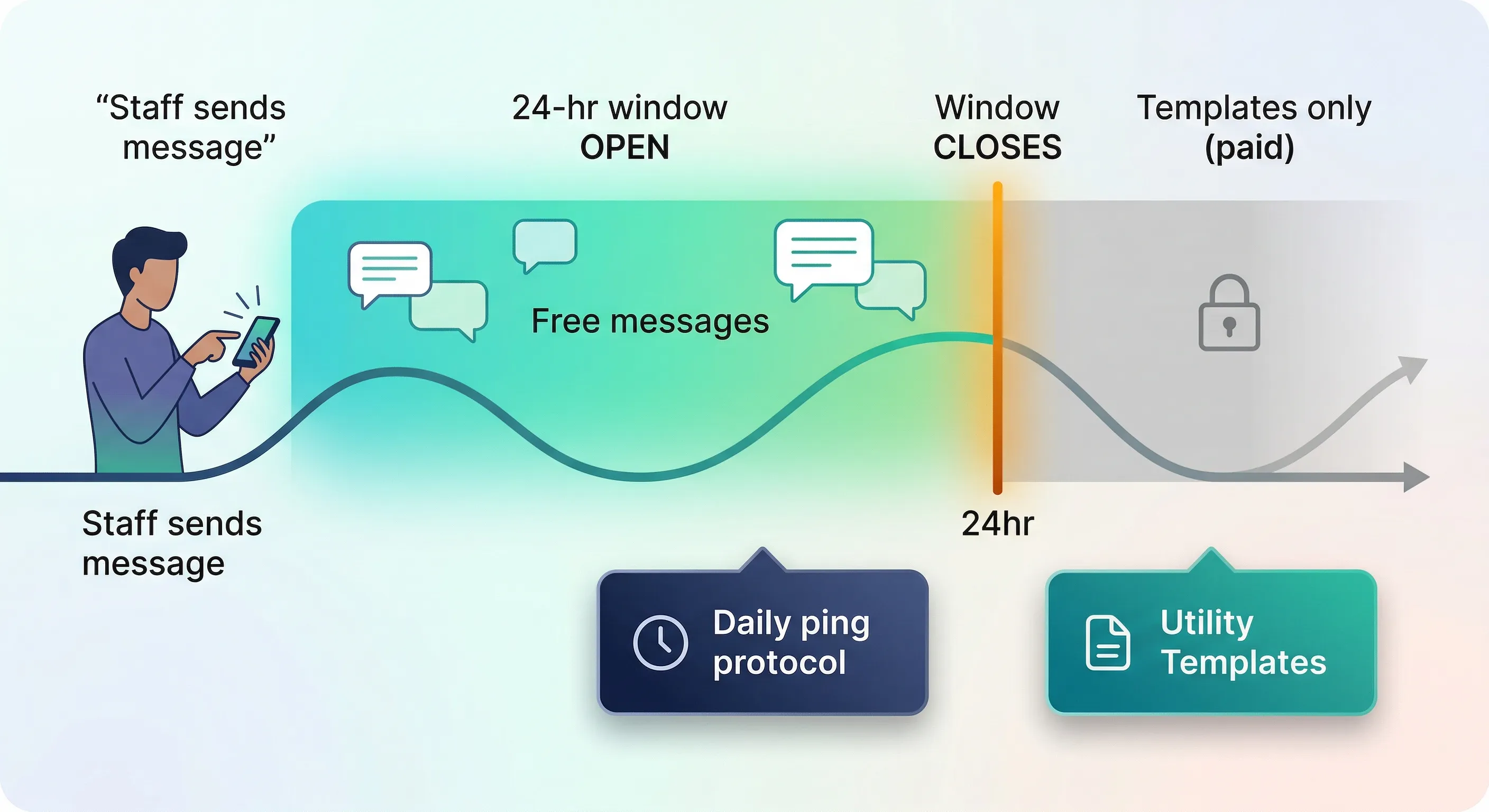
The WhatsApp Business API enforces a 24-hour customer care window. When a person sends a message to your WhatsApp Business number, a session opens. For the following 24 hours, you can send that person free-form messages of any format at no per-message cost. Once 24 hours pass without a reply from them, the session closes.
With a closed session, the API can only send pre-approved Template messages. For staff alert routing, the practical risk is this: if a staff member has not sent any message to the system number in the past 24 hours, a free-form WhatsApp alert sent to them will fail silently at the API level. No error notification reaches you. The staff member receives nothing.
There are two standard workarounds. The first is a daily ping protocol: staff send a simple check-in message to the system number each morning at the start of their shift, keeping their session open throughout the working day. The second is Utility Template messages: pre-approved templates with dynamic variable slots (for example, “New delivery for {{1}} arriving at {{2}} at {{3}}”). Templates can be sent regardless of session state, but require Meta’s prior approval and incur a small per-message fee when sent outside an active session.
Template message rejection patterns
When alerts must be sent outside an active session, pre-approved Template messages are required. Template submission is not a formality — rejection rates are high, reasons are often vague, and each rejection adds days to your deployment.
Common rejection patterns:
- Variable formatting violations. Variables must be sequential ({{1}}, {{2}}, {{3}}). Placing a variable at the very start or end of a string, stacking two variables side-by-side with no static text between them, or using too many variables relative to the fixed text triggers automatic rejection.
- Vague templates. A template such as “Update: {{1}}” is rejected because its structure is broad enough to be abused for spam. Reviewers expect enough static context to understand the purpose of the message.
- Algorithmic misinterpretation. Templates are scanned by automated systems that flag prohibited contexts. Legitimate business language — words such as “win,” “raffle,” or “prize” — can trigger a gambling flag even in an entirely innocent context, such as a staff recognition message.
- Category mismatch. Marketing messages submitted under the cheaper “Utility” or “Authentication” categories are rejected or automatically reclassified at a higher per-message rate.
The practical implication: surround variables with enough static context to make the template’s purpose unambiguous, avoid variables at string boundaries, and submit the correct category from the start. Build approval time into your deployment schedule.
The Zapier wall for multi-staff routing
As covered in the platforms section, Zapier‘s native WhatsApp integration cannot send to other people’s numbers. This catches many businesses after they have already committed to building on Zapier. If your workflow requires routing to different staff members based on email content, you will need Make.com, n8n, or a BSP integration. Adding one of those is the solution, not a fix layered on top of Zapier.
Group messaging is not supported by the API
A common expectation when designing staff alert routing is that alerts should go to a WhatsApp group, mirroring how teams already communicate. The WhatsApp Business API does not support sending messages to groups. This is a hard platform limitation, not a configuration issue.
A Zapier community thread from October 2025 illustrates the typical discovery: a user asked about routing automated emails to a staff WhatsApp group and received official confirmation from Zapier staff that Meta’s API does not support group messaging. The response suggested third-party BSP alternatives for broadcast scenarios.
The correct architecture is a broadcast pattern: the routing table stores individual staff phone numbers, and the workflow sends the same message to each matched number individually. This achieves the equivalent outcome — everyone relevant receives the alert — using the infrastructure that actually exists. The audit trail is also more useful: you can see which individual staff members received the message, rather than only knowing that a message was sent to a group.
Hardcoded staff numbers
A common mistake when building routing workflows is embedding staff phone numbers directly into the automation logic as fixed values inside a Make.com module, an n8n Set node, or a Zapier webhook payload. When a staff member leaves, changes roles, or updates their number, the automation breaks silently. You then have to audit every workflow node to find and update the number.
The solution is to centralise routing logic in an external table (a Google Sheet, Airtable base, or database) and have the workflow query it at runtime. The logic becomes “look up who should receive a delivery alert for the East Side location” rather than “send to this specific number.” Staff changes require updating one spreadsheet row, not editing a workflow canvas.
Meta Business Verification
To move beyond the developer sandbox tier (250 API messages per day), your business must complete Meta Business Verification. The process requires your legal business name, phone number, and address to match exactly across submitted documents and your Meta Business Manager profile.
Timelines vary. The review can take 15 minutes or up to 14 business days. Businesses with specific regional documentation requirements (a VAT Registration Certificate, a country-specific company registration number, or a tax authority file number) face additional scrutiny. Any mismatch, including a typo or address abbreviation difference between documents, results in rejection and a fresh appeals process.
Coexistence Mode (2026)
Until recently, migrating a phone number to the WhatsApp Cloud API disconnected it from the WhatsApp Business mobile app. Staff who relied on the app for daily conversations had to move to a shared inbox tool instead.
As of 2026, Meta’s Coexistence Mode allows the same phone number to run on both the native WhatsApp Business App and the Cloud API simultaneously. Manual one-to-one conversations, voice calls, and group chats continue in the app; automated alerts and programmatic messages run through the API in the background. The one trade-off: broadcast lists in the native app are disabled when coexistence is active, so bulk outbound messages must go through the API layer.
Which Approach Is Right for You
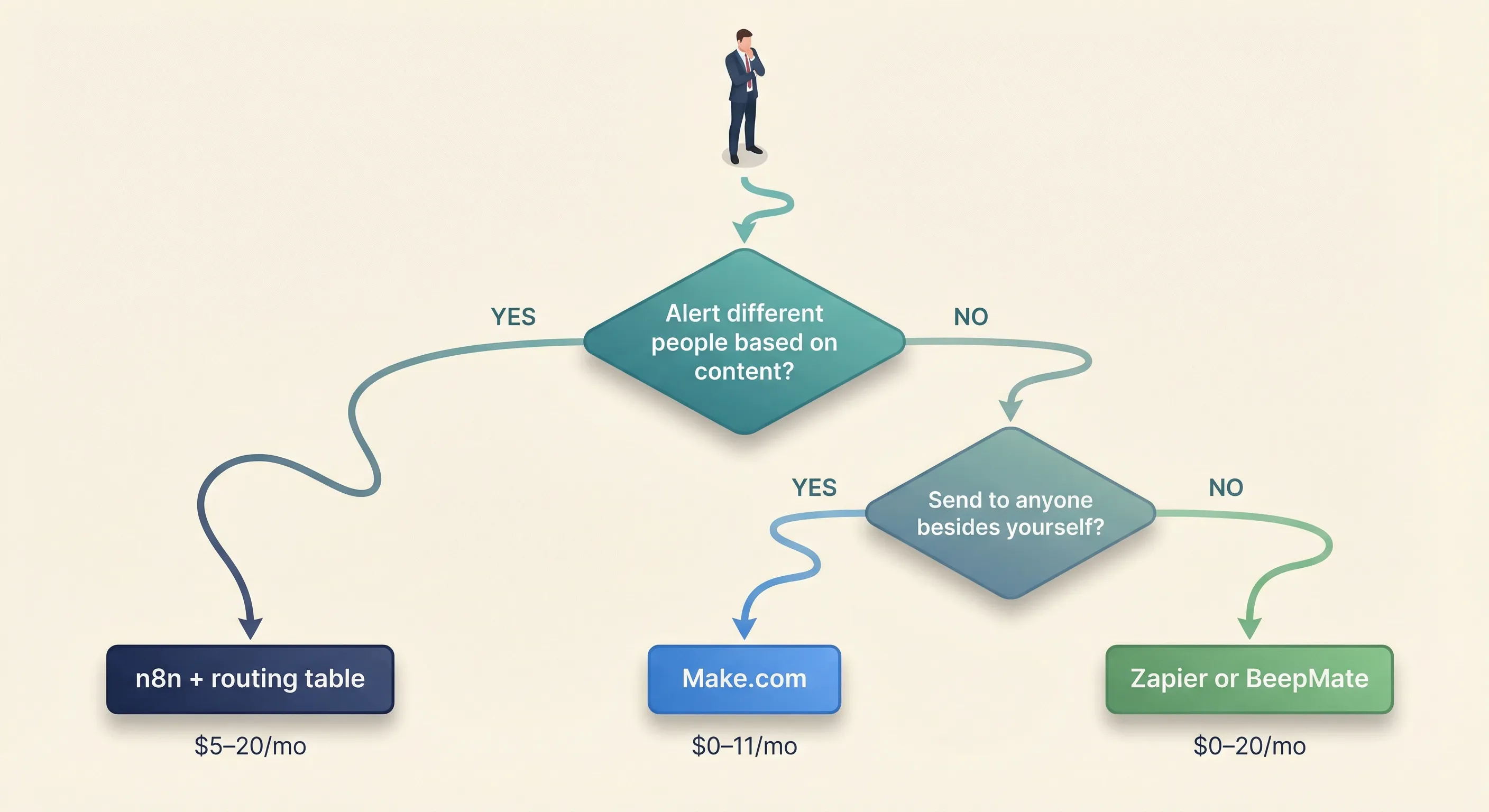
| What you need | Best approach |
|---|---|
| Forward selected emails to yourself | Zapier or BeepMate |
| Alert one specific person based on email trigger | Make.com (basic flow) |
| Route alerts to different staff based on email content | n8n with a routing table |
| No technical setup at all | BeepMate or app2email |
| High volume with low per-message cost | n8n self-hosted + Meta API direct |
AI-powered filtering and summarisation | n8n with AI classification node |
Cost comparison: 500 emails/month
| Approach | Platform cost | Meta API cost | Estimated total |
|---|---|---|---|
Zapier (personal triage only) | $19.99/month | None | ~$20/month |
Zapier + BSP (staff routing) | $19.99–$69/month | $2.50–$25/month | ~$22–94/month |
Make.com + Meta API | $0–$10.59/month | Low (within active session) | ~$0–11/month |
n8n Cloud + Meta API | ~$24/month | Low (within active session) | ~$24/month |
n8n self-hosted + Meta API | $5–20/month (VPS) | Low (within active session) | ~$5–20/month |
BeepMate | Lifetime deal / subscription | None | One-off or subscription |
Meta API message costs apply when Utility Templates are sent outside an open session. For internal staff alerts where staff send a daily check-in message to keep their session open, template fees can be avoided entirely for day-to-day operations.
Meta API per-message rates (as of March 2026)
When Utility Templates are required, costs vary significantly by country. Rates shown are per message.
| Country | Utility message | Marketing message |
|---|---|---|
| India | ~$0.0014 | ~$0.0094 |
| Colombia | ~$0.0008 | ~$0.0125 |
| USA / Canada | ~$0.004 | ~$0.025 |
| Brazil | ~$0.0068 | ~$0.0625 |
| UK | ~$0.020 | ~$0.049 |
| Germany | ~$0.050 | ~$0.123 |
Marketing rates are shown for comparison only. Staff alert routing uses Utility messages or free-form messages within an active session, not Marketing messages.
For 500 Utility Template messages per month, the cost ranges from under $1 in India to approximately $10 in the UK and $25 in Germany. For most internal alert use cases where the daily ping protocol keeps sessions open, the practical template cost approaches zero.
Next Steps
Audit your email volume before you build
Before choosing a tool, map your actual situation:
- How many emails per month genuinely need same-day
WhatsAppdelivery? - Is the goal personal triage, staff routing, or system monitoring?
- Do different emails need to go to different people, or to one fixed destination?
- Are the staff who will use this technically comfortable enough to self-service the setup, or does it need to be built and maintained for them?
The answer to the third question is the most important one. If you need different emails routed to different people, you are in the n8n territory regardless of how convenient another tool seems.
Understand the bigger picture
Email routing is one component of a broader WhatsApp operations strategy. Understanding how the WhatsApp Business API works, what the four tiers of WhatsApp automation look like, and how to avoid account bans will save significant rework later. WhatsApp Automation for Small Business: From Free App to AI-Powered Bots covers the full context, from the free WhatsApp Business app through to AI-powered conversation bots.
Continue building
If you have a basic alert set up and want to improve it, the logical next step is adding AI classification so only relevant emails trigger a notification. A basic forward sends everything. An AI-enhanced workflow reads each email, determines whether it warrants an alert, extracts the routing key (location, department, or “all staff”), and discards the rest. The difference in signal quality is substantial, and your staff receive alerts that are always actionable rather than learning to ignore them.
If you need help
Getting email-to-WhatsApp routing right involves Meta Business Verification, routing table design, AI classification, session management, and end-to-end testing. If you would rather have it built properly than spend days debugging it yourself, get in touch to discuss implementation.
Conclusion
The right email-to-WhatsApp approach is the one that matches the actual complexity of your problem. For personal inbox triage, Zapier or BeepMate will do the job in an afternoon. For routing supplier emails to the right field worker based on content, you need a workflow with a routing table and AI classification, which requires a more capable platform and a more careful setup.
The mistake most businesses make is choosing a tool based on what seems easiest to configure, then discovering mid-build that it cannot send to other people’s numbers, or that alerts are silently failing because the 24-hour session window closed overnight. Understanding the constraints upfront means building the right thing the first time.
The deeper shift is architectural: separating the routing logic (who should receive this alert, based on what criteria) from the delivery mechanism (how to send via WhatsApp). When those are kept separate (routing rules in a spreadsheet, delivery logic in a workflow), the system is easy to maintain as your team and alert types change. When they are tangled together, every staff change or new alert type becomes a workflow edit. The businesses that get the most value from this kind of automation are the ones that treat it as a system, not a one-off connection.