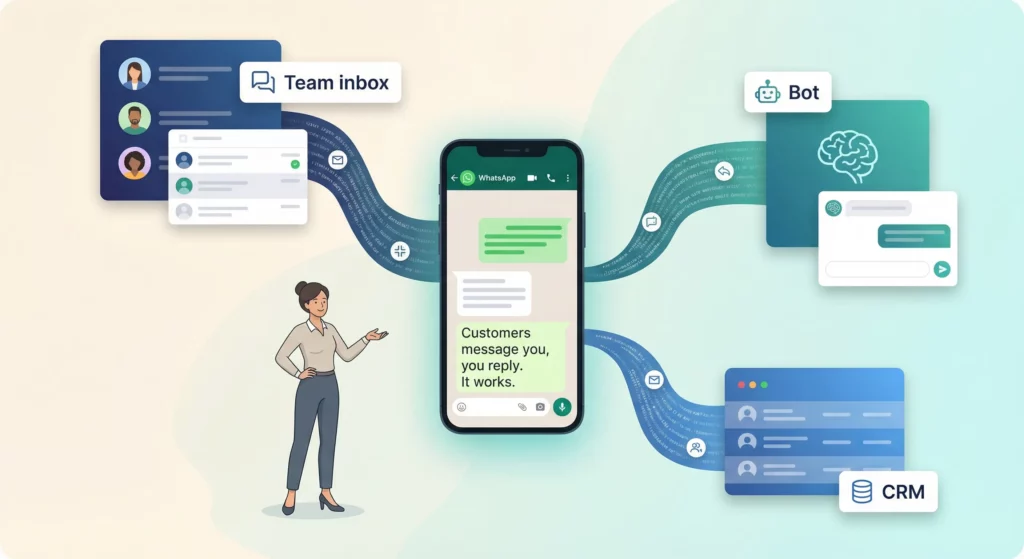
You are already using WhatsApp for business. Customers message you, you reply, and it works. Until it doesn’t. Messages get buried, leads go cold overnight, and your team argues about who replied to what.
The question is not whether you need automation. It is how far you need to go. The WhatsApp automation landscape ranges from free built-in features you might not be using, to AI-powered bots that handle thousands of conversations without human input. Choosing wrong wastes money or, worse, gets your account banned.
This guide walks you through the full spectrum: what the free app actually does, four tiers of automation with real pricing, a vendor comparison, and the mistakes that land businesses in trouble. Whether you are handling 20 messages a day or 2,000, you will know exactly where you fit and what to do next.
Table of Contents
When Manual WhatsApp Stops Working
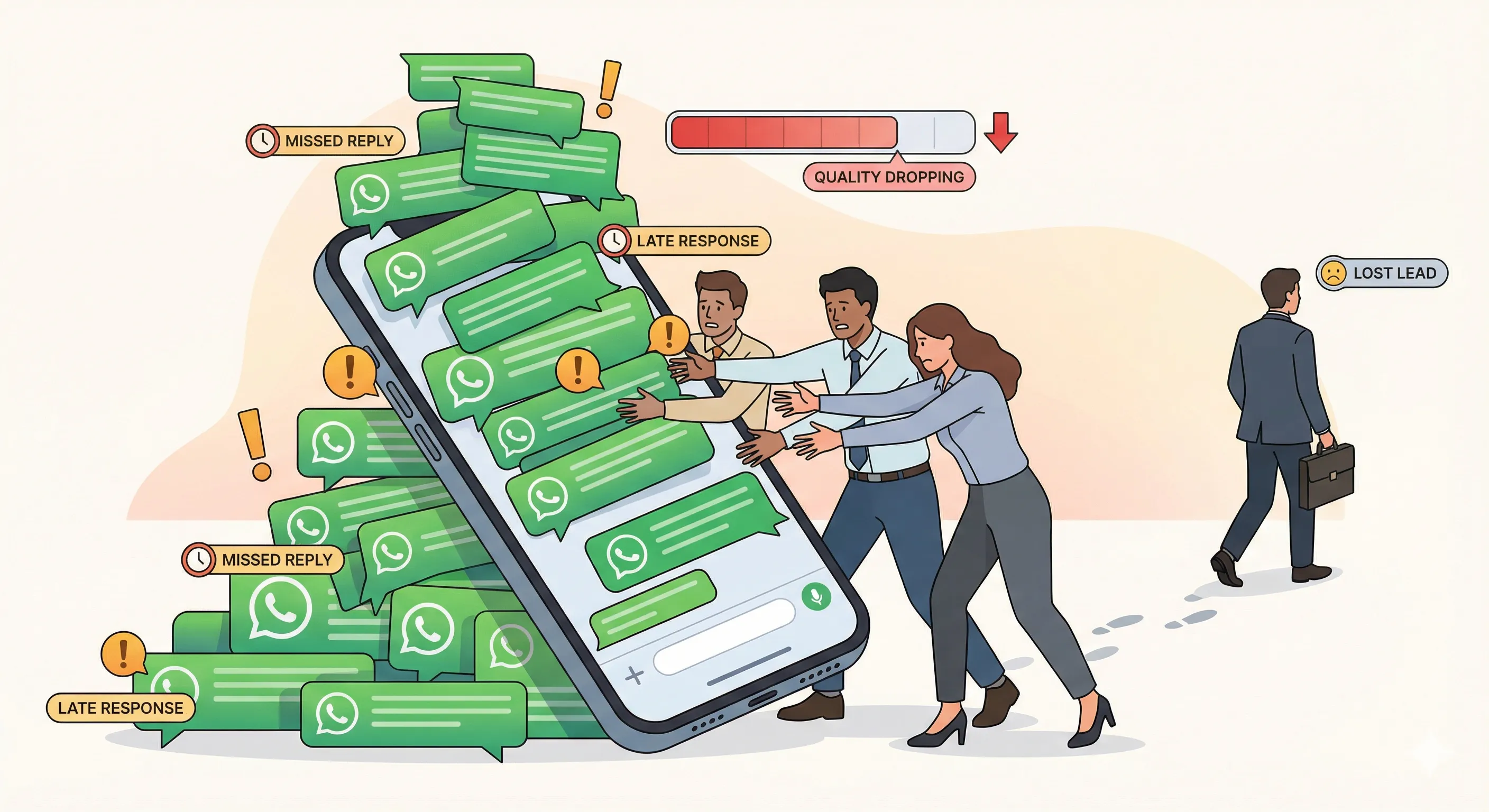
WhatsApp works brilliantly at small scale. One person, one phone, quick replies. But it degrades in specific, predictable ways as your business grows. Recognising these warning signs early saves you from the slow bleed of lost leads and frustrated customers.
The Warning Signs
Messages get buried.
As volume grows, WhatsApp’s consumer-grade chat interface has no ticket statuses, no priority queuing, and no SLA indicators. Critical customer requests disappear under newer messages. If you have ever scrolled back through a day’s chats wondering “did anyone reply to this?”, you have hit this wall.
Nobody owns the conversation.
Without assignment or routing, every agent sees every chat. The result is either duplicate responses (two people answering the same customer) or no response at all (everyone assumes someone else handled it). One industry source describes it as “multiple drivers trying to control a single vehicle.”
After-hours leads go cold.
The Business App’s away message is a single, flat text response with no conditional logic and no chatbot flows. Peak lead submission hours are 7 PM to 11 PM on weekdays and all day on weekends, precisely when most small businesses have zero coverage.
Institutional knowledge walks out the door.
When staff leave, customer history and context leave with them. No CRM integration means the only record of a negotiation, a special price, or an unresolved complaint lives in one person’s chat thread on one device.
The broadcast wall.
You can only send broadcasts to 256 contacts per list, and recipients must have saved your number in their contacts. For most businesses, that means a fraction of your actual audience receives your messages.
The Numbers Behind the Breaking Point
The breaking point is not a feeling. It is measurable.
| Indicator | Manageable | Breaking point |
|---|---|---|
| Daily messages | Under 20 | 50+ |
| Team size | 1-2 people | 3+ customer-facing staff |
| Broadcast audience | Under 256 | 256+ contacts |
| Device connections | 1-4 | 5+ (free) / 10+ (Premium) |
The business cost of staying manual past this point is real. 78% of customers buy from the first business that responds. The average lead response time across industries is 42 hours. 73% of consumers will leave a company after just one bad experience, and 28% abandon a brand after a single bad interaction.
If you are running Click-to-WhatsApp ads, the stakes are even higher. Meta gives you a 72-hour free messaging window when someone clicks your ad. Failing to engage that lead within the window due to manual delays is a total loss of your acquisition cost.
What the Free WhatsApp Business App Actually Does
Before spending money on automation, understand exactly what the free app offers. Many businesses are not using the features they already have.
The Features Worth Using
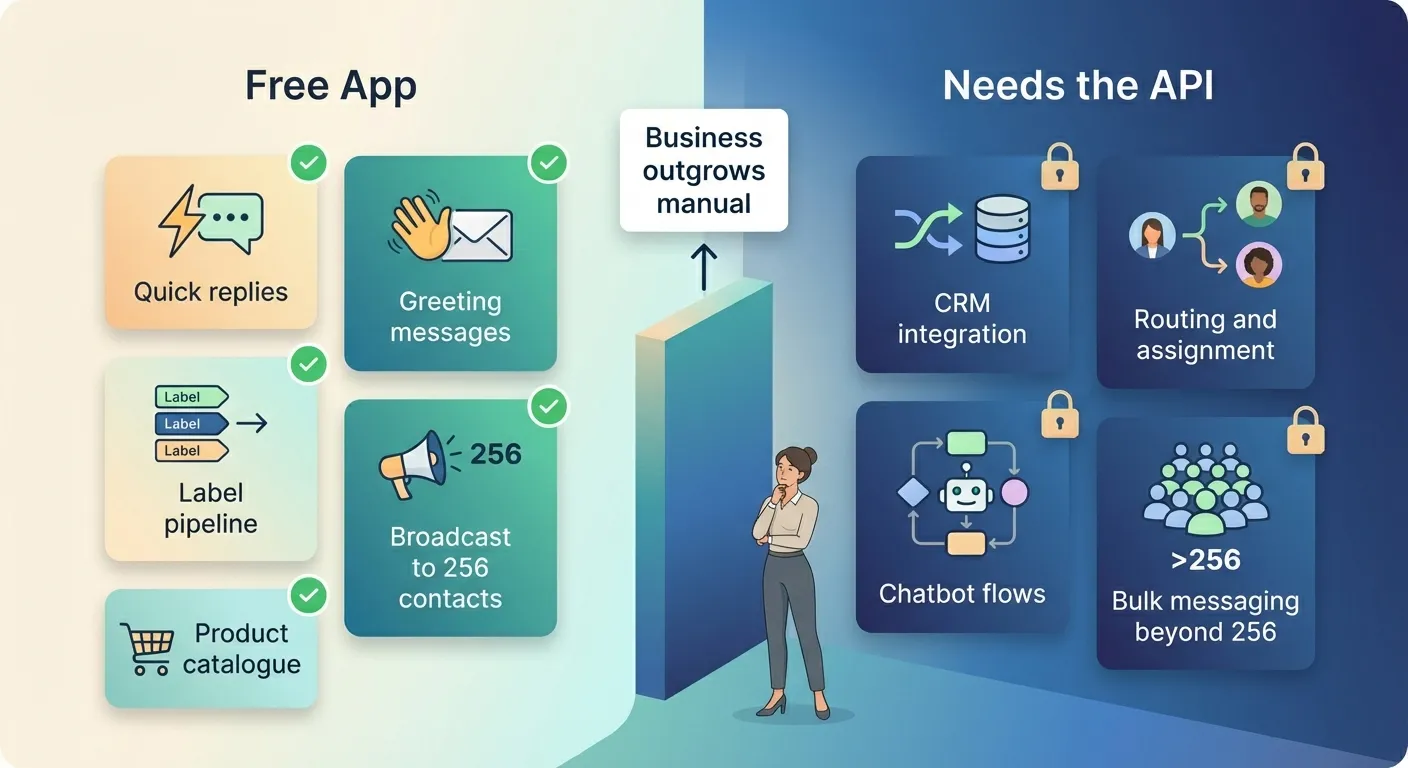
The WhatsApp Business App includes several features that the regular consumer app does not:
- Business profile: Address, hours, website, email, description, and logo. This is your storefront.
- Product catalogue: Up to 500 products with images, prices, and descriptions. Customers browse directly in the chat.
- Quick replies: Up to 50 pre-written responses triggered by typing
/. These are manually selected, not automatic, and each is limited to 500 characters. - Greeting messages: Auto-sent on first contact or after 14 days of inactivity. Plain text only; one active at a time.
- Away messages: Auto-reply during defined hours. Plain text only. Three scheduling modes: always on, custom schedule, or outside business hours.
- Labels: Up to 20 custom labels (plus 5 defaults), colour-coded, multiple per chat. Manual assignment only, but effective for pipeline tracking (New Lead, Quoted, Paid, Shipped, Complete).
- Broadcast lists: Send to up to 256 contacts per list.
- Short links and QR codes:
wa.me/links for easy customer access. - Linked devices: 1 primary phone plus 4 companion devices on the free tier.
There is also WhatsApp Business Premium (also called Meta Verified, roughly $5-10/month where available) which extends linked devices to 10, adds basic manual chat assignment, a custom vanity URL, and eligibility for a blue verification badge. It is only available in select markets.
One limitation worth knowing:
Quick replies created on one device do not sync across linked devices. If your team relies on these, everyone needs to set them up individually.
Where the Free App Is the Right Choice
The free app is genuinely sufficient, and you should not over-invest, in these scenarios:
- Solo entrepreneurs, freelancers, and consultants handling fewer than 50 messages per day with a single point of contact
- Local retail shops, bakeries, salons, and cafes with walk-in-focused business models and manageable order volumes
- Appointment-based services (salons, clinics, tutors) where one or two people manage all client communication
- Small customer bases (under 256 contacts for broadcast, under 50 regular daily conversations)
- Early-stage startups validating product-market fit, where manual conversations yield irreplaceable customer insight
If your business fits one of these descriptions, maximise the free app before looking elsewhere. Set up all 50 quick replies, configure away messages properly, and use labels to track your pipeline.
The Hard Limits That Force a Move
The free app cannot do the following, regardless of how disciplined you are:
- No CRM integration. Customer data lives only in chat threads, not your business systems.
- No routing or assignment. There is no way to automatically direct conversations to the right person.
- No chatbot flows. Beyond a static greeting and away message, there is no automated conversation logic.
- No API access. You cannot connect WhatsApp to anything else programmatically.
- 256-contact broadcast cap. And recipients must have saved your number.
When you hit these limits, you have three further tiers to consider.
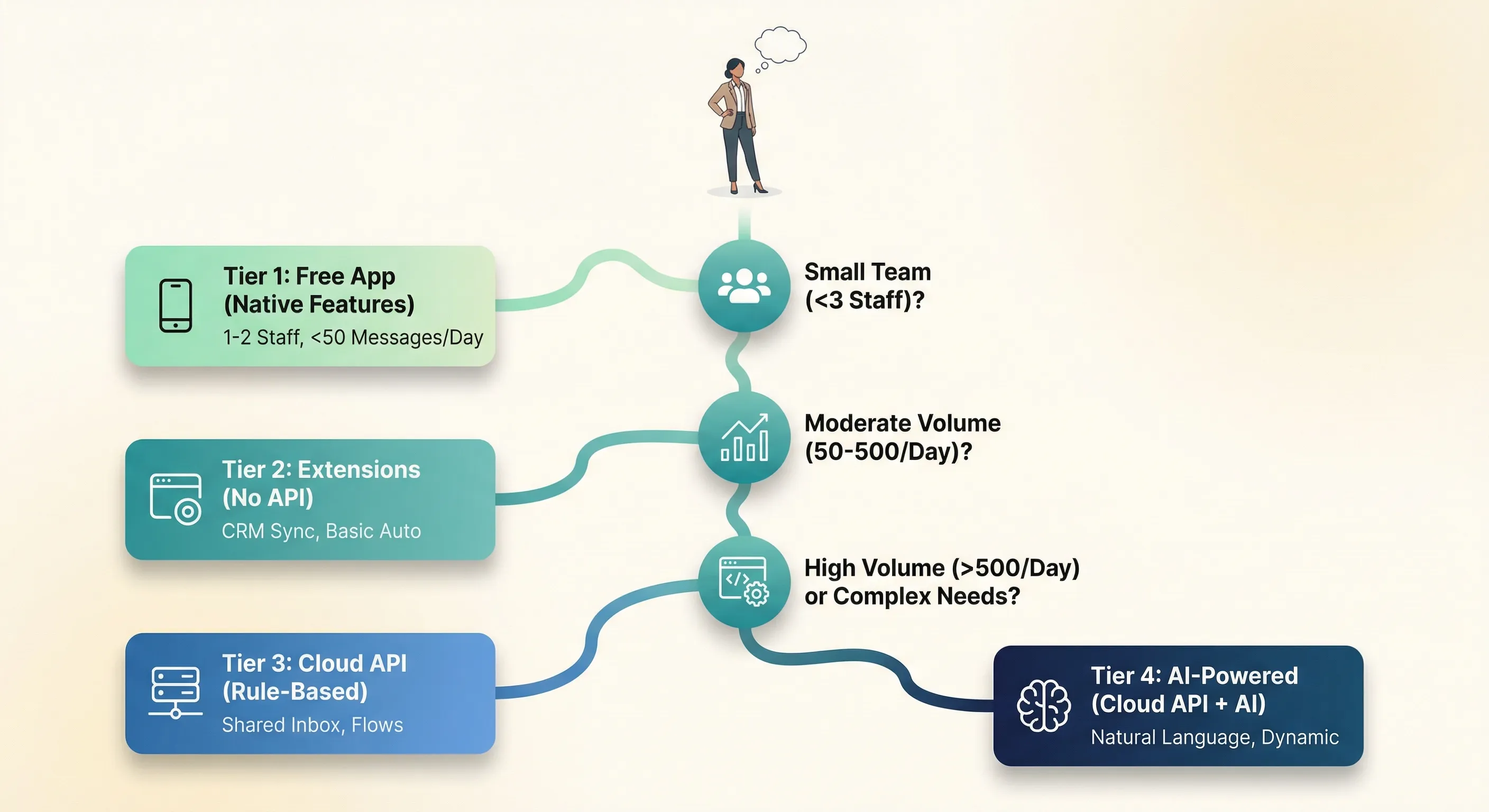
The Four Tiers of WhatsApp Automation
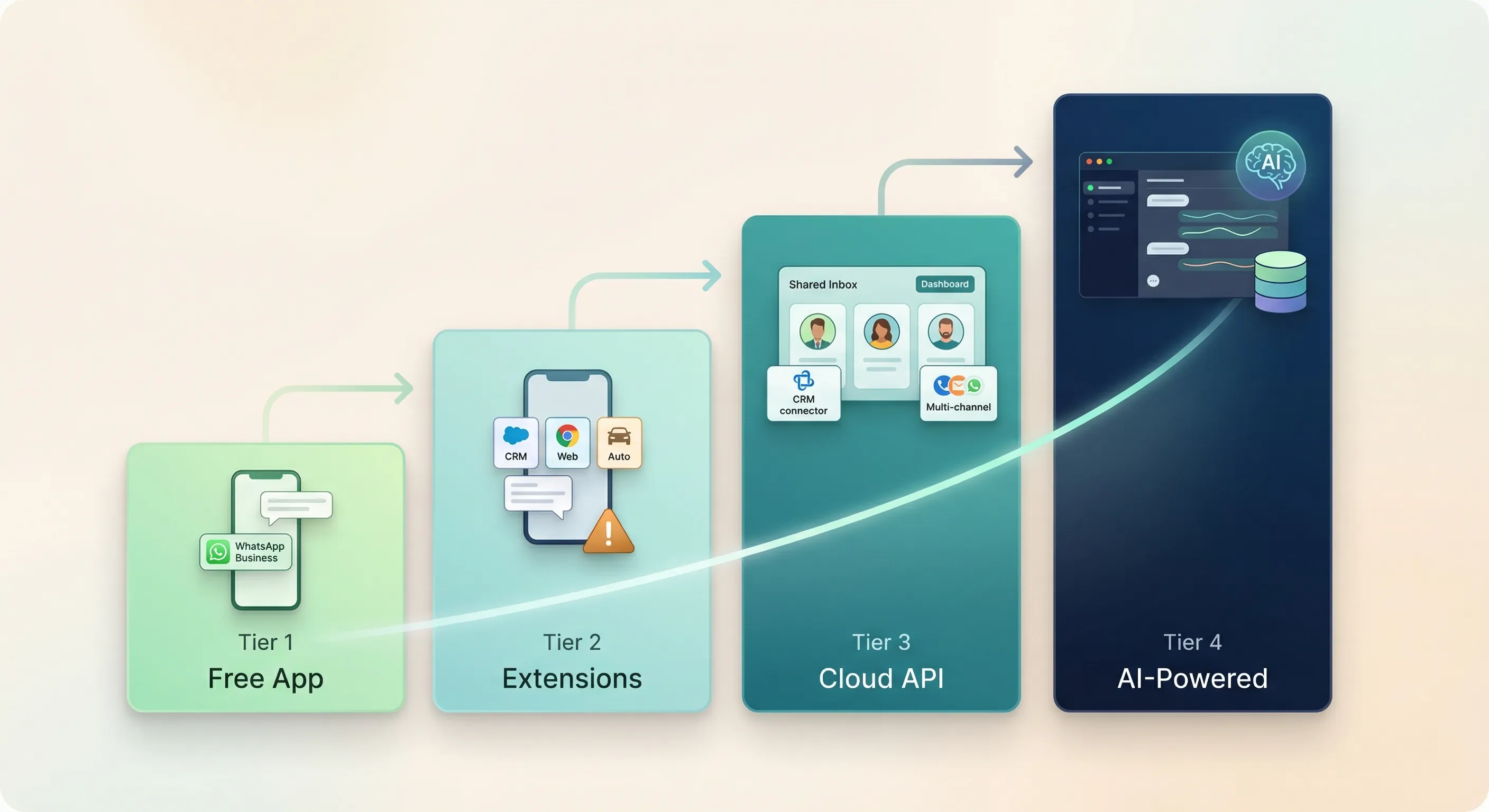
The WhatsApp automation landscape divides into four distinct tiers. Each has different capabilities, costs, risks, and complexity. Understanding where you fit prevents the two most common mistakes: over-investing in tools you do not need, or under-investing and capping your growth.
Tier 1: The Business App (Native Features)
This is the baseline covered in the previous section. Free, set up in hours, and genuinely sufficient for micro-businesses with 1-2 staff and under 50 daily conversations.
The key is disciplined use: label-based pipeline management, quick reply shortcuts for every FAQ, away messages for 24/7 basic responsiveness, and your product catalogue functioning as a mobile storefront.
Cost: Free (or $5-10/month for Premium where available).
Tier 2: Third-Party Tools (No API Required)
A category of browser extensions, CRM bridges, and unofficial automation tools exists that enhances the Business App without requiring API access. These tools layer on top of WhatsApp Web to add capabilities the free app lacks.
Notable tools (as of March 2026):
| Tool | Type | Monthly cost | Key capability |
|---|---|---|---|
WAPlus CRM | Chrome extension | Free (basic); premium plans available | CRM integration (HubSpot, Zoho, Salesforce), AI chatbot |
WA Web Plus | Chrome extension | $14.99-$49.99 | Broadcasting, auto-replies, scheduling, webhooks |
Cooby | Chrome extension | $15.99-$25.49 | CRM integration, reminders, templates |
Eazybe | Chrome extension | Premium plans available | CRM sync (HubSpot, Zoho, Salesforce), AI agents |
TimelinesAI | QR-code bridge | Plans available | Syncs WhatsApp to CRM via QR scan; shared inbox |
The critical risk warning.
WhatsApp’s Terms of Service explicitly prohibit applications that interact with its services without prior written consent. Meta’s enforcement algorithms monitor high-volume messaging, rapid messaging to unsaved numbers, high block rates, and technical signatures of automation scripts.
The enforcement gradient runs from low to high risk:
- Privacy-only extensions (like
WAToolkit): Very low risk. Read-only, no message automation. - CRM sync tools (
Eazybe,Cooby,TimelinesAI): Low to moderate. Primarily reading and syncing data. - Scheduling and template tools: Moderate. Some users report years of use without issues.
- Broadcasting extensions (aggressive use): Moderate to high. Broadcasting to unsaved numbers triggers detection.
- Bulk messaging tools: High risk. Documented bans after as few as 50 bulk messages.
- Modified WhatsApp apps (
GB WhatsApp,FM WhatsApp): Instant detection and permanent ban.
Who Tier 2 suits:
Businesses that have outgrown Tier 1 but are not ready for API investment. Sales teams of 2-5 needing shared visibility. Companies wanting CRM sync and basic automation, who are comfortable with moderate risk.
Who should avoid Tier 2:
Any business that cannot afford account suspension (healthcare, legal, financial services). High-volume operations with 500+ daily conversations. Companies requiring GDPR compliance guarantees. If your WhatsApp number is central to your business and losing it would be devastating, the risk is not worth it.
Tier 3: The Cloud API with Rule-Based Automation
This tier moves you onto Meta’s official infrastructure, accessed through a licensed Business Solution Provider (BSP). It unlocks everything the free app cannot do:
- Unlimited concurrent conversations and bulk messaging via approved templates
- Multi-agent shared team inbox with conversation assignment and routing
- Structured auto-replies: reply buttons (up to 3), list messages (up to 10 options), interactive templates
WhatsApp Flows: multi-screen, form-like experiences within WhatsApp (appointment booking, lead capture, surveys, checkout) without redirecting to a browser- Full CRM integration (
Salesforce,HubSpot,Shopify,Zoho, and more) - Performance analytics and agent metrics
To access the API, you need to complete Meta Business Verification. This requires submitting legal incorporation documents, tax registration, and address verification. The timeline ranges from 10 minutes to 14 business days. Common rejection reasons include mismatched business details, blurry or expired documents, and a website domain that does not contain the legal business name.
BSP pricing (as of March 2026):
| Platform | Starting price | Users included | Message markup | Best for |
|---|---|---|---|---|
WATI | $59/month | 3 (locked on Growth plan) | ~20% on Meta fees | WhatsApp-first SMBs, no-code |
Interakt | ~$11/month | Unlimited | 12-25% | Indian D2C, Shopify |
Respond.io | $79/month | 10 | None (0%) | Omnichannel, advanced workflows |
Zoko | $34.99/month | ~2 | Per-conversation fee | Shopify e-commerce |
Trengo | ~$325/month | 10 | Via wallet | European support teams |
Gallabox | $89/month | 5 | Subscription + Meta | Indian SMBs |
On top of the BSP subscription, you pay Meta’s per-message fees for template messages (see the API mechanics section below for pricing). Total monthly cost for a small business handling around 1,000 conversations is typically $50-$150. For 5,000 conversations, expect $150-$500.
The limitations of rule-based automation.
These bots operate on structured decision trees. They work well for defined paths (“Press 1 for Sales, 2 for Support, 3 for Order Tracking”) but break on unexpected input. They cannot understand natural language variations, they require constant manual updating as your products and FAQs change, and they feel robotic to customers. If your use case is straightforward and predictable, this is fine. If customers ask varied questions in varied ways, you will find the limits quickly.
Tier 4: AI-Powered Automation
This tier adds natural language understanding on top of the Cloud API infrastructure. Instead of rigid decision trees, AI-powered bots understand what customers mean, maintain context across multiple messages, and generate dynamic responses.
How this differs from Tier 3:
| Aspect | Rule-based (Tier 3) | AI-powered (Tier 4) |
|---|---|---|
| Understanding | Keyword matching only | Natural language understanding |
| Flexibility | Fixed decision trees | Handles varied phrasings of the same intent |
| Context | No memory between turns | Multi-turn context and session memory |
| Learning | Static; manual updates required | Learns from your documents and knowledge base |
| Personalisation | Template placeholders only | Dynamic responses based on user history and context |
The standard 2026 architecture combines a large language model (like GPT-4o, Claude, or Gemini) with RAG (Retrieval-Augmented Generation) pulling from your business knowledge base, connected to your CRM for personalised context, with confidence-threshold-based escalation to humans when the AI is uncertain.
AI-native platforms (as of March 2026):
| Platform | AI approach | Starting price | Best for |
|---|---|---|---|
Botpress | Open-source, multi-LLM orchestration | Free to $495/month | Developers, maximum flexibility |
Respond.io | AI Agent with knowledge source learning | $79-$279/month | All-rounder, CRM integration |
WATI (Astra AI) | AI agent, up to 60% query deflection | $49-$279/month | SMBs, no-code |
Chatbase | No-code LLM trained on business content | Free to $120/month | Quick AI deployment |
Kommunicate | AI agents with 40+ integrations | $34-$167/month | Mid-market support |
Total monthly cost including platform, Meta fees, and AI compute: $60-$180 for small businesses (around 1,000 conversations), $200-$650 for medium (around 5,000 conversations).
Realistic expectations versus marketing hype.
Well-implemented AI systems achieve 60-75% ticket deflection without human intervention. That is genuinely impressive. But claims of “90%+ automation” are overstated for most businesses, “zero hallucination” is impossible (rates range from under 5% for simple FAQs to 25%+ for complex scenarios), and “set and forget” is a myth. These systems require ongoing monitoring, knowledge base updates, and prompt optimisation.
The Air Canada chatbot invented a bereavement fare policy that did not exist and the airline was held legally liable in a tribunal ruling, establishing precedent that businesses own their AI’s mistakes.
The January 2026 policy change.
Meta banned general-purpose AI assistants from WhatsApp. All AI deployments must serve concrete, defined business tasks: order tracking, product consultation, lead qualification, appointment booking, and similar. Open-domain “ChatGPT wrapper” bots that let users ask anything are not permitted. Businesses that deployed these before the policy change were hit with massive per-message fees from non-commercial conversations, followed by account suspensions. Only task-specific business bots remain compliant.
Which Tier Is Right for You?
Use this quick reference to match your situation to a tier:
| Your situation | Recommended tier |
|---|---|
| Solo operator, under 50 messages/day, 1-2 staff | Tier 1 (Free App) |
| Small team (2-5), need CRM sync, comfortable with risk | Tier 2 (Third-party tools) |
| Growing business, 500+ monthly inquiries, need shared inbox and CRM | Tier 3 (Cloud API, rule-based) |
| High volume, varied customer queries, existing knowledge base | Tier 4 (Cloud API, AI-powered) |
| Not sure yet | Start at Tier 1, monitor the warning signs from Section 1 |
How the WhatsApp API Actually Works
If you are considering Tier 3 or 4, you need to understand the mechanical rules that govern the API. These are not optional; violating them gets your account restricted or banned.
The 24-Hour Service Window and Template System
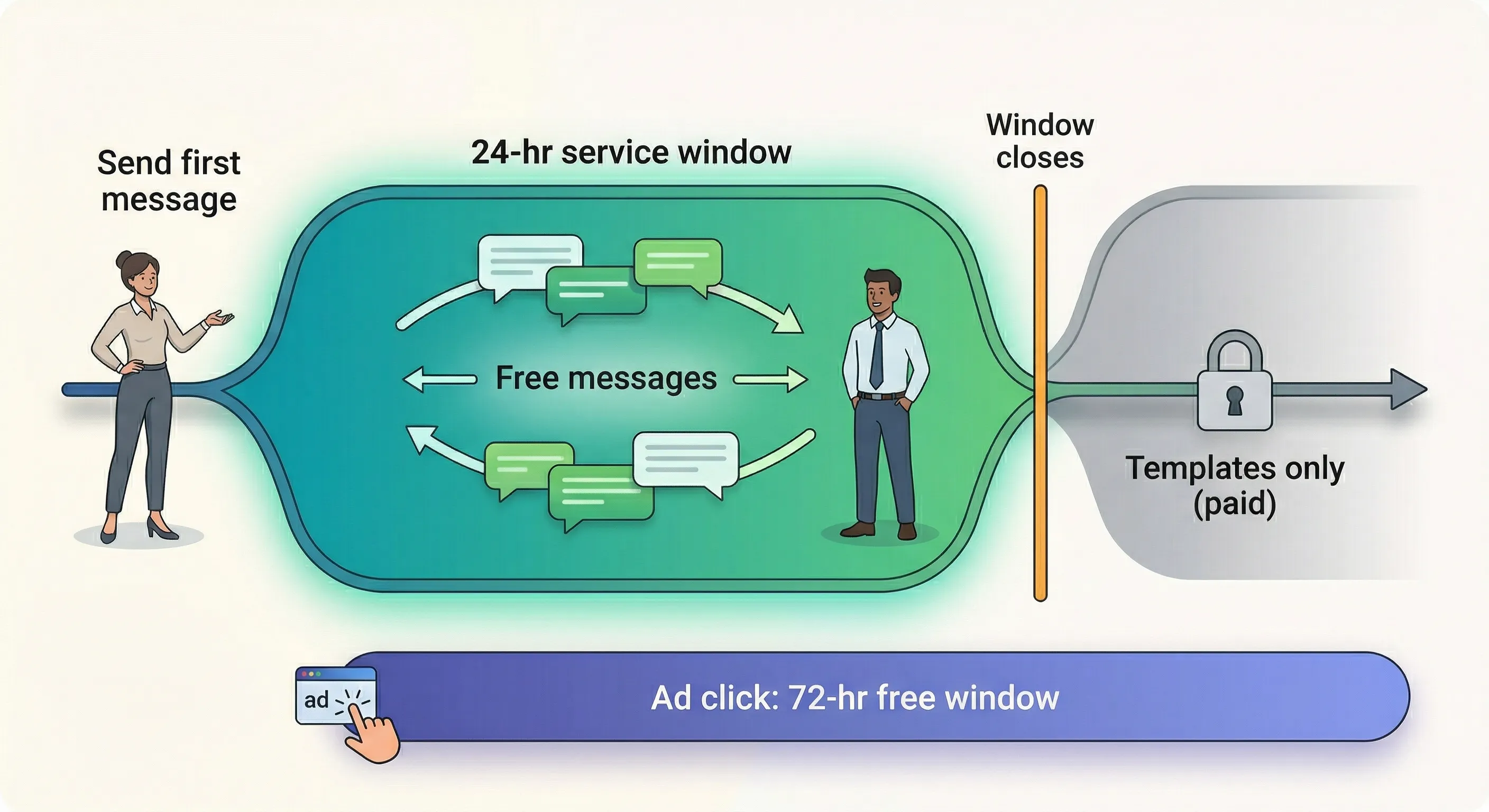
The core mechanic of the WhatsApp API is the 24-hour service window. When a customer sends you a message, a 24-hour window opens. During this window, you can reply with free-form text, rich media, or automated conversational flows, all free of charge. Utility template messages within this window are also free (since April 2025).
Once the window closes (24 hours after the customer’s last message), free-form messaging is blocked. You can only reach the customer using a pre-approved template message, which is charged per message.
Templates are categorised by Meta:
- Marketing: Promotions, offers, re-engagement campaigns. Always charged.
- Utility: Order confirmations, shipping updates, appointment reminders. Free within the 24-hour window; charged outside it.
- Authentication: OTPs and 2FA codes. Always charged.
- Service: Free-form responses within the service window. Always free.
Templates must be submitted to Meta for review before use. Approval typically takes 15-30 minutes, though complex cases can take up to 48 hours. The most common rejection reason is category mismatch: submitting promotional content as “utility.” Since mid-April 2025, Meta silently reclassifies “warm” utility templates with promotional wording to the marketing category, which costs more.
The 72-hour free window from ads.
When a customer enters via a Click-to-WhatsApp ad on Facebook or Instagram, all message types (including marketing and authentication) are free for 72 hours, provided the customer keeps the service window active by responding. This is a significant cost advantage that many businesses fail to leverage.
Messaging Limits and Quality Ratings
New API accounts cannot send unlimited messages immediately. Meta uses a tiered system based on your quality rating:
| Tier | Unique customers per 24 hours |
|---|---|
| Unverified/new | 250 |
| Tier 1 | 1,000 |
| Tier 2 | 10,000 |
| Tier 3 | 100,000 |
| Unlimited | No cap |
You advance tiers automatically by using 50%+ of your current limit for 7 consecutive days while maintaining medium or high quality. Since October 2025, these limits are calculated at the business portfolio level, not per phone number. That means one bad campaign can exhaust messaging limits for all phone numbers under your portfolio.
Your quality rating (Green, Yellow, or Red) is based on the past 7 days of user signals: blocks, spam reports, and engagement. If your quality drops to Red for 7+ consecutive days, your messaging tier decreases. Individual templates also have their own quality ratings and can be paused or disabled based on poor user feedback.
The Coexistence Option (2025+)
Historically, a phone number could exist on the Business App or the API, but not both. Migrating meant permanently losing access to the familiar mobile interface.
Since late 2025, WhatsApp Coexistence allows a single business phone number to operate on both the native app and the Cloud API simultaneously. This is a significant change. Your team can continue using the mobile app for personal, high-touch conversations and voice/video calls, while the API handles automated messaging, CRM sync, and bulk broadcasts in the background.
Up to 6 months of 1:1 chat history and contacts are imported when you enable Coexistence, so you do not lose context.
The trade-offs are real though.
API throughput drops from 80 messages per second to 20 messages per second with Coexistence enabled. Broadcast lists, group chats, and Stories are disabled on the mobile app. You must open the app at least once every 14 days. For most small businesses, these trade-offs are manageable. For businesses running high-volume Black Friday campaigns or time-sensitive notifications, the throughput reduction matters.
The practical impact is that Coexistence reduces the migration barrier. Moving to the API is no longer an all-or-nothing decision. You can test it while keeping your existing app workflow intact.
What Messages Actually Cost
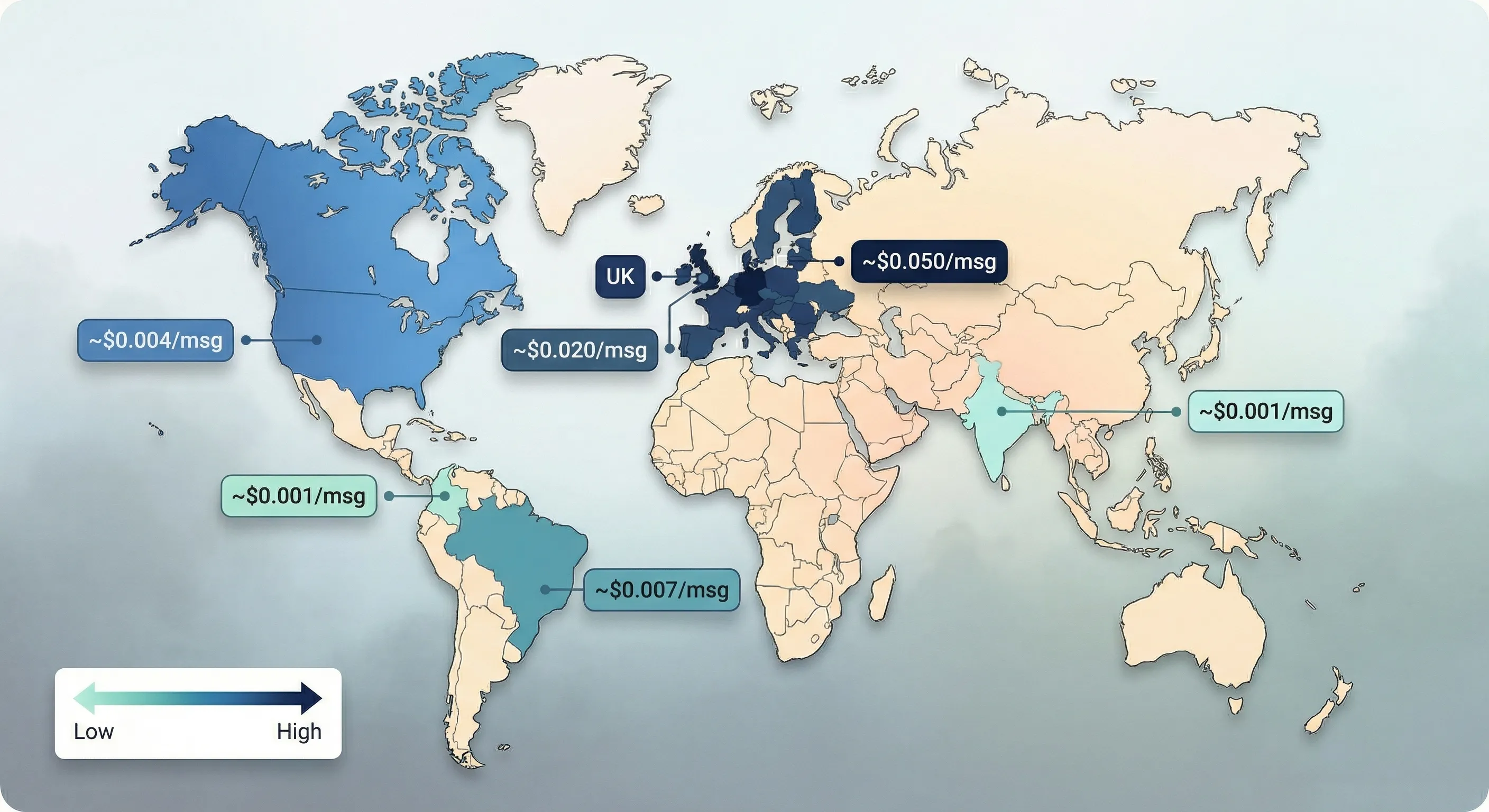
Meta charges per delivered template message, with pricing based on the message category and the recipient’s country. Service messages within the 24-hour window are always free. The pricing spread across regions is dramatic (all figures as of March 2026):
| Country | Marketing | Utility | Authentication |
|---|---|---|---|
| India | ~$0.0094 | ~$0.0014 | ~$0.0014 |
| Colombia | $0.0125 | $0.0008 | $0.0008 |
| USA/Canada | $0.025 | $0.004 | $0.004 |
| Brazil | $0.0625 | $0.0068 | $0.0068 |
| UK | ~$0.049 | ~$0.020 | ~$0.020 |
| Germany | ~$0.123 | ~$0.050 | ~$0.050 |
A 10,000-message marketing campaign to Indian customers costs roughly $94 in Meta fees. The same campaign to German customers costs roughly $1,230: about 13 times more expensive. Your region fundamentally changes the ROI calculation.
On top of Meta’s fees, your BSP may add a per-message markup. Twilio adds roughly $0.005 per message. WATI adds approximately 20%. Respond.io charges zero message markup (platform subscription only). Always ask about markup transparency before committing to a provider.
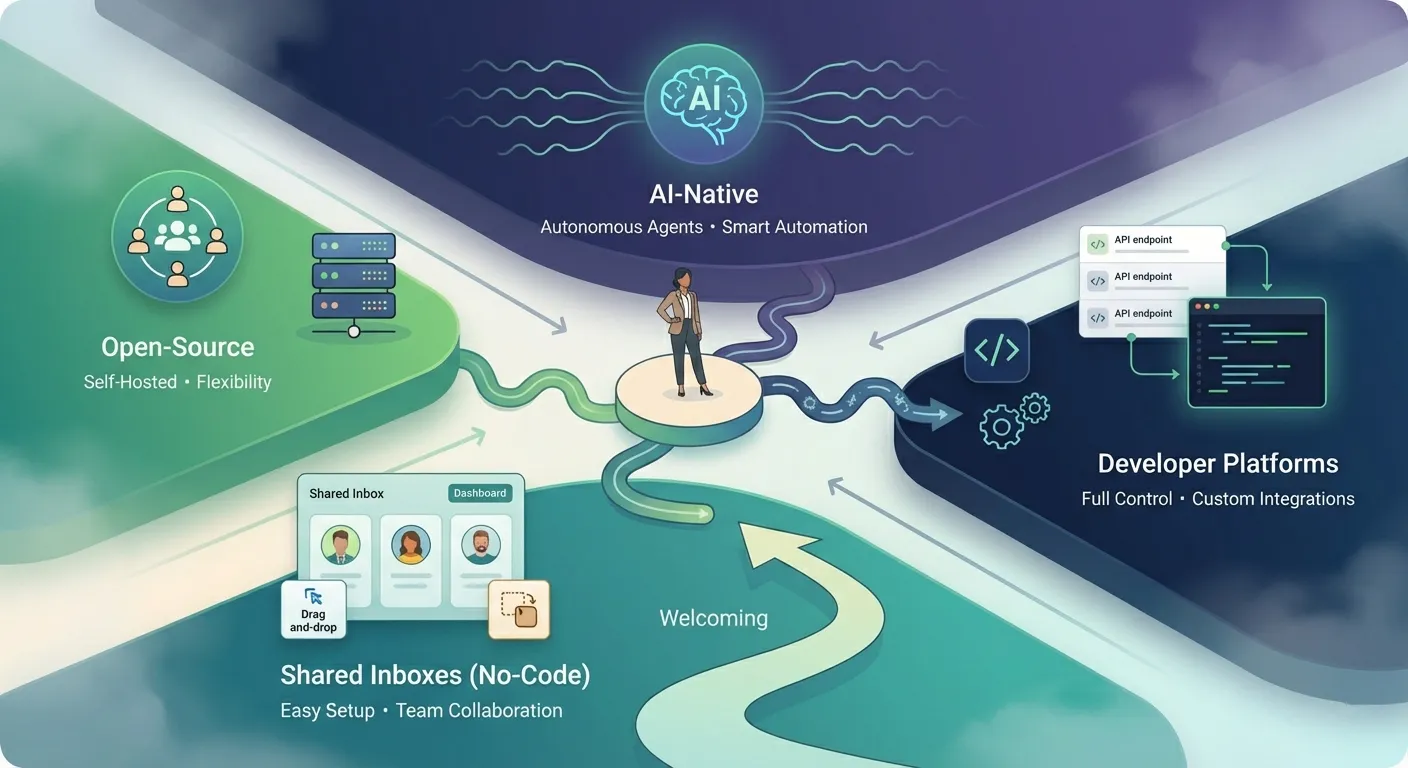
Choosing the Right Tools: A Vendor Landscape
The vendor ecosystem is fragmented. Choosing the wrong category of tool (not just the wrong brand) is the most expensive mistake you can make.
BSPs and Shared Inboxes (No-Code)
These are the platforms most small businesses should evaluate first. They provide ready-to-use interfaces, shared team inboxes, and drag-and-drop workflow builders. No developer needed.
Differentiation within this category matters.WATI focuses almost exclusively on a “WhatsApp-first” architecture, optimising deeply for WhatsApp’s interactive features like catalogues and Flows. This makes it strong for e-commerce. Respond.io and Trengo offer omnichannel unification, pulling WhatsApp, Instagram, Facebook Messenger, and web chat into a single inbox, which suits support teams handling diverse traffic sources. Interakt and Zoko are built around Shopify integration for direct-to-consumer brands.
Pricing comparison (as of March 2026):
| Platform | Starting price | Users | Markup | Key strength | Notable limitation |
|---|---|---|---|---|---|
WATI | $59/month | 3 (locked) | ~20% | No-code chatbot; Shopify integration | Growth plan locked at 3 users; frequent price increases reported |
Interakt | ~$11/month | Unlimited | 12-25% | Very affordable; deep Shopify integration | Email-only support (often days, not hours); starter plan missing key features |
Respond.io | $79/month | 10 | 0% | Widest channel support (10+); AI Agent; 99.999% SLA | Higher entry price than WhatsApp-only platforms |
Zoko | $34.99/month | ~2 | Per-conversation | 19 prebuilt e-commerce flows | WhatsApp-only; limited team size |
Trengo | ~$325/month | 10 | Via wallet | GDPR-compliant (EU servers); omnichannel | Users report 165%+ price hikes; flowbots are paid add-ons |
Gallabox | $89/month | 5 | Subscription + Meta | WhatsApp Flows support; 40+ integrations | Primarily Indian market |
The complaints column matters. Check G2, Capterra, and Reddit reviews for any platform you are considering. Support quality in particular varies widely: some platforms take days to respond to basic issues.
Developer Platforms
Twilio, Bird (formerly MessageBird), and Vonage provide raw API infrastructure for engineering teams. They offer maximum flexibility to build highly customised integrations directly into proprietary applications or complex internal systems.
The trade-off is profound complexity. Operating these platforms requires dedicated developers, ongoing DevOps maintenance, and custom code to handle webhooks and session management. Building a full solution from scratch on the direct Cloud API typically costs $20,000-$60,000 in development time. Unless your business has developers on staff and a specific reason to build custom, this category is not for you.
Open-Source Options
Chatwoot is the most viable open-source option for WhatsApp customer support. The free self-hosted community edition provides an omnichannel inbox. Premium features (AI, SLAs, audit logs) require paid licences ($19-$99 per agent per month) even when self-hosted. Realistic cost for a 5-agent team: $0 (community) to $495/month (premium) plus server costs and Meta fees. One critical limitation: the free tier has 30-day data retention. Your data is auto-deleted.
Botpress excels for AI-powered conversational bots with deep customisation. The free tier (500 messages per month) is excellent for prototyping, but AI compute costs are unpredictable and can spike.
A warning about Baileys. This is an unofficial open-source library that reverse-engineers WhatsApp’s WebSocket protocol. It explicitly violates WhatsApp’s Terms of Service and carries severe ban risk. A malicious npm fork (“lotusbail”) with 56,000+ downloads was found stealing WhatsApp credentials and hijacking accounts. Do not use it for any business or production purpose.
What to Ask Before You Choose
Before committing to any vendor, get clear answers to these questions:
- Markup transparency: Does the vendor pass Meta’s fees through at cost, or add a hidden per-message surcharge?
- Channel scope: You need WhatsApp today, but will you need
Instagram, email, or SMS within 12 months? - Data portability: Can you export all data and migrate your phone number if you switch? What exactly transfers and what does not?
- Team size fit: How many agents are included? Watch for per-user fees and locked user counts.
- Support quality: Check reviews for support responsiveness. Some platforms take 3+ days to respond to issues.
- Total cost at your volume: Calculate the all-in monthly cost at your expected message volume: platform subscription plus Meta per-message fees plus BSP markup plus any AI compute costs.
Mistakes That Get Your Account Banned (or Waste Your Budget)
The WhatsApp automation space has a graveyard of banned accounts and wasted budgets. These are the mistakes that put businesses there.
Using Unofficial Automation Tools
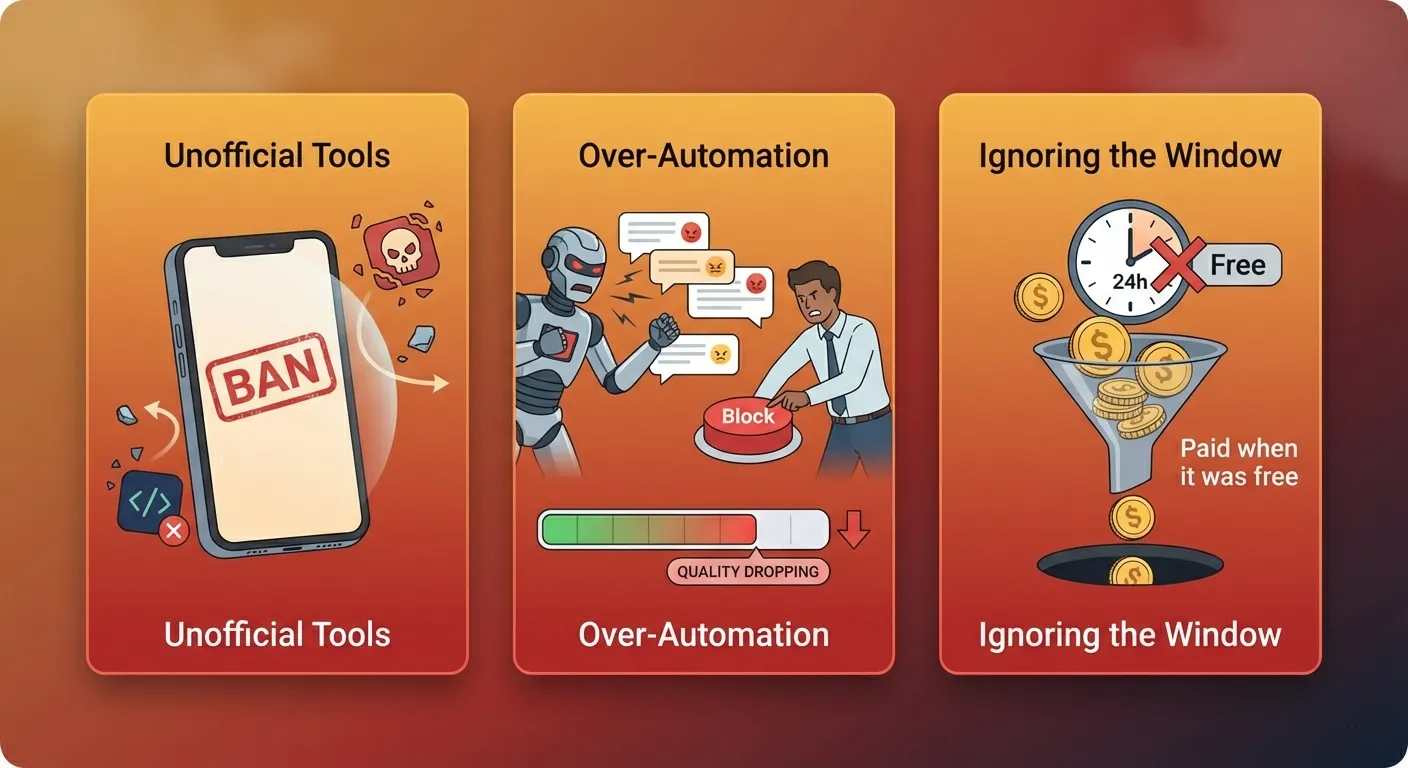
This is the single highest-risk mistake. Meta’s enforcement algorithms in 2026 are aggressive. Modified apps (GB WhatsApp, FM WhatsApp) trigger instant detection and permanent bans. Bulk-sender Chrome extensions result in permanent bans. Even sending 20-30 messages per day from the standard app to unsaved numbers can flag detection.
The scale of enforcement is not theoretical. In September 2023, over 7 million WhatsApp accounts were banned in India alone, with 2.5 million banned proactively without any user report. Permanent bans mean total loss of your contacts, chat history, and media with no recovery and no meaningful appeals process.
Deploying a “ChatGPT Wrapper” on WhatsApp
Before the January 2026 policy change, some businesses attached open-domain AI models to their WhatsApp number, letting users ask anything. The result: massive per-message fees from non-commercial conversations that drove no sales, followed by account suspensions when Meta enforced the new policy.
In 2026, all AI deployments on WhatsApp must serve concrete, defined business tasks. Order tracking, product consultation, lead qualification, appointment booking: these are compliant. A general-purpose chatbot that answers any question is not. OpenAI‘s ChatGPT and Perplexity were forced off the platform entirely.
Over-Automating and Losing the Human Touch
WhatsApp is a personal channel where your customers talk to their friends and family. Overly formal or robotic automation (“We hereby acknowledge receipt of your inquiry”) causes immediate disengagement. When customers feel they are talking to a wall, they block you. Blocks degrade your quality rating, which restricts your messaging limits, which limits your reach: a death spiral.
The recommended approach:
- Follow the 60-25-15 content rule: 60% educational content, 25% product information, 15% promotional.
- Limit broadcasts to 2-3 per week maximum.
- Always include a clear “speak to a human” option in any automated flow.
- Start manual, observe customer patterns, then automate the repetitive while preserving personalised elements.
One retail company maintained a 25% human handoff rate for complex queries while automating the remaining 75%, achieving a 40% conversion increase. The human element is not a cost to minimise; it is what keeps the channel personal and effective.
Ignoring the 24-Hour Window
Businesses frequently send paid template messages for follow-ups that would have been free within the service window, wasting $50-$400+ per month in avoidable fees. Utility messages within the 24-hour window became free in April 2025, but many businesses are unaware.
Click-to-WhatsApp ads open a 72-hour free window that many businesses fail to leverage. If you are running these ads and not engaging leads within that window, you are paying for acquisition and then paying again to follow up when both costs could have been covered by the ad click.
Getting Locked Into the Wrong Vendor
Switching BSPs is technically possible, but practically painful. What migrates: your phone number, display name, quality rating, messaging limits, and high-quality approved templates. What does not migrate: chat history, automation flows, chatbot scripts, CRM integrations, webhook configurations, and analytics data. Every BSP uses proprietary automation builders, so everything you built must be rebuilt from scratch.
There is also the “2FA hostage situation.” The departing BSP must manually disable two-factor authentication on your phone number before Meta’s systems can route it to the new provider. While Meta’s policies prohibit BSPs from stalling this, some do, resulting in prolonged downtime for your business communications.
If your original BSP registered your phone number under their corporate entity rather than transferring it to your Meta Business Manager during setup, you face a mandatory 30-day portability delay before any migration can begin. Verify number ownership during onboarding, not when you want to leave.
What Results Actually Look Like
Vendor marketing is full of extraordinary ROI claims. Here is what the evidence actually shows, with appropriate caveats.
The Credible Benchmarks
Some numbers are inherent to the WhatsApp channel itself, not to automation:
| Metric | Comparison | |
|---|---|---|
| Open rates | 98% | Email: ~20% |
| Messages read within 5 minutes | 88% | – |
| Conversion rate | 45-60% (vendor-reported best cases) | Email: 2-5% |
| Cart recovery rate | 35-45% of lost sales | – |
| No-show reduction | 40% with automated reminders | – |
| Response time improvement | ~50% with API | – |
The 98% open rate is impressive but reflects the nature of WhatsApp push notifications, not your automation skill. Treat conversion rates of “45-60%” as directional from vendor marketing, not independently verified. The ROI multiples you will see in vendor case studies (150x, 275x) represent top-end results, not typical outcomes.
Case Studies Worth Examining
These case studies illustrate what is achievable at different scales. All figures come from vendor marketing materials and should be verified against original sources before treating them as benchmarks:
Smile Dental (clinical healthcare):
Transitioned from manual WhatsApp scheduling to an AI-driven booking agent. Results: 300% increase in new patient appointments, 45% higher customer satisfaction scores, 60% reduction in appointment no-shows through automated reminders, and the scheduling workload reduced to 15 minutes of daily review.
800 Storage (Dubai, storage services):
Migrated from the Business App to the API with structured routing via Respond.io. First response time dropped 30% to 1 minute 56 seconds, resolution time dropped 60% to 5 minutes 24 seconds, and conversions increased 30%.
Atomberg (consumer appliances):
Implemented WhatsApp automation to manage over 2,500 daily customer support queries. The AI agent achieved 86% first-contact resolution rate, leading to a reported 30-60% reduction in overall support costs.
Bot MD (enterprise healthcare, Southeast Asia):
Automated routine patient follow-ups across hospital networks, generating combined cost savings and recovered revenue of nearly $1.5 million annually for a single mid-sized hospital.
The Break-Even Threshold
Economic analyses suggest the break-even point for API investment is predictable. Profitability is typically achieved once a business sustains 200+ daily inbound conversations. At that threshold, the labour cost savings from automated support reliably exceed the combined software subscription and per-message Meta fees.
Below that volume, the free app or a low-cost Tier 2 tool is likely more cost-effective. Above it, the automation pays for itself.
Next Steps
Take Your First Practical Steps
If you are still on the free app and it is working:
Maximise what you have. Set up all 50 quick replies covering your most common questions. Configure away messages for after-hours coverage. Use labels to track your pipeline systematically. Revisit the warning signs from the first section of this guide periodically, and move up when you hit them.
If you are hitting the breaking points:
Start by measuring your actual daily message volume and team size. Map your needs against the four tiers. If you are heading toward Tier 3, shortlist two BSPs that match your needs (WhatsApp-only vs omnichannel, your team size, your region) and run their free trials before committing to an annual plan.
If you are already on the API and evaluating AI:
Audit your current bot’s deflection rate. If it is below 50%, fix your knowledge base and decision trees before layering on AI. Ensure you have a clear human escalation path. Review Meta’s January 2026 AI policy to confirm your implementation is task-specific and compliant.
Understanding the Bigger Picture
WhatsApp automation delivers specific communication and customer service gains, but it is one component of a broader automation strategy. Understanding how it connects with your CRM, marketing automation, and operational workflows creates compounding value rather than isolated improvements.
Our guide to deciding what to automate in your small business provides a framework for evaluating and prioritising automation opportunities across your entire operation, not just messaging.
If You Need Help
If you are unsure where to start or want a second opinion on your automation strategy, Digital MicroEnterprise helps small businesses evaluate and implement the right tools for their situation. You do not need to figure this out alone.
Conclusion
WhatsApp automation is not a single decision. It is a spectrum, and the right answer depends on where your business is today, not where vendors want you to be tomorrow.
The businesses that succeed with WhatsApp automation share three habits: they start with their actual pain points rather than a vendor’s feature list, they choose the tier that matches their current scale rather than their aspirational one, and they resist the temptation to over-automate a channel that works because it feels personal.
Start with what is free. Automate what is repetitive. Keep a human in the loop for everything else. And when you do invest in tooling, verify number ownership, understand the pricing model, and always have an exit plan.